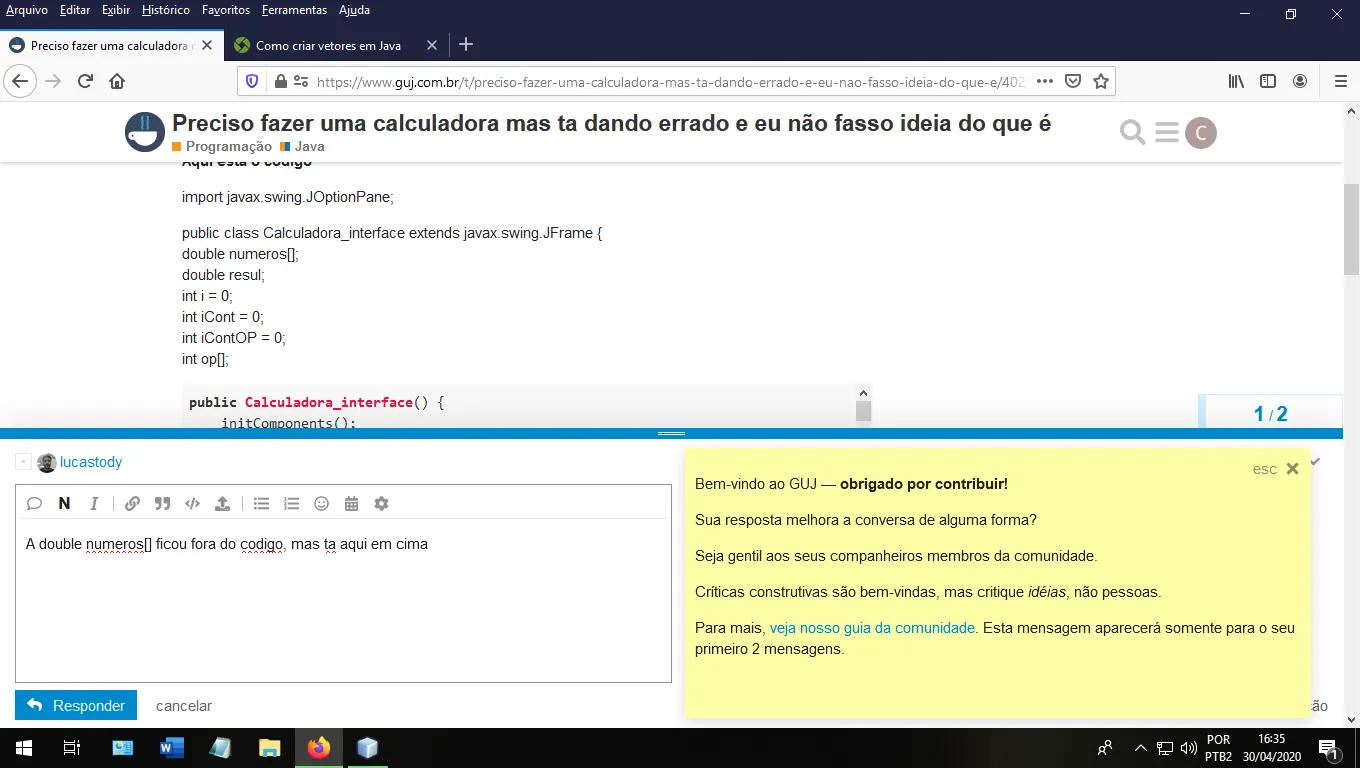
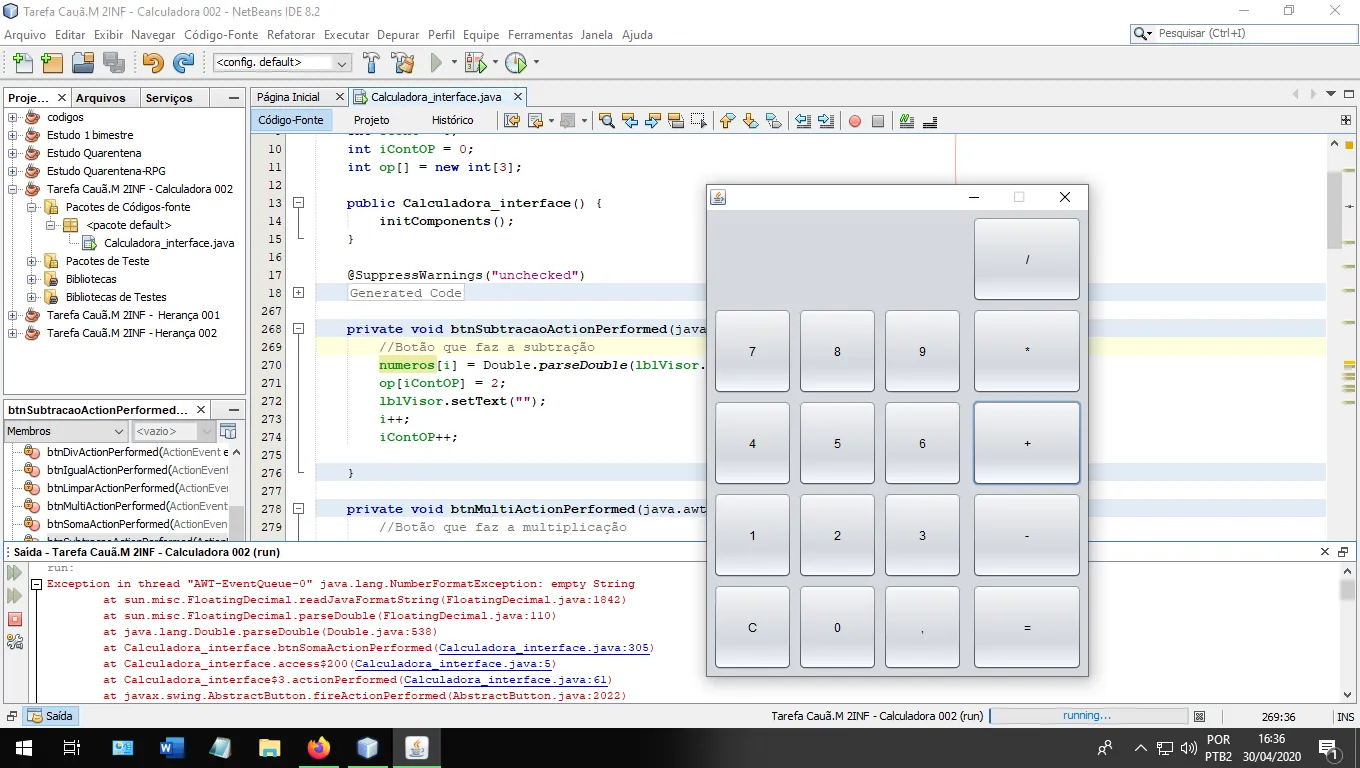
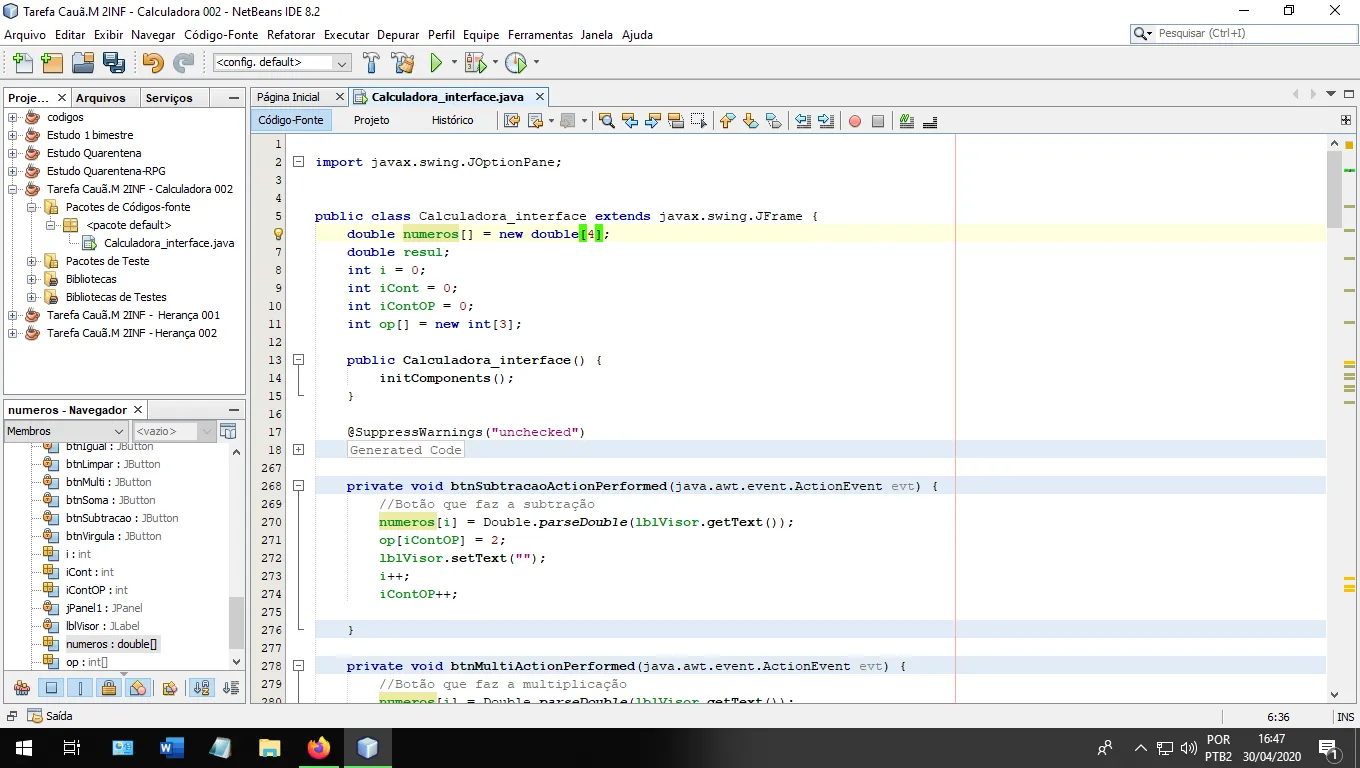
sempre que eu abro a interface gráfica do programa, não tem problemas quando digito um numero ou a vírgula, quando eu limpo a tela (botão C das calculadoras normais) ou o igual não da problema nenhum, mas quando eu aperto em qualquer botão de operação da um erro.
alguém pode analisar meu código e me dizer onde eu estou errando?
Aqui esta o codigo
import javax.swing.JOptionPane;

public class Calculadora_interface extends javax.swing.JFrame {
    double numeros[];
    double resul;
    int i = 0;
    int iCont = 0;
    int iContOP = 0;
    int op[];

    public Calculadora_interface() {
        initComponents();
    }

    @SuppressWarnings("unchecked")
    // <editor-fold defaultstate="collapsed" desc="Generated Code">
    private void initComponents() {

        btnIgual = new javax.swing.JButton();
        btnDiv = new javax.swing.JButton();
        btnSoma = new javax.swing.JButton();
        btnSubtracao = new javax.swing.JButton();
        btnMulti = new javax.swing.JButton();
        btn0 = new javax.swing.JButton();
        btn1 = new javax.swing.JButton();
        btn2 = new javax.swing.JButton();
        btn3 = new javax.swing.JButton();
        btn4 = new javax.swing.JButton();
        btn5 = new javax.swing.JButton();
        btn6 = new javax.swing.JButton();
        btn7 = new javax.swing.JButton();
        btn8 = new javax.swing.JButton();
        btn9 = new javax.swing.JButton();
        btnVirgula = new javax.swing.JButton();
        btnLimpar = new javax.swing.JButton();
        jPanel1 = new javax.swing.JPanel();
        lblVisor = new javax.swing.JLabel();

        setDefaultCloseOperation(javax.swing.WindowConstants.EXIT_ON_CLOSE);
        setResizable(false);

        btnIgual.setText("=");
        btnIgual.addActionListener(new java.awt.event.ActionListener() {
            public void actionPerformed(java.awt.event.ActionEvent evt) {
                btnIgualActionPerformed(evt);
            }
        });

        btnDiv.setText("/");
        btnDiv.addActionListener(new java.awt.event.ActionListener() {
            public void actionPerformed(java.awt.event.ActionEvent evt) {
                btnDivActionPerformed(evt);
            }
        });

        btnSoma.setText("+");
        btnSoma.addActionListener(new java.awt.event.ActionListener() {
            public void actionPerformed(java.awt.event.ActionEvent evt) {
                btnSomaActionPerformed(evt);
            }
        });

        btnSubtracao.setText("-");
        btnSubtracao.addActionListener(new java.awt.event.ActionListener() {
            public void actionPerformed(java.awt.event.ActionEvent evt) {
                btnSubtracaoActionPerformed(evt);
            }
        });

        btnMulti.setText("*");
        btnMulti.addActionListener(new java.awt.event.ActionListener() {
            public void actionPerformed(java.awt.event.ActionEvent evt) {
                btnMultiActionPerformed(evt);
            }
        });

        btn0.setText("0");
        btn0.addActionListener(new java.awt.event.ActionListener() {
            public void actionPerformed(java.awt.event.ActionEvent evt) {
                btn0ActionPerformed(evt);
            }
        });

        btn1.setText("1");
        btn1.addActionListener(new java.awt.event.ActionListener() {
            public void actionPerformed(java.awt.event.ActionEvent evt) {
                btn1ActionPerformed(evt);
            }
        });

        btn2.setText("2");
        btn2.addActionListener(new java.awt.event.ActionListener() {
            public void actionPerformed(java.awt.event.ActionEvent evt) {
                btn2ActionPerformed(evt);
            }
        });

        btn3.setText("3");
        btn3.addActionListener(new java.awt.event.ActionListener() {
            public void actionPerformed(java.awt.event.ActionEvent evt) {
                btn3ActionPerformed(evt);
            }
        });

        btn4.setText("4");
        btn4.addActionListener(new java.awt.event.ActionListener() {
            public void actionPerformed(java.awt.event.ActionEvent evt) {
                btn4ActionPerformed(evt);
            }
        });

        btn5.setText("5");
        btn5.addActionListener(new java.awt.event.ActionListener() {
            public void actionPerformed(java.awt.event.ActionEvent evt) {
                btn5ActionPerformed(evt);
            }
        });

        btn6.setText("6");
        btn6.addActionListener(new java.awt.event.ActionListener() {
            public void actionPerformed(java.awt.event.ActionEvent evt) {
                btn6ActionPerformed(evt);
            }
        });

        btn7.setText("7");
        btn7.addActionListener(new java.awt.event.ActionListener() {
            public void actionPerformed(java.awt.event.ActionEvent evt) {
                btn7ActionPerformed(evt);
            }
        });

        btn8.setText("8");
        btn8.addActionListener(new java.awt.event.ActionListener() {
            public void actionPerformed(java.awt.event.ActionEvent evt) {
                btn8ActionPerformed(evt);
            }
        });

        btn9.setText("9");
        btn9.addActionListener(new java.awt.event.ActionListener() {
            public void actionPerformed(java.awt.event.ActionEvent evt) {
                btn9ActionPerformed(evt);
            }
        });

        btnVirgula.setText(",");
        btnVirgula.addActionListener(new java.awt.event.ActionListener() {
            public void actionPerformed(java.awt.event.ActionEvent evt) {
                btnVirgulaActionPerformed(evt);
            }
        });

        btnLimpar.setText("C");
        btnLimpar.addActionListener(new java.awt.event.ActionListener() {
            public void actionPerformed(java.awt.event.ActionEvent evt) {
                btnLimparActionPerformed(evt);
            }
        });

        lblVisor.setFont(new java.awt.Font("Microsoft Sans Serif", 1, 24)); // NOI18N

        javax.swing.GroupLayout jPanel1Layout = new javax.swing.GroupLayout(jPanel1);
        jPanel1.setLayout(jPanel1Layout);
        jPanel1Layout.setHorizontalGroup(
            jPanel1Layout.createParallelGroup(javax.swing.GroupLayout.Alignment.LEADING)
            .addGroup(jPanel1Layout.createSequentialGroup()
                .addContainerGap()
                .addComponent(lblVisor, javax.swing.GroupLayout.DEFAULT_SIZE, javax.swing.GroupLayout.DEFAULT_SIZE, Short.MAX_VALUE)
                .addContainerGap())
        );
        jPanel1Layout.setVerticalGroup(
            jPanel1Layout.createParallelGroup(javax.swing.GroupLayout.Alignment.LEADING)
            .addGroup(jPanel1Layout.createSequentialGroup()
                .addContainerGap()
                .addComponent(lblVisor, javax.swing.GroupLayout.DEFAULT_SIZE, 64, Short.MAX_VALUE)
                .addContainerGap())
        );

        javax.swing.GroupLayout layout = new javax.swing.GroupLayout(getContentPane());
        getContentPane().setLayout(layout);
        layout.setHorizontalGroup(
            layout.createParallelGroup(javax.swing.GroupLayout.Alignment.LEADING)
            .addGroup(layout.createSequentialGroup()
                .addContainerGap()
                .addGroup(layout.createParallelGroup(javax.swing.GroupLayout.Alignment.LEADING)
                    .addGroup(layout.createSequentialGroup()
                        .addGroup(layout.createParallelGroup(javax.swing.GroupLayout.Alignment.LEADING)
                            .addComponent(btn1, javax.swing.GroupLayout.PREFERRED_SIZE, 78, javax.swing.GroupLayout.PREFERRED_SIZE)
                            .addComponent(btn7, javax.swing.GroupLayout.DEFAULT_SIZE, javax.swing.GroupLayout.DEFAULT_SIZE, Short.MAX_VALUE)
                            .addComponent(btn4, javax.swing.GroupLayout.DEFAULT_SIZE, 76, Short.MAX_VALUE)
                            .addComponent(btnLimpar))
                        .addPreferredGap(javax.swing.LayoutStyle.ComponentPlacement.RELATED)
                        .addGroup(layout.createParallelGroup(javax.swing.GroupLayout.Alignment.LEADING)
                            .addComponent(btn0, javax.swing.GroupLayout.PREFERRED_SIZE, 70, javax.swing.GroupLayout.PREFERRED_SIZE)
                            .addComponent(btn2, javax.swing.GroupLayout.PREFERRED_SIZE, 70, javax.swing.GroupLayout.PREFERRED_SIZE)
                            .addComponent(btn5, javax.swing.GroupLayout.DEFAULT_SIZE, 70, Short.MAX_VALUE)
                            .addComponent(btn8, javax.swing.GroupLayout.DEFAULT_SIZE, javax.swing.GroupLayout.DEFAULT_SIZE, Short.MAX_VALUE))
                        .addPreferredGap(javax.swing.LayoutStyle.ComponentPlacement.RELATED)
                        .addGroup(layout.createParallelGroup(javax.swing.GroupLayout.Alignment.LEADING)
                            .addComponent(btn3, javax.swing.GroupLayout.PREFERRED_SIZE, 79, javax.swing.GroupLayout.PREFERRED_SIZE)
                            .addComponent(btn9, javax.swing.GroupLayout.DEFAULT_SIZE, javax.swing.GroupLayout.DEFAULT_SIZE, Short.MAX_VALUE)
                            .addComponent(btn6, javax.swing.GroupLayout.DEFAULT_SIZE, 79, Short.MAX_VALUE)
                            .addComponent(btnVirgula))
                        .addGap(10, 10, 10)
                        .addGroup(layout.createParallelGroup(javax.swing.GroupLayout.Alignment.LEADING)
                            .addComponent(btnMulti, javax.swing.GroupLayout.DEFAULT_SIZE, javax.swing.GroupLayout.DEFAULT_SIZE, Short.MAX_VALUE)
                            .addComponent(btnIgual, javax.swing.GroupLayout.PREFERRED_SIZE, 110, javax.swing.GroupLayout.PREFERRED_SIZE)
                            .addComponent(btnSubtracao, javax.swing.GroupLayout.DEFAULT_SIZE, 110, Short.MAX_VALUE)
                            .addComponent(btnSoma, javax.swing.GroupLayout.PREFERRED_SIZE, 79, javax.swing.GroupLayout.PREFERRED_SIZE))
                        .addGap(0, 0, Short.MAX_VALUE))
                    .addGroup(layout.createSequentialGroup()
                        .addComponent(jPanel1, javax.swing.GroupLayout.DEFAULT_SIZE, javax.swing.GroupLayout.DEFAULT_SIZE, Short.MAX_VALUE)
                        .addPreferredGap(javax.swing.LayoutStyle.ComponentPlacement.RELATED)
                        .addComponent(btnDiv, javax.swing.GroupLayout.DEFAULT_SIZE, 105, Short.MAX_VALUE)))
                .addContainerGap())
        );

        layout.linkSize(javax.swing.SwingConstants.HORIZONTAL, new java.awt.Component[] {btn0, btn1, btn2, btn3, btn4, btn5, btn6, btn7, btn8, btn9, btnLimpar, btnVirgula});

        layout.linkSize(javax.swing.SwingConstants.HORIZONTAL, new java.awt.Component[] {btnDiv, btnIgual, btnMulti, btnSoma, btnSubtracao});

        layout.setVerticalGroup(
            layout.createParallelGroup(javax.swing.GroupLayout.Alignment.LEADING)
            .addGroup(layout.createSequentialGroup()
                .addContainerGap()
                .addGroup(layout.createParallelGroup(javax.swing.GroupLayout.Alignment.LEADING, false)
                    .addComponent(btnDiv, javax.swing.GroupLayout.DEFAULT_SIZE, 86, Short.MAX_VALUE)
                    .addComponent(jPanel1, javax.swing.GroupLayout.PREFERRED_SIZE, javax.swing.GroupLayout.DEFAULT_SIZE, javax.swing.GroupLayout.PREFERRED_SIZE))
                .addPreferredGap(javax.swing.LayoutStyle.ComponentPlacement.RELATED)
                .addGroup(layout.createParallelGroup(javax.swing.GroupLayout.Alignment.BASELINE)
                    .addComponent(btn9, javax.swing.GroupLayout.PREFERRED_SIZE, 86, javax.swing.GroupLayout.PREFERRED_SIZE)
                    .addComponent(btn8, javax.swing.GroupLayout.PREFERRED_SIZE, 86, javax.swing.GroupLayout.PREFERRED_SIZE)
                    .addComponent(btn7, javax.swing.GroupLayout.PREFERRED_SIZE, 86, javax.swing.GroupLayout.PREFERRED_SIZE)
                    .addComponent(btnMulti, javax.swing.GroupLayout.DEFAULT_SIZE, javax.swing.GroupLayout.DEFAULT_SIZE, Short.MAX_VALUE))
                .addPreferredGap(javax.swing.LayoutStyle.ComponentPlacement.RELATED)
                .addGroup(layout.createParallelGroup(javax.swing.GroupLayout.Alignment.BASELINE)
                    .addComponent(btn6, javax.swing.GroupLayout.PREFERRED_SIZE, 60, javax.swing.GroupLayout.PREFERRED_SIZE)
                    .addComponent(btn5, javax.swing.GroupLayout.PREFERRED_SIZE, 60, javax.swing.GroupLayout.PREFERRED_SIZE)
                    .addComponent(btn4, javax.swing.GroupLayout.PREFERRED_SIZE, 59, javax.swing.GroupLayout.PREFERRED_SIZE)
                    .addComponent(btnSoma, javax.swing.GroupLayout.PREFERRED_SIZE, 64, javax.swing.GroupLayout.PREFERRED_SIZE))
                .addGap(6, 6, 6)
                .addGroup(layout.createParallelGroup(javax.swing.GroupLayout.Alignment.BASELINE)
                    .addComponent(btn1, javax.swing.GroupLayout.DEFAULT_SIZE, javax.swing.GroupLayout.DEFAULT_SIZE, Short.MAX_VALUE)
                    .addComponent(btn2, javax.swing.GroupLayout.DEFAULT_SIZE, javax.swing.GroupLayout.DEFAULT_SIZE, Short.MAX_VALUE)
                    .addComponent(btn3, javax.swing.GroupLayout.DEFAULT_SIZE, javax.swing.GroupLayout.DEFAULT_SIZE, Short.MAX_VALUE)
                    .addComponent(btnSubtracao, javax.swing.GroupLayout.PREFERRED_SIZE, 64, javax.swing.GroupLayout.PREFERRED_SIZE))
                .addPreferredGap(javax.swing.LayoutStyle.ComponentPlacement.RELATED)
                .addGroup(layout.createParallelGroup(javax.swing.GroupLayout.Alignment.LEADING, false)
                    .addGroup(layout.createParallelGroup(javax.swing.GroupLayout.Alignment.BASELINE)
                        .addComponent(btnVirgula, javax.swing.GroupLayout.PREFERRED_SIZE, 76, javax.swing.GroupLayout.PREFERRED_SIZE)
                        .addComponent(btn0, javax.swing.GroupLayout.PREFERRED_SIZE, 70, javax.swing.GroupLayout.PREFERRED_SIZE)
                        .addComponent(btnLimpar))
                    .addComponent(btnIgual, javax.swing.GroupLayout.PREFERRED_SIZE, 86, javax.swing.GroupLayout.PREFERRED_SIZE))
                .addContainerGap(javax.swing.GroupLayout.DEFAULT_SIZE, Short.MAX_VALUE))
        );

        layout.linkSize(javax.swing.SwingConstants.VERTICAL, new java.awt.Component[] {btnDiv, btnIgual, btnMulti, btnSoma, btnSubtracao});

        layout.linkSize(javax.swing.SwingConstants.VERTICAL, new java.awt.Component[] {btn0, btn1, btn2, btn3, btn4, btn5, btn6, btn7, btn8, btn9, btnLimpar, btnVirgula});

        pack();
        setLocationRelativeTo(null);
    }// </editor-fold>

    private void btnSubtracaoActionPerformed(java.awt.event.ActionEvent evt) {
        //Botão que faz a subtração
        numeros[i] = Double.parseDouble(lblVisor.getText());
        op[iContOP] = 2;
        lblVisor.setText("");
        i++;
        iContOP++;

    }

    private void btnMultiActionPerformed(java.awt.event.ActionEvent evt) {
        //Botão que faz a multiplicação
        numeros[i] = Double.parseDouble(lblVisor.getText());
        op[iContOP] = 3;
        lblVisor.setText("");
        i++;
        iContOP++;

    }


    private void btnDivActionPerformed(java.awt.event.ActionEvent evt) {
        //Botão que faz a divisão
        numeros[i] = Double.parseDouble(lblVisor.getText());
        op[iContOP] = 4;
        lblVisor.setText("");
        i++;
        iContOP++;

    }

    private void btn9ActionPerformed(java.awt.event.ActionEvent evt) {
        lblVisor.setText(lblVisor.getText() + "9");
    }

    private void btnSomaActionPerformed(java.awt.event.ActionEvent evt) {
        //Botão que faz a adição
        numeros[i] = Double.parseDouble(lblVisor.getText());
        op[iContOP] = 1;
        lblVisor.setText("");
        i++;
        iContOP++;

    }

    private void btnLimparActionPerformed(java.awt.event.ActionEvent evt) {
        //Botão que limpa o visor
        lblVisor.setText("");
        while (i > iCont){
            numeros[iCont] = 0.0;
            op[iCont] = 0;
            iCont++;
        }
        i = 0;
        iCont = 0;
        iContOP = 0;

    }

    private void btn4ActionPerformed(java.awt.event.ActionEvent evt) {
        lblVisor.setText(lblVisor.getText() + "4");
    }

    private void btnIgualActionPerformed(java.awt.event.ActionEvent evt) {
        //Botão =
        while(iCont < i){
            if(op[iContOP] == 1){
                resul = numeros[iCont] + numeros[iCont+1];
                numeros[iCont+1] = resul;
                iCont++;
                iContOP++;
            }else if(op[iContOP] == 2){
                resul = numeros[iCont] - numeros[iCont+1];
                numeros[iCont+1] = resul;
                iCont++;
                iContOP++;
            }else if(op[iContOP] == 3){
                resul = numeros[iCont] * numeros[iCont+1];
                numeros[iCont+1] = resul;
                iCont++;
                iContOP++;
            }else if(op[iContOP] == 4){
                resul = numeros[iCont] / numeros[iCont+1];
                numeros[iCont+1] = resul;
                iCont++;
                iContOP++;
            }else{
                JOptionPane.showInputDialog("algo de errado não esta certo");
                iCont++;
                iContOP++;
            }
        }


    }

    private void btn7ActionPerformed(java.awt.event.ActionEvent evt) {

        lblVisor.setText(lblVisor.getText() + "7");

    }

    private void btn8ActionPerformed(java.awt.event.ActionEvent evt) {

        lblVisor.setText(lblVisor.getText() + "8");

    }

    private void btn5ActionPerformed(java.awt.event.ActionEvent evt) {

        lblVisor.setText(lblVisor.getText() + "5");

    }

    private void btn6ActionPerformed(java.awt.event.ActionEvent evt) {

        lblVisor.setText(lblVisor.getText() + "6");

    }

    private void btn1ActionPerformed(java.awt.event.ActionEvent evt) {

        lblVisor.setText(lblVisor.getText() + "1");

    }

    private void btn2ActionPerformed(java.awt.event.ActionEvent evt) {

        lblVisor.setText(lblVisor.getText() + "2");

    }

    private void btn3ActionPerformed(java.awt.event.ActionEvent evt) {

        lblVisor.setText(lblVisor.getText() + "3");

    }

    private void btn0ActionPerformed(java.awt.event.ActionEvent evt) {

        lblVisor.setText(lblVisor.getText() + "0");

    }

    private void btnVirgulaActionPerformed(java.awt.event.ActionEvent evt) {
       //Botão que faz adiciona uma virgula
        lblVisor.setText(lblVisor.getText() + ".");

    }

    /**
     * @param args the command line arguments
     */
    public static void main(String args[]) {
        /* Set the Nimbus look and feel */
        //<editor-fold defaultstate="collapsed" desc=" Look and feel setting code (optional) ">
        /* If Nimbus (introduced in Java SE 6) is not available, stay with the default look and feel.
         * For details see http://download.oracle.com/javase/tutorial/uiswing/lookandfeel/plaf.html
         */
        try {
            for (javax.swing.UIManager.LookAndFeelInfo info : javax.swing.UIManager.getInstalledLookAndFeels()) {
                if ("Nimbus".equals(info.getName())) {
                    javax.swing.UIManager.setLookAndFeel(info.getClassName());
                    break;
                }
            }
        } catch (ClassNotFoundException ex) {
            java.util.logging.Logger.getLogger(Calculadora_interface.class.getName()).log(java.util.logging.Level.SEVERE, null, ex);
        } catch (InstantiationException ex) {
            java.util.logging.Logger.getLogger(Calculadora_interface.class.getName()).log(java.util.logging.Level.SEVERE, null, ex);
        } catch (IllegalAccessException ex) {
            java.util.logging.Logger.getLogger(Calculadora_interface.class.getName()).log(java.util.logging.Level.SEVERE, null, ex);
        } catch (javax.swing.UnsupportedLookAndFeelException ex) {
            java.util.logging.Logger.getLogger(Calculadora_interface.class.getName()).log(java.util.logging.Level.SEVERE, null, ex);
        }
        //</editor-fold>

        /* Create and display the form */
        java.awt.EventQueue.invokeLater(new Runnable() {
            public void run() {
                new Calculadora_interface().setVisible(true);
            }
        });
    }

    // Variables declaration - do not modify
    private javax.swing.JButton btn0;
    private javax.swing.JButton btn1;
    private javax.swing.JButton btn2;
    private javax.swing.JButton btn3;
    private javax.swing.JButton btn4;
    private javax.swing.JButton btn5;
    private javax.swing.JButton btn6;
    private javax.swing.JButton btn7;
    private javax.swing.JButton btn8;
    private javax.swing.JButton btn9;
    private javax.swing.JButton btnDiv;
    private javax.swing.JButton btnIgual;
    private javax.swing.JButton btnLimpar;
    private javax.swing.JButton btnMulti;
    private javax.swing.JButton btnSoma;
    private javax.swing.JButton btnSubtracao;
    private javax.swing.JButton btnVirgula;
    private javax.swing.JPanel jPanel1;
    private javax.swing.JLabel lblVisor;
    // End of variables declaration
}
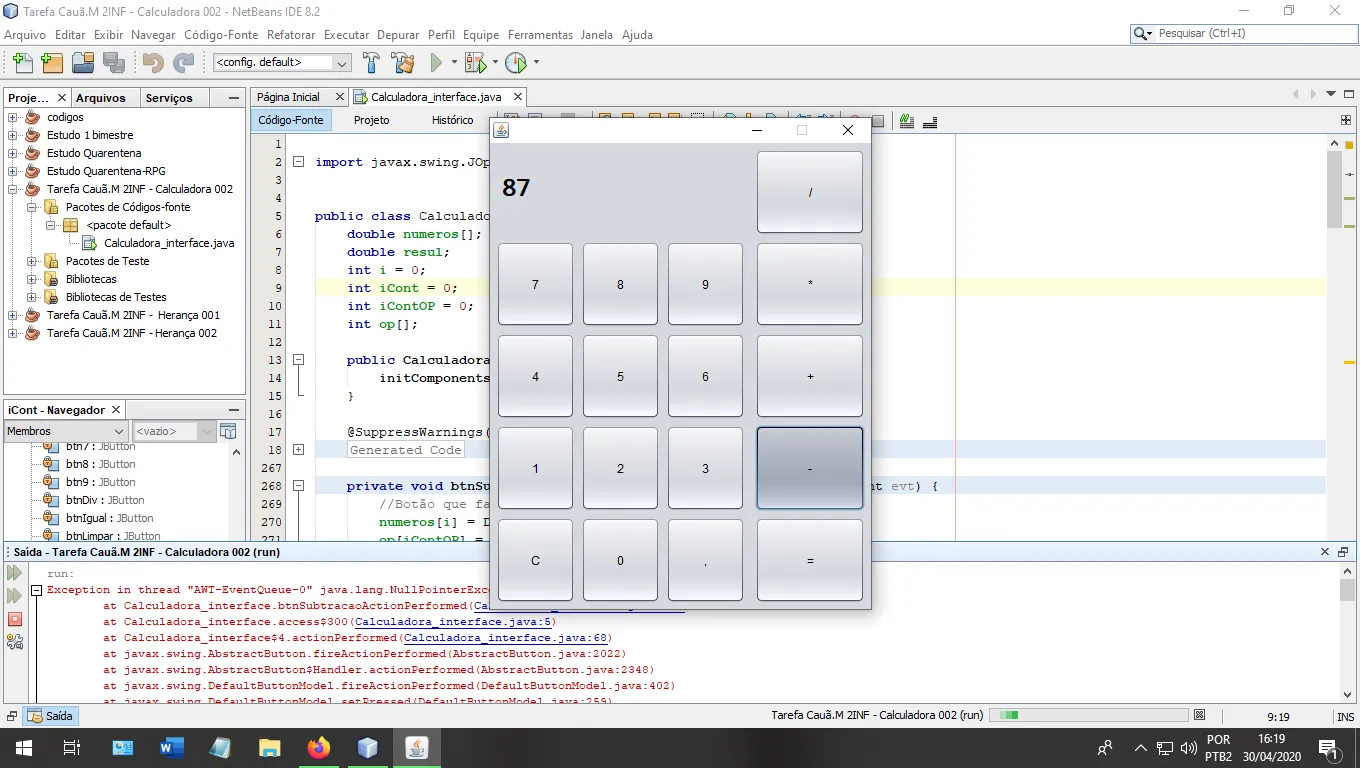
Aqui a imagem do erro
por favor, alguem me ajuda ;-;