gilgpf 16 de jun. de 2010
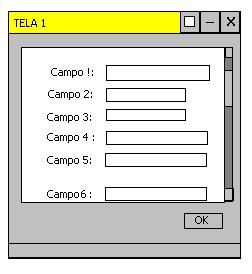
Segue a minha classe para vocês analisarem, reparem que não aparece a barra de rolagem vertical !
package interfaceGrafica ;
import java.awt.* ;
import javax.swing.* ;
public class testeJScroll extends javax . swing . JFrame {
private JScrollPane jScrollPan = new JScrollPane ();
private JPanel pan = new JPanel ();
private JTextField jt = new JTextField ();
private JTextField jt1 = new JTextField ();
private JTextField jt2 = new JTextField ();
public testeJScroll () {
init ();
}
private void init () {
getContentPane (). setLayout ( null );
pan . setLayout ( null );
pan . setBounds ( 50 , 50 , 200 , 200 );
jScrollPan . setBounds ( 50 , 50 , 200 , 100 );
jScrollPan . setVerticalScrollBarPolicy ( JScrollPane . VERTICAL_SCROLLBAR_AS_NEEDED );
jScrollPan . setHorizontalScrollBarPolicy ( JScrollPane . HORIZONTAL_SCROLLBAR_NEVER );
pan . setBorder ( BorderFactory . createLineBorder ( Color . ORANGE , 1 ));
jt . setBounds ( 10 , 10 , 70 , 20 );
pan . add ( jt );
jt1 . setBounds ( 10 , 50 , 70 , 20 );
pan . add ( jt1 );
jt2 . setBounds ( 10 , 100 , 70 , 20 );
pan . add ( jt2 );
jScrollPan . setViewportView ( pan );
getContentPane (). add ( jScrollPan );
setDefaultCloseOperation ( javax . swing . WindowConstants . EXIT_ON_CLOSE );
//pack();
setSize ( 320 , 300 );
}
public static void main ( String [] args ) {
testeJScroll m = new testeJScroll ();
m . setVisible ( true );
}
}
manhanijava 16 de jun. de 2010
amigo tem que ser necessariamente assim??? por que não usar um Tabbed Pane…???ficaria mais bonitoo visual e menos problemático
entanglement 16 de jun. de 2010
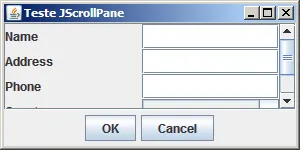
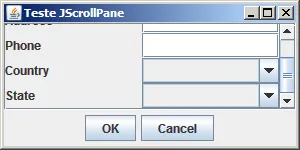
Veja este programa. Ele mostra um formulário com várias entradas, dentro de um JScrollPane. O único problema é que o scroll não é automático se você mudar o foco com o teclado.
package guj ;
import java.awt.BorderLayout ;
import java.awt.FlowLayout ;
import java.awt.GridLayout ;
import javax.swing.JButton ;
import javax.swing.JComboBox ;
import javax.swing.JFrame ;
import javax.swing.JLabel ;
import javax.swing.JPanel ;
import javax.swing.JScrollPane ;
import javax.swing.JTextField ;
import javax.swing.SwingUtilities ;
public class ExemploJScrollPane extends JFrame {
private static final long serialVersionUID = 1L ;
private JPanel jContentPane = null ;
private JScrollPane scpMain = null ;
private JPanel pnlButtons = null ;
private JButton btnOK = null ;
private JButton btnCancel = null ;
private JPanel pnlInputFields = null ;
private JLabel lblName = null ;
private JTextField txtName = null ;
private JLabel lblAddress = null ;
private JTextField txtAddress = null ;
private JLabel lblPhone = null ;
private JTextField txtPhone = null ;
private JLabel lblCountry = null ;
private JComboBox cboCountry = null ;
private JLabel lblState = null ;
private JComboBox cboState = null ;
private JScrollPane getScpMain () {
if ( scpMain == null ) {
scpMain = new JScrollPane ();
scpMain . setViewportView ( getPnlInputFields ());
}
return scpMain ;
}
private JPanel getPnlButtons () {
if ( pnlButtons == null ) {
pnlButtons = new JPanel ();
pnlButtons . setLayout ( new FlowLayout ());
pnlButtons . add ( getBtnOK (), null );
pnlButtons . add ( getBtnCancel (), null );
}
return pnlButtons ;
}
private JButton getBtnOK () {
if ( btnOK == null ) {
btnOK = new JButton ();
btnOK . setText ( "OK" );
}
return btnOK ;
}
private JButton getBtnCancel () {
if ( btnCancel == null ) {
btnCancel = new JButton ();
btnCancel . setText ( "Cancel" );
}
return btnCancel ;
}
private JPanel getPnlInputFields () {
if ( pnlInputFields == null ) {
lblState = new JLabel ();
lblState . setText ( "State" );
lblCountry = new JLabel ();
lblCountry . setText ( "Country" );
lblPhone = new JLabel ();
lblPhone . setText ( "Phone" );
lblAddress = new JLabel ();
lblAddress . setText ( "Address" );
lblName = new JLabel ();
lblName . setText ( "Name" );
GridLayout gridLayout = new GridLayout ();
gridLayout . setRows ( 5 );
gridLayout . setColumns ( 2 );
pnlInputFields = new JPanel ();
pnlInputFields . setLayout ( gridLayout );
pnlInputFields . add ( lblName , null );
pnlInputFields . add ( getTxtName (), null );
pnlInputFields . add ( lblAddress , null );
pnlInputFields . add ( getTxtAddress (), null );
pnlInputFields . add ( lblPhone , null );
pnlInputFields . add ( getTxtPhone (), null );
pnlInputFields . add ( lblCountry , null );
pnlInputFields . add ( getCboCountry (), null );
pnlInputFields . add ( lblState , null );
pnlInputFields . add ( getCboState (), null );
}
return pnlInputFields ;
}
private JTextField getTxtName () {
if ( txtName == null ) {
txtName = new JTextField ();
}
return txtName ;
}
private JTextField getTxtAddress () {
if ( txtAddress == null ) {
txtAddress = new JTextField ();
}
return txtAddress ;
}
private JTextField getTxtPhone () {
if ( txtPhone == null ) {
txtPhone = new JTextField ();
}
return txtPhone ;
}
private JComboBox getCboCountry () {
if ( cboCountry == null ) {
cboCountry = new JComboBox ();
}
return cboCountry ;
}
private JComboBox getCboState () {
if ( cboState == null ) {
cboState = new JComboBox ();
}
return cboState ;
}
public static void main ( String [] args ) {
SwingUtilities . invokeLater ( new Runnable () {
public void run () {
ExemploJScrollPane thisClass = new ExemploJScrollPane ();
thisClass . setDefaultCloseOperation ( JFrame . EXIT_ON_CLOSE );
thisClass . setVisible ( true );
}
});
}
public ExemploJScrollPane () {
super ();
initialize ();
}
private void initialize () {
this . setSize ( 300 , 150 );
this . setContentPane ( getJContentPane ());
this . setTitle ( "Teste JScrollPane" );
}
private JPanel getJContentPane () {
if ( jContentPane == null ) {
jContentPane = new JPanel ();
jContentPane . setLayout ( new BorderLayout ());
jContentPane . add ( getScpMain (), BorderLayout . CENTER );
jContentPane . add ( getPnlButtons (), BorderLayout . SOUTH );
}
return jContentPane ;
}
}
gilgpf 16 de jun. de 2010
Pouts ! era isso mesmo que eu precisava !
entanglement, Valew !