Pessoal,
Com esse método, consigo buscar todos dos registros do banco, sendo mostrados na tabela
public JInternalPesquisaFamiliar() {

initComponents();

//preecherTabela(“SELECT * FROM familia ORDER BY nome”);

}

private void jButtonPesquisarActionPerformed(java.awt.event.ActionEvent evt) {

if(jComboBoxPesquisa.getSelectedItem().toString().equals(""))

{

JOptionPane.showMessageDialog(rootPane, “Favor escolher uma opção para pesquisa”,“Informação”, JOptionPane.INFORMATION_MESSAGE);

}

else if(jComboBoxPesquisa.getSelectedItem().toString().equals(“NOME”))

{

conex.executaSQL(“SELECT * FROM familiar WHERE nome LIKE’%” + mod.getPesquisa() + “%’”);

mod.setPesquisa(jTextFieldNome.getText());

BeansFamiliar model = control.buscaFamiliarNome(mod);

jTextFieldNome.setText(model.getNome());

}
}
private void jComboBoxPesquisaActionPerformed(java.awt.event.ActionEvent evt) {
    try
    {
        if(jComboBoxPesquisa.getSelectedItem().toString().equals("NOME"))
        {
            jLabelCPF.setVisible(false);
            jFormattedTextFieldCPF.setVisible(false);
            jLabelNome.setVisible(true);
            jTextFieldNome.setVisible(true);
        }
        else
        {
            jLabelCPF.setVisible(true);
            jFormattedTextFieldCPF.setVisible(true);
            jLabelNome.setVisible(false);
            jTextFieldNome.setVisible(false);
        }
    }
    catch(Exception ex)
    {

    }
}
private void jTableFamiliarMouseClicked(java.awt.event.MouseEvent evt) {
    String nome = "" + jTableFamiliar.getValueAt(jTableFamiliar.getSelectedRow(), 1);

    conex.conexao();

    conex.executaSQL("SELECT * FROM familia WHERE nome = '"+nome+"'");
    try
    {
        conex.rs.first();
        //jTextFieldCodigo.setText(conex.rs.getString("id"));
    }
    catch (SQLException ex)
    {
        Logger.getLogger(JInternalPesquisaFamiliar.class.getName()).log(Level.SEVERE, null, ex);
    }
    conex.desconecta();
}
private void jButtonFecharActionPerformed(java.awt.event.ActionEvent evt) {
    this.dispose();
}
public void preecherTabela(String sql)
{
    ArrayList dados = new ArrayList();

    String [] colunas = new String[]{"ID","Status","Nome","Data Nascimento","CPF"}; //Nome das colunas

    conex.conexao();
    conex.executaSQL(sql);

    try
    {
        conex.rs.first();
        do
        {
            dados.add(new Object[]
            {
                conex.rs.getInt("id"),conex.rs.getString("status"),
                conex.rs.getString("nome"),
                conex.rs.getString("datanascimento"),
                conex.rs.getString("cpf")
            });
        }
        while(conex.rs.next());
    }
    catch(SQLException ex)
    {
        JOptionPane.showMessageDialog(rootPane, "Erro ao preencher ArrayList" + ex);
    }
    ModeloTabela modelo = new ModeloTabela(dados, colunas);

    jTableFamiliar.setModel(modelo);

    //determina o tamanho da tabela
    jTableFamiliar.getColumnModel().getColumn(0).setPreferredWidth(30);
    jTableFamiliar.getColumnModel().getColumn(0).setResizable(false);
    jTableFamiliar.getColumnModel().getColumn(1).setPreferredWidth(100);
    jTableFamiliar.getColumnModel().getColumn(1).setResizable(false);
    jTableFamiliar.getColumnModel().getColumn(2).setPreferredWidth(350);
    jTableFamiliar.getColumnModel().getColumn(2).setResizable(false);
    jTableFamiliar.getColumnModel().getColumn(3).setPreferredWidth(150);
    jTableFamiliar.getColumnModel().getColumn(3).setResizable(false);
    jTableFamiliar.getColumnModel().getColumn(4).setPreferredWidth(150);
    jTableFamiliar.getColumnModel().getColumn(4).setResizable(false);


    jTableFamiliar.getTableHeader().setReorderingAllowed(false);
    jTableFamiliar.setAutoResizeMode(jTableFamiliar.AUTO_RESIZE_OFF);
    jTableFamiliar.setSelectionMode(ListSelectionModel.SINGLE_SELECTION);

    conex.desconecta();
}
Assim:
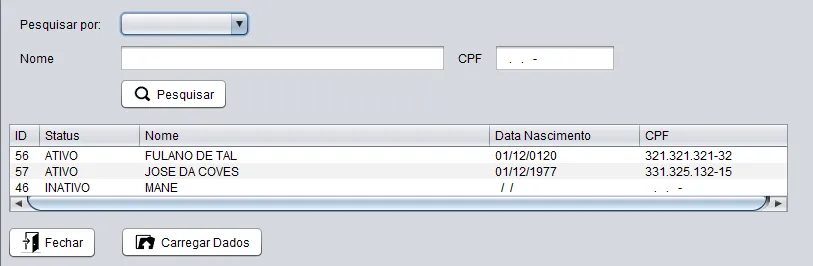
Desde que descomente a linha //preencherTabela.
Gostaria de selecionar uma opção, tipo nome ou cpf, preencher a tabela com o nome pesquisado, e assim que for selecionada a linha, clicar no botão “carregar”, fechar o formulário de pesquisa, e abrir este formulário:

com os campos preenchidos.
Comentando o método preencherTabela, a query não funciona. Não trás nenhum dado na pesquisa. Como devo proceder?