

Boa noite, estou tentando implementar a extensão dataTables ao meu projeto. Entretanto, sempre que vou utilizar algum dos botões para exportar seus valores, não tenho retorno de nenhum dado. Também quando utilizo a campo de busca, todos os dados somem. O que poderia ser? Se trata de uma tabela dinâmica, com seus dados construídos via Ajax. Seria algo relacionado ao cache armazenado? Ouvi dizer que tabelas dinâmicas são um caso à parte.
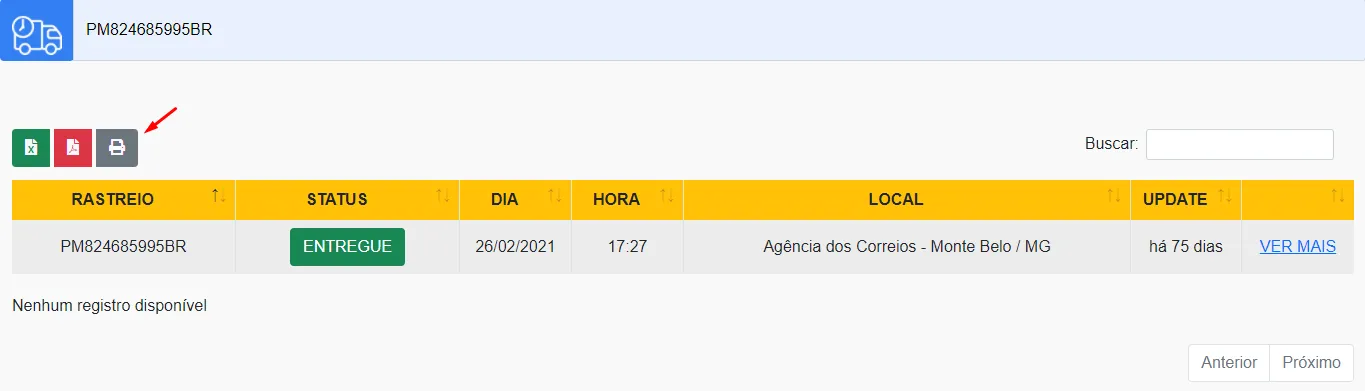

HTML
<div class="row">
            <div class="col-lg-12">
                <div class="table-responsive">
                    <table id="teste" class="table table-striped table-bordered" cellspacing="0" width="100%">
                    <thead class="bg-warning text-center">
                        <tr>
                          <th class="col-2">RASTREIO</th>
                          <th class="col-2">STATUS</th>
                          <th class="col-1">DIA</th>
                          <th class="col-1">HORA</th>
                          <th class="col-4">LOCAL</th>
                          <th class="col-1">UPDATE</th>
                          <th class="col-2"> </th>
                        </tr>
                    </thead>
                    <tbody id="result" class="text-center">
              </tbody>
           </table>
  </div>
</div>
PHP
foreach ($arrayCompleto as $key => $value) { echo “”; $key ”;
foreach ($value as $chave => $text)
{
if ($text[‘Status’] == “Objeto entregue ao destinatário”)
{
echo “ENTREGUE ”;
}
else
{
echo “NULL ”;
}
echo “$text[Dia]
$text[Hora] ;
$text[Local] ;
$text[Update] ;
VER MAIS
}
}
}AJAX
function search(){

var dados = $(’#codigo’).serialize();

$.ajax({

url:“api/obj.php”,

type:“POST”,

dataType: ‘html’,

data: dados,

success:function(data){

$(’#result’).empty().html(data);

}

});

}
JS
$(document).ready( function () {

$(’<a class="hashtag" href="https://www.guj.com.br/tags/teste">#teste</a>’).DataTable({

“language”: {

“lengthMenu”: “”,

“info”: “Mostrando página <strong><em>PAGE</em></strong> de <em>PAGES</em>”,

“infoEmpty”: “Nenhum registro disponível”,

“infoFiltered”: “(filtrado de MAX registros no total)”,

“sInfoPostFix”: “”,

“sInfoThousands”: “.”,

“sLoadingRecords”: “Carregando…”,

“sProcessing”: “Processando…”,

“sZeroRecords”: “Nenhum registro encontrado”,

“sSearch”: “Buscar:”,

“oPaginate”: {

“sNext”: “Próximo”,

“sPrevious”: “Anterior”,

“sFirst”: “Primeiro”,

“sLast”: “Último”

},

“oAria”: {

“sSortAscending”: “: Ordenar colunas de forma ascendente”,

“sSortDescending”: “: Ordenar colunas de forma descendente”

}

},

responsive: “true”,

dom: ‘Bfrtilp’,

buttons:[

{

extend:    ‘excelHtml5’,

text:      ’<i></i> ',

titleAttr: ‘Excel’,

className: ‘btn btn-success’

},

{

extend:    ‘pdfHtml5’,

text:      ’<i></i> ',

titleAttr: ‘PDF’,

className: ‘btn btn-danger ms-1’

},

{

extend:    ‘print’,

text:      ’<i></i> ',

titleAttr: ‘PRINT’,

className: ‘btn ms-1’

}]

});

});