
ola pessoal
nao estou conseguindo mudar a cor das bordas de uma JTabbedPane
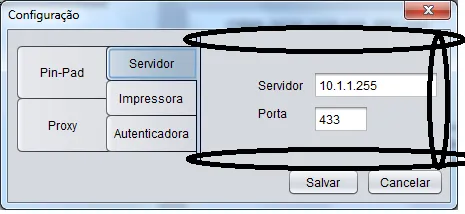
gostaria que a borda ficasse em toda a volta, nao apenas em cima
Borda num JTabbedPane
M
6 Respostas
M
se eu mudo de tabPage.setTabLayoutPolicy(javax.swing.JTabbedPane.WRAP_TAB_LAYOUT); para tabPage.setTabLayoutPolicy(javax.swing.JTabbedPane.SCROLL_TAB_LAYOUT); dae ele nao aparece nenhuma borda
eu gostaria que mostrasse todas as bordas do tabpage
E
Será que você pode setar a borda do JTabbedPane com setBorder?
M
com setborder nao da certo …
E
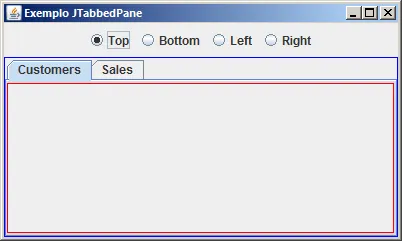
Qual das bordas você quer setar? Você pode setar a borda do JPanel que está dentro do JTabbedPane, ou então a borda do próprio JTabbedPane.
package guj;

import java.awt.BorderLayout;
import java.awt.Color;
import java.awt.FlowLayout;
import java.awt.event.ActionEvent;
import java.awt.event.ActionListener;

import javax.swing.BorderFactory;
import javax.swing.ButtonGroup;
import javax.swing.JFrame;
import javax.swing.JPanel;
import javax.swing.JRadioButton;
import javax.swing.JTabbedPane;
import javax.swing.SwingUtilities;

public class ExemploJTabbedPane extends JFrame {

	private class RadioButtonListener implements ActionListener {
		@Override
		public void actionPerformed(ActionEvent e) {
			if (e.getSource() == rdoTop && rdoTop.isSelected()) {
				tbpPanes.setTabPlacement(JTabbedPane.TOP);
			} else if (e.getSource() == rdoBottom && rdoBottom.isSelected()) {
				tbpPanes.setTabPlacement(JTabbedPane.BOTTOM);
			} else if (e.getSource() == rdoLeft && rdoLeft.isSelected()) {
				tbpPanes.setTabPlacement(JTabbedPane.LEFT);
			} else if (e.getSource() == rdoRight && rdoRight.isSelected()) {
				tbpPanes.setTabPlacement(JTabbedPane.RIGHT);
			}
		}
	}
	public ExemploJTabbedPane() {
		super();
		initialize();
	}
	private JPanel getJContentPane() {
		if (jContentPane == null) {
			jContentPane = new JPanel();
			jContentPane.setLayout(new BorderLayout());
			jContentPane.add(getPnlRadioButtons(), BorderLayout.NORTH);
			jContentPane.add(getTbpPanes(), BorderLayout.CENTER);
		}
		return jContentPane;
	}
	private JPanel getPnlCustomers() {
		if (pnlCustomers == null) {
			pnlCustomers = new JPanel();
			pnlCustomers.setLayout(new BorderLayout());
			pnlCustomers.setBorder (BorderFactory.createLineBorder(Color.RED));
		}
		return pnlCustomers;
	}
	private JPanel getPnlRadioButtons() {
		if (pnlRadioButtons == null) {
			pnlRadioButtons = new JPanel();
			pnlRadioButtons.setLayout(new FlowLayout());
			pnlRadioButtons.add(getRdoTop(), null);
			pnlRadioButtons.add(getRdoBottom(), null);
			pnlRadioButtons.add(getRdoLeft(), null);
			pnlRadioButtons.add(getRdoRight(), null);
			btgTabs = new ButtonGroup();
			btgTabs.add(getRdoTop());
			btgTabs.add(getRdoBottom());
			btgTabs.add(getRdoLeft());
			btgTabs.add(getRdoRight());
		}
		return pnlRadioButtons;
	}
	private JPanel getPnlSales() {
		if (pnlSales == null) {
			pnlSales = new JPanel();
			pnlSales.setLayout(new BorderLayout());
			pnlSales.setBorder (BorderFactory.createLineBorder(Color.GREEN));
		}
		return pnlSales;
	}
	private JRadioButton getRdoBottom() {
		if (rdoBottom == null) {
			rdoBottom = new JRadioButton();
			rdoBottom.setText("Bottom");
			rdoBottom.addActionListener(new RadioButtonListener());
		}
		return rdoBottom;
	}
	private JRadioButton getRdoLeft() {
		if (rdoLeft == null) {
			rdoLeft = new JRadioButton();
			rdoLeft.setText("Left");
			rdoLeft.addActionListener(new RadioButtonListener());
		}
		return rdoLeft;
	}
	private JRadioButton getRdoRight() {
		if (rdoRight == null) {
			rdoRight = new JRadioButton();
			rdoRight.setText("Right");
			rdoRight.addActionListener(new RadioButtonListener());
		}
		return rdoRight;
	}
	private JRadioButton getRdoTop() {
		if (rdoTop == null) {
			rdoTop = new JRadioButton();
			rdoTop.setText("Top");
			rdoTop.addActionListener(new RadioButtonListener());
		}
		return rdoTop;
	}
	private JTabbedPane getTbpPanes() {
		if (tbpPanes == null) {
			tbpPanes = new JTabbedPane();
			tbpPanes.addTab("Customers", null, getPnlCustomers(), "Customer data");
			tbpPanes.addTab("Sales", null, getPnlSales(), "Sale data");
			tbpPanes.addChangeListener(new javax.swing.event.ChangeListener() {
			    public void stateChanged(javax.swing.event.ChangeEvent e) {
			        if (tbpPanes.getSelectedComponent() == getPnlSales()) {
			            System.out.println ("Entrou no painel 'Sales'");
			        }
			    }
			});
			tbpPanes.setBorder (BorderFactory.createLineBorder(Color.BLUE));
		}
		return tbpPanes;
	}
	private void initialize() {
		this.setSize(300, 200);
		this.setContentPane(getJContentPane());
		this.setTitle("Exemplo JTabbedPane");
	}
	public static void main(String[] args) {
		SwingUtilities.invokeLater(new Runnable() {
			public void run() {
				ExemploJTabbedPane thisClass = new ExemploJTabbedPane();
				thisClass.setDefaultCloseOperation(JFrame.EXIT_ON_CLOSE);
				thisClass.setVisible(true);
			}
		});
	}

	private static final long serialVersionUID = 1L;
	private JPanel jContentPane = null;
	private JPanel pnlRadioButtons = null;
	private JRadioButton rdoTop = null;
	private JRadioButton rdoBottom = null;
	private JRadioButton rdoLeft = null;
	private JRadioButton rdoRight = null;
	private JTabbedPane tbpPanes = null;
	private JPanel pnlCustomers = null;
	private JPanel pnlSales = null;
	private ButtonGroup btgTabs = null;
}
M
segue anexo a tela …
M
nada
Criado 27 de janeiro de 2012
Ultima resposta 6 de fev. de 2012
Respostas 6
Participantes 2