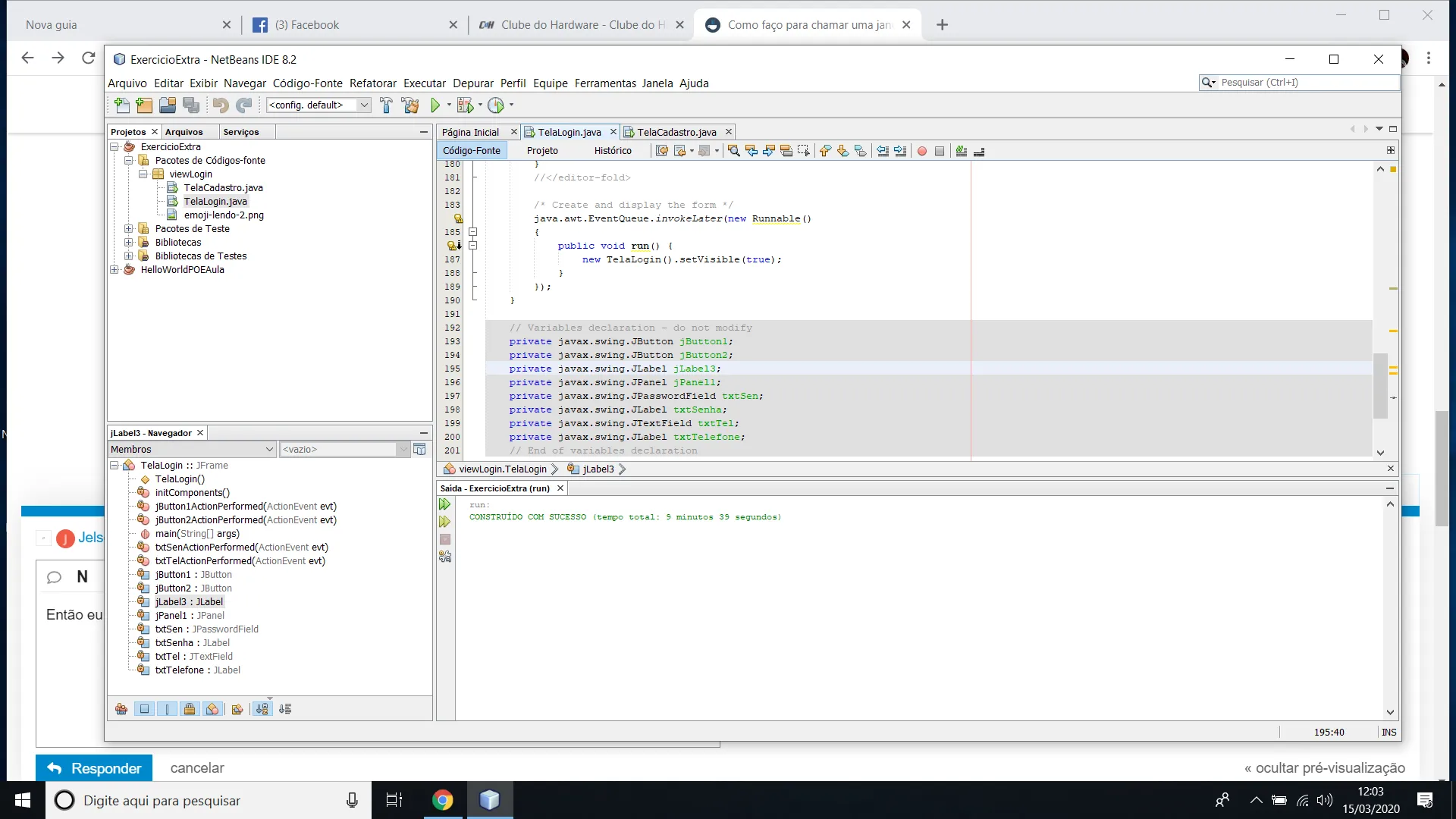
TELA DE LOGIN
package viewLogin;
import javax.swing.JOptionPane;
public class TelaLogin extends javax.swing.JFrame
{
public TelaLogin()
{
initComponents();
}
@SuppressWarnings("unchecked")
// <editor-fold defaultstate="collapsed" desc="Generated Code">
private void initComponents() {
jPanel1 = new javax.swing.JPanel();
jLabel3 = new javax.swing.JLabel();
txtTelefone = new javax.swing.JLabel();
txtTel = new javax.swing.JTextField();
txtSen = new javax.swing.JPasswordField();
txtSenha = new javax.swing.JLabel();
jButton1 = new javax.swing.JButton();
jButton2 = new javax.swing.JButton();
setDefaultCloseOperation(javax.swing.WindowConstants.EXIT_ON_CLOSE);
setResizable(false);
javax.swing.GroupLayout jPanel1Layout = new javax.swing.GroupLayout(jPanel1);
jPanel1.setLayout(jPanel1Layout);
jPanel1Layout.setHorizontalGroup(
jPanel1Layout.createParallelGroup(javax.swing.GroupLayout.Alignment.LEADING)
.addGap(0, 305, Short.MAX_VALUE)
);
jPanel1Layout.setVerticalGroup(
jPanel1Layout.createParallelGroup(javax.swing.GroupLayout.Alignment.LEADING)
.addGap(0, 56, Short.MAX_VALUE)
);
jLabel3.setIcon(new javax.swing.ImageIcon(getClass().getResource("/viewLogin/emoji-lendo-2.png"))); // NOI18N
txtTelefone.setForeground(new java.awt.Color(0, 51, 204));
txtTelefone.setText("NUMERO TELEFONE");
txtTel.addActionListener(new java.awt.event.ActionListener() {
public void actionPerformed(java.awt.event.ActionEvent evt) {
txtTelActionPerformed(evt);
}
});
txtSen.setText("jPasswordField1");
txtSen.addActionListener(new java.awt.event.ActionListener() {
public void actionPerformed(java.awt.event.ActionEvent evt) {
txtSenActionPerformed(evt);
}
});
txtSenha.setForeground(new java.awt.Color(0, 51, 204));
txtSenha.setText("SENHA");
jButton1.setFont(new java.awt.Font("Times New Roman", 0, 13)); // NOI18N
jButton1.setForeground(new java.awt.Color(0, 153, 51));
jButton1.setText("ENTRAR");
jButton1.addActionListener(new java.awt.event.ActionListener() {
public void actionPerformed(java.awt.event.ActionEvent evt) {
jButton1ActionPerformed(evt);
}
});
jButton2.setFont(new java.awt.Font("Tahoma", 1, 13)); // NOI18N
jButton2.setForeground(new java.awt.Color(51, 51, 0));
jButton2.setText("SAIR");
jButton2.setMaximumSize(new java.awt.Dimension(79, 25));
jButton2.setMinimumSize(new java.awt.Dimension(79, 25));
jButton2.addActionListener(new java.awt.event.ActionListener() {
public void actionPerformed(java.awt.event.ActionEvent evt) {
jButton2ActionPerformed(evt);
}
});
javax.swing.GroupLayout layout = new javax.swing.GroupLayout(getContentPane());
getContentPane().setLayout(layout);
layout.setHorizontalGroup(
layout.createParallelGroup(javax.swing.GroupLayout.Alignment.LEADING)
.addGroup(layout.createSequentialGroup()
.addGap(6, 6, 6)
.addComponent(jLabel3, javax.swing.GroupLayout.PREFERRED_SIZE, 264, javax.swing.GroupLayout.PREFERRED_SIZE)
.addGroup(layout.createParallelGroup(javax.swing.GroupLayout.Alignment.LEADING)
.addGroup(layout.createSequentialGroup()
.addGap(10, 10, 10)
.addComponent(txtTel, javax.swing.GroupLayout.PREFERRED_SIZE, 279, javax.swing.GroupLayout.PREFERRED_SIZE))
.addGroup(layout.createSequentialGroup()
.addGap(18, 18, 18)
.addGroup(layout.createParallelGroup(javax.swing.GroupLayout.Alignment.LEADING)
.addComponent(jButton1)
.addComponent(jPanel1, javax.swing.GroupLayout.PREFERRED_SIZE, javax.swing.GroupLayout.DEFAULT_SIZE, javax.swing.GroupLayout.PREFERRED_SIZE)))
.addGroup(layout.createSequentialGroup()
.addGap(226, 226, 226)
.addComponent(jButton2, javax.swing.GroupLayout.PREFERRED_SIZE, javax.swing.GroupLayout.DEFAULT_SIZE, javax.swing.GroupLayout.PREFERRED_SIZE))
.addGroup(layout.createSequentialGroup()
.addPreferredGap(javax.swing.LayoutStyle.ComponentPlacement.UNRELATED)
.addGroup(layout.createParallelGroup(javax.swing.GroupLayout.Alignment.LEADING)
.addComponent(txtSen, javax.swing.GroupLayout.PREFERRED_SIZE, 279, javax.swing.GroupLayout.PREFERRED_SIZE)
.addComponent(txtTelefone)
.addComponent(txtSenha))))
.addContainerGap(javax.swing.GroupLayout.DEFAULT_SIZE, Short.MAX_VALUE))
);
layout.setVerticalGroup(
layout.createParallelGroup(javax.swing.GroupLayout.Alignment.LEADING)
.addGroup(layout.createSequentialGroup()
.addContainerGap()
.addGroup(layout.createParallelGroup(javax.swing.GroupLayout.Alignment.LEADING, false)
.addGroup(layout.createSequentialGroup()
.addComponent(txtTel, javax.swing.GroupLayout.PREFERRED_SIZE, javax.swing.GroupLayout.DEFAULT_SIZE, javax.swing.GroupLayout.PREFERRED_SIZE)
.addPreferredGap(javax.swing.LayoutStyle.ComponentPlacement.RELATED)
.addComponent(txtTelefone)
.addGap(18, 18, 18)
.addComponent(txtSen, javax.swing.GroupLayout.PREFERRED_SIZE, javax.swing.GroupLayout.DEFAULT_SIZE, javax.swing.GroupLayout.PREFERRED_SIZE)
.addPreferredGap(javax.swing.LayoutStyle.ComponentPlacement.RELATED)
.addComponent(txtSenha)
.addGap(28, 28, 28)
.addGroup(layout.createParallelGroup(javax.swing.GroupLayout.Alignment.BASELINE)
.addComponent(jButton1)
.addComponent(jButton2, javax.swing.GroupLayout.PREFERRED_SIZE, javax.swing.GroupLayout.DEFAULT_SIZE, javax.swing.GroupLayout.PREFERRED_SIZE))
.addPreferredGap(javax.swing.LayoutStyle.ComponentPlacement.RELATED, javax.swing.GroupLayout.DEFAULT_SIZE, Short.MAX_VALUE)
.addComponent(jPanel1, javax.swing.GroupLayout.PREFERRED_SIZE, javax.swing.GroupLayout.DEFAULT_SIZE, javax.swing.GroupLayout.PREFERRED_SIZE)
.addGap(27, 27, 27))
.addComponent(jLabel3, javax.swing.GroupLayout.PREFERRED_SIZE, 305, javax.swing.GroupLayout.PREFERRED_SIZE))
.addGap(0, 0, Short.MAX_VALUE))
);
pack();
}// </editor-fold>
private void jButton1ActionPerformed(java.awt.event.ActionEvent evt) {
if(txtTel.getText().equals("1234") && txtSen.getText().equals("1234"))
{
JOptionPane.showMessageDialog(null,"Acesso Permitido");
}else{
JOptionPane.showMessageDialog(null,"Telefone ou Senha Inválidos,Tente Novamente!");
}
}
private void txtTelActionPerformed(java.awt.event.ActionEvent evt) {
// TODO add your handling code here:
}
private void jButton2ActionPerformed(java.awt.event.ActionEvent evt) {
}
private void txtSenActionPerformed(java.awt.event.ActionEvent evt) {
// TODO add your handling code here:
}
public static void main(String args[])
{
/* Set the Nimbus look and feel */
//<editor-fold defaultstate="collapsed" desc=" Look and feel setting code (optional) ">
/* If Nimbus (introduced in Java SE 6) is not available, stay with the default look and feel.
* For details see http://download.oracle.com/javase/tutorial/uiswing/lookandfeel/plaf.html
*/
try {
for (javax.swing.UIManager.LookAndFeelInfo info : javax.swing.UIManager.getInstalledLookAndFeels()) {
if ("Nimbus".equals(info.getName())) {
javax.swing.UIManager.setLookAndFeel(info.getClassName());
break;
}
}
} catch (ClassNotFoundException ex) {
java.util.logging.Logger.getLogger(TelaLogin.class.getName()).log(java.util.logging.Level.SEVERE, null, ex);
} catch (InstantiationException ex) {
java.util.logging.Logger.getLogger(TelaLogin.class.getName()).log(java.util.logging.Level.SEVERE, null, ex);
} catch (IllegalAccessException ex) {
java.util.logging.Logger.getLogger(TelaLogin.class.getName()).log(java.util.logging.Level.SEVERE, null, ex);
} catch (javax.swing.UnsupportedLookAndFeelException ex) {
java.util.logging.Logger.getLogger(TelaLogin.class.getName()).log(java.util.logging.Level.SEVERE, null, ex);
}
//</editor-fold>
/* Create and display the form */
java.awt.EventQueue.invokeLater(new Runnable()
{
public void run() {
new TelaLogin().setVisible(true);
}
});
}
// Variables declaration - do not modify
private javax.swing.JButton jButton1;
private javax.swing.JButton jButton2;
private javax.swing.JLabel jLabel3;
private javax.swing.JPanel jPanel1;
private javax.swing.JPasswordField txtSen;
private javax.swing.JLabel txtSenha;
private javax.swing.JTextField txtTel;
private javax.swing.JLabel txtTelefone;
// End of variables declaration
}
TELA DE CADASTRO
package viewLogin;
public class TelaCadastro extends javax.swing.JFrame
{
public TelaCadastro()
{
initComponents();
}
@SuppressWarnings("unchecked")
// <editor-fold defaultstate="collapsed" desc="Generated Code">
private void initComponents() {
jPanel1 = new javax.swing.JPanel();
jLabel4 = new javax.swing.JLabel();
jLabel5 = new javax.swing.JLabel();
txtCod = new javax.swing.JTextField();
txtTit = new javax.swing.JTextField();
jLabel1 = new javax.swing.JLabel();
jLabel2 = new javax.swing.JLabel();
txtAut = new javax.swing.JTextField();
txtNumero = new javax.swing.JComboBox<>();
jLabel3 = new javax.swing.JLabel();
jScrollPane1 = new javax.swing.JScrollPane();
jTextArea1 = new javax.swing.JTextArea();
jLabel6 = new javax.swing.JLabel();
jRadioButton1 = new javax.swing.JRadioButton();
jRadioButton2 = new javax.swing.JRadioButton();
jRadioButton3 = new javax.swing.JRadioButton();
jRadioButton4 = new javax.swing.JRadioButton();
jRadioButton5 = new javax.swing.JRadioButton();
jButton1 = new javax.swing.JButton();
jButton2 = new javax.swing.JButton();
setDefaultCloseOperation(javax.swing.WindowConstants.EXIT_ON_CLOSE);
setResizable(false);
jPanel1.setForeground(new java.awt.Color(255, 51, 51));
jLabel4.setFont(new java.awt.Font("Times New Roman", 0, 13)); // NOI18N
jLabel4.setForeground(new java.awt.Color(255, 0, 0));
jLabel4.setText("Código");
jLabel5.setFont(new java.awt.Font("Times New Roman", 0, 13)); // NOI18N
jLabel5.setForeground(new java.awt.Color(255, 0, 0));
jLabel5.setText("Titulo");
txtCod.addActionListener(new java.awt.event.ActionListener() {
public void actionPerformed(java.awt.event.ActionEvent evt) {
txtCodActionPerformed(evt);
}
});
txtTit.addActionListener(new java.awt.event.ActionListener() {
public void actionPerformed(java.awt.event.ActionEvent evt) {
txtTitActionPerformed(evt);
}
});
jLabel1.setFont(new java.awt.Font("Times New Roman", 0, 13)); // NOI18N
jLabel1.setForeground(new java.awt.Color(255, 0, 0));
jLabel1.setText("Autor");
jLabel2.setFont(new java.awt.Font("Times New Roman", 0, 13)); // NOI18N
jLabel2.setForeground(new java.awt.Color(255, 0, 0));
jLabel2.setText("Edicao");
txtNumero.setFont(new java.awt.Font("Times New Roman", 0, 13)); // NOI18N
txtNumero.setForeground(new java.awt.Color(0, 102, 255));
txtNumero.setModel(new javax.swing.DefaultComboBoxModel<>(new String[] { "Numero" }));
txtNumero.addActionListener(new java.awt.event.ActionListener() {
public void actionPerformed(java.awt.event.ActionEvent evt) {
txtNumeroActionPerformed(evt);
}
});
jLabel3.setFont(new java.awt.Font("Times New Roman", 0, 13)); // NOI18N
jLabel3.setForeground(new java.awt.Color(255, 0, 0));
jLabel3.setText("Citacao");
jTextArea1.setColumns(20);
jTextArea1.setRows(5);
jScrollPane1.setViewportView(jTextArea1);
jLabel6.setFont(new java.awt.Font("Times New Roman", 0, 13)); // NOI18N
jLabel6.setForeground(new java.awt.Color(255, 0, 0));
jLabel6.setText("Genero");
jRadioButton1.setFont(new java.awt.Font("Times New Roman", 0, 13)); // NOI18N
jRadioButton1.setForeground(new java.awt.Color(0, 51, 204));
jRadioButton1.setText("romance");
jRadioButton1.addActionListener(new java.awt.event.ActionListener() {
public void actionPerformed(java.awt.event.ActionEvent evt) {
jRadioButton1ActionPerformed(evt);
}
});
jRadioButton2.setFont(new java.awt.Font("Times New Roman", 0, 13)); // NOI18N
jRadioButton2.setForeground(new java.awt.Color(0, 51, 204));
jRadioButton2.setText("terror");
jRadioButton3.setFont(new java.awt.Font("Times New Roman", 0, 13)); // NOI18N
jRadioButton3.setForeground(new java.awt.Color(0, 51, 204));
jRadioButton3.setText("Ficcao");
jRadioButton4.setFont(new java.awt.Font("Times New Roman", 0, 13)); // NOI18N
jRadioButton4.setForeground(new java.awt.Color(0, 51, 204));
jRadioButton4.setText("Drama ");
jRadioButton4.addActionListener(new java.awt.event.ActionListener() {
public void actionPerformed(java.awt.event.ActionEvent evt) {
jRadioButton4ActionPerformed(evt);
}
});
jRadioButton5.setFont(new java.awt.Font("Times New Roman", 0, 13)); // NOI18N
jRadioButton5.setForeground(new java.awt.Color(0, 51, 204));
jRadioButton5.setText("Biografia");
jButton1.setForeground(new java.awt.Color(0, 153, 102));
jButton1.setText("SALVAR");
jButton2.setFont(new java.awt.Font("Times New Roman", 1, 13)); // NOI18N
jButton2.setForeground(new java.awt.Color(0, 51, 51));
jButton2.setText("SAIR");
javax.swing.GroupLayout jPanel1Layout = new javax.swing.GroupLayout(jPanel1);
jPanel1.setLayout(jPanel1Layout);
jPanel1Layout.setHorizontalGroup(
jPanel1Layout.createParallelGroup(javax.swing.GroupLayout.Alignment.LEADING)
.addGroup(jPanel1Layout.createSequentialGroup()
.addContainerGap()
.addGroup(jPanel1Layout.createParallelGroup(javax.swing.GroupLayout.Alignment.LEADING)
.addGroup(jPanel1Layout.createSequentialGroup()
.addComponent(jLabel3)
.addGap(309, 309, 309)
.addGroup(jPanel1Layout.createParallelGroup(javax.swing.GroupLayout.Alignment.LEADING)
.addComponent(jRadioButton2)
.addComponent(jRadioButton3))
.addGap(0, 0, Short.MAX_VALUE))
.addGroup(jPanel1Layout.createSequentialGroup()
.addGroup(jPanel1Layout.createParallelGroup(javax.swing.GroupLayout.Alignment.LEADING)
.addGroup(jPanel1Layout.createSequentialGroup()
.addComponent(txtCod, javax.swing.GroupLayout.PREFERRED_SIZE, 129, javax.swing.GroupLayout.PREFERRED_SIZE)
.addPreferredGap(javax.swing.LayoutStyle.ComponentPlacement.RELATED)
.addComponent(txtTit))
.addGroup(jPanel1Layout.createSequentialGroup()
.addComponent(jLabel4)
.addPreferredGap(javax.swing.LayoutStyle.ComponentPlacement.RELATED, javax.swing.GroupLayout.DEFAULT_SIZE, Short.MAX_VALUE)
.addComponent(jLabel5)
.addGap(103, 103, 103))
.addGroup(javax.swing.GroupLayout.Alignment.TRAILING, jPanel1Layout.createSequentialGroup()
.addGroup(jPanel1Layout.createParallelGroup(javax.swing.GroupLayout.Alignment.LEADING)
.addComponent(jLabel1)
.addComponent(txtAut, javax.swing.GroupLayout.PREFERRED_SIZE, 328, javax.swing.GroupLayout.PREFERRED_SIZE))
.addPreferredGap(javax.swing.LayoutStyle.ComponentPlacement.RELATED, javax.swing.GroupLayout.DEFAULT_SIZE, Short.MAX_VALUE)
.addGroup(jPanel1Layout.createParallelGroup(javax.swing.GroupLayout.Alignment.LEADING)
.addComponent(jLabel2, javax.swing.GroupLayout.PREFERRED_SIZE, 45, javax.swing.GroupLayout.PREFERRED_SIZE)
.addComponent(txtNumero, javax.swing.GroupLayout.PREFERRED_SIZE, 90, javax.swing.GroupLayout.PREFERRED_SIZE)))
.addGroup(jPanel1Layout.createSequentialGroup()
.addGroup(jPanel1Layout.createParallelGroup(javax.swing.GroupLayout.Alignment.TRAILING, false)
.addGroup(jPanel1Layout.createSequentialGroup()
.addGap(10, 10, 10)
.addComponent(jButton1)
.addPreferredGap(javax.swing.LayoutStyle.ComponentPlacement.RELATED, javax.swing.GroupLayout.DEFAULT_SIZE, Short.MAX_VALUE)
.addComponent(jButton2))
.addGroup(jPanel1Layout.createSequentialGroup()
.addComponent(jScrollPane1, javax.swing.GroupLayout.PREFERRED_SIZE, 151, javax.swing.GroupLayout.PREFERRED_SIZE)
.addGap(198, 198, 198)
.addGroup(jPanel1Layout.createParallelGroup(javax.swing.GroupLayout.Alignment.LEADING)
.addComponent(jRadioButton4)
.addComponent(jRadioButton5)
.addComponent(jLabel6)
.addComponent(jRadioButton1))))
.addGap(0, 24, Short.MAX_VALUE)))
.addContainerGap())))
);
jPanel1Layout.setVerticalGroup(
jPanel1Layout.createParallelGroup(javax.swing.GroupLayout.Alignment.LEADING)
.addGroup(jPanel1Layout.createSequentialGroup()
.addContainerGap()
.addGroup(jPanel1Layout.createParallelGroup(javax.swing.GroupLayout.Alignment.LEADING)
.addComponent(jLabel4)
.addComponent(jLabel5, javax.swing.GroupLayout.Alignment.TRAILING))
.addPreferredGap(javax.swing.LayoutStyle.ComponentPlacement.RELATED)
.addGroup(jPanel1Layout.createParallelGroup(javax.swing.GroupLayout.Alignment.LEADING)
.addGroup(jPanel1Layout.createSequentialGroup()
.addComponent(txtCod, javax.swing.GroupLayout.PREFERRED_SIZE, javax.swing.GroupLayout.DEFAULT_SIZE, javax.swing.GroupLayout.PREFERRED_SIZE)
.addGap(18, 18, 18)
.addComponent(jLabel1)
.addGap(2, 2, 2)
.addGroup(jPanel1Layout.createParallelGroup(javax.swing.GroupLayout.Alignment.BASELINE)
.addComponent(txtAut, javax.swing.GroupLayout.PREFERRED_SIZE, javax.swing.GroupLayout.DEFAULT_SIZE, javax.swing.GroupLayout.PREFERRED_SIZE)
.addComponent(txtNumero, javax.swing.GroupLayout.PREFERRED_SIZE, javax.swing.GroupLayout.DEFAULT_SIZE, javax.swing.GroupLayout.PREFERRED_SIZE)))
.addGroup(jPanel1Layout.createSequentialGroup()
.addComponent(txtTit, javax.swing.GroupLayout.PREFERRED_SIZE, javax.swing.GroupLayout.DEFAULT_SIZE, javax.swing.GroupLayout.PREFERRED_SIZE)
.addGap(18, 18, 18)
.addComponent(jLabel2)))
.addGroup(jPanel1Layout.createParallelGroup(javax.swing.GroupLayout.Alignment.LEADING)
.addGroup(jPanel1Layout.createSequentialGroup()
.addGap(13, 13, 13)
.addComponent(jLabel3)
.addPreferredGap(javax.swing.LayoutStyle.ComponentPlacement.RELATED)
.addComponent(jScrollPane1)
.addGap(56, 56, 56))
.addGroup(jPanel1Layout.createSequentialGroup()
.addGap(22, 22, 22)
.addComponent(jLabel6, javax.swing.GroupLayout.PREFERRED_SIZE, 16, javax.swing.GroupLayout.PREFERRED_SIZE)
.addPreferredGap(javax.swing.LayoutStyle.ComponentPlacement.UNRELATED)
.addComponent(jRadioButton1)
.addPreferredGap(javax.swing.LayoutStyle.ComponentPlacement.RELATED)
.addComponent(jRadioButton2)
.addPreferredGap(javax.swing.LayoutStyle.ComponentPlacement.RELATED)
.addComponent(jRadioButton3)
.addPreferredGap(javax.swing.LayoutStyle.ComponentPlacement.RELATED)
.addComponent(jRadioButton4)
.addPreferredGap(javax.swing.LayoutStyle.ComponentPlacement.UNRELATED)
.addComponent(jRadioButton5)
.addGap(18, 18, 18)
.addGroup(jPanel1Layout.createParallelGroup(javax.swing.GroupLayout.Alignment.BASELINE)
.addComponent(jButton2)
.addComponent(jButton1))
.addGap(0, 16, Short.MAX_VALUE))))
);
javax.swing.GroupLayout layout = new javax.swing.GroupLayout(getContentPane());
getContentPane().setLayout(layout);
layout.setHorizontalGroup(
layout.createParallelGroup(javax.swing.GroupLayout.Alignment.LEADING)
.addGroup(layout.createSequentialGroup()
.addContainerGap()
.addComponent(jPanel1, javax.swing.GroupLayout.DEFAULT_SIZE, javax.swing.GroupLayout.DEFAULT_SIZE, Short.MAX_VALUE)
.addContainerGap())
);
layout.setVerticalGroup(
layout.createParallelGroup(javax.swing.GroupLayout.Alignment.LEADING)
.addGroup(javax.swing.GroupLayout.Alignment.TRAILING, layout.createSequentialGroup()
.addContainerGap(javax.swing.GroupLayout.DEFAULT_SIZE, Short.MAX_VALUE)
.addComponent(jPanel1, javax.swing.GroupLayout.PREFERRED_SIZE, javax.swing.GroupLayout.DEFAULT_SIZE, javax.swing.GroupLayout.PREFERRED_SIZE)
.addContainerGap())
);
pack();
}// </editor-fold>
private void txtTitActionPerformed(java.awt.event.ActionEvent evt) {
// TODO add your handling code here:
}
private void txtNumeroActionPerformed(java.awt.event.ActionEvent evt) {
}
private void jRadioButton1ActionPerformed(java.awt.event.ActionEvent evt) {
// TODO add your handling code here:
}
private void txtCodActionPerformed(java.awt.event.ActionEvent evt) {
// TODO add your handling code here:
}
private void jRadioButton4ActionPerformed(java.awt.event.ActionEvent evt) {
// TODO add your handling code here:
}
/**
* @param args the command line arguments
*/
public static void main(String args[]) {
/* Set the Nimbus look and feel */
//<editor-fold defaultstate="collapsed" desc=" Look and feel setting code (optional) ">
/* If Nimbus (introduced in Java SE 6) is not available, stay with the default look and feel.
* For details see http://download.oracle.com/javase/tutorial/uiswing/lookandfeel/plaf.html
*/
try {
for (javax.swing.UIManager.LookAndFeelInfo info : javax.swing.UIManager.getInstalledLookAndFeels()) {
if ("Nimbus".equals(info.getName())) {
javax.swing.UIManager.setLookAndFeel(info.getClassName());
break;
}
}
} catch (ClassNotFoundException ex) {
java.util.logging.Logger.getLogger(TelaCadastro.class.getName()).log(java.util.logging.Level.SEVERE, null, ex);
} catch (InstantiationException ex) {
java.util.logging.Logger.getLogger(TelaCadastro.class.getName()).log(java.util.logging.Level.SEVERE, null, ex);
} catch (IllegalAccessException ex) {
java.util.logging.Logger.getLogger(TelaCadastro.class.getName()).log(java.util.logging.Level.SEVERE, null, ex);
} catch (javax.swing.UnsupportedLookAndFeelException ex) {
java.util.logging.Logger.getLogger(TelaCadastro.class.getName()).log(java.util.logging.Level.SEVERE, null, ex);
}
//</editor-fold>
//</editor-fold>
/* Create and display the form */
java.awt.EventQueue.invokeLater(new Runnable() {
public void run() {
new TelaCadastro().setVisible(true);
}
});
}
// Variables declaration - do not modify
private javax.swing.JButton jButton1;
private javax.swing.JButton jButton2;
private javax.swing.JLabel jLabel1;
private javax.swing.JLabel jLabel2;
private javax.swing.JLabel jLabel3;
private javax.swing.JLabel jLabel4;
private javax.swing.JLabel jLabel5;
private javax.swing.JLabel jLabel6;
private javax.swing.JPanel jPanel1;
private javax.swing.JRadioButton jRadioButton1;
private javax.swing.JRadioButton jRadioButton2;
private javax.swing.JRadioButton jRadioButton3;
private javax.swing.JRadioButton jRadioButton4;
private javax.swing.JRadioButton jRadioButton5;
private javax.swing.JScrollPane jScrollPane1;
private javax.swing.JTextArea jTextArea1;
private javax.swing.JTextField txtAut;
private javax.swing.JTextField txtCod;
private javax.swing.JComboBox<String> txtNumero;
private javax.swing.JTextField txtTit;
// End of variables declaration
}