
Olá, sou iniciante em linguagem Java, e eu estou querendo criar um Bot para Discord em Java, mas não consegui, queria saber se é possível eu transformar todo o código q eu tenho em linguagem Java para JavaScript?
Vou colocar abaixo o link do comando q eu desejo fazer funcionar, por favor alguém me ajuda 
Como transformar um código em JAVA para Node.JS

41 Respostas

Se ainda restava alguma esperança de que era possível… Infelizmente transformar não é possível nos dias de hoje.
O que é possível é reescrever o código de Java pra JavaScript, na raça mesmo. No próprio Github tem vários exemplo de bot pra o discord em Node.
Eu tenho bots em Node, mas o negocio é q eu queria especificamente esse comando q eu enviei ai, pra ele pesquisar naquele site especifico, tem como eu fazer isso com node.js?
1 like
Com certeza! Eu sempre gosto de recomendar o Puppeteer (https://pptr.dev/)
Muito obrigado, vou tentar ver se consigo alguma coisa aqui, sou iniciante nisso 
2 likes
É bem simples! Basicamente vc vai precisar inspecionar o elemento da página que vc quer (apertando F12 no seu teclado), e ir pegando as classes correspondentes e etc…
Exemplo básico com o site que vc quer:

Fonte de um código que fiz pra entrar no site Letras, procurar uma música e trazer o conteúdo que eu quero.
'use strict';
const puppeteer = require('puppeteer');

async function getDataArtigo() {
    const browser = await puppeteer.launch({
        headless: false,
        args: ['--disable-web-security', '--user-data-dir', '--allow-running-insecure-content']
    });

    try {
        const page = await browser.newPage();
        await page.setUserAgent("Mozilla/5.0 (Windows NT 10.0) AppleWebKit/537.36 (KHTML, like Gecko) Chrome/42.0.2311.135 Safari/537.36 Edge/12.10136")
        await page.setViewport({ width: 1280, height: 800 });
        await page.goto(`https://www.letras.mus.br/`);

        //Vai pesquisar pela palavra chave...
        await page.$('#main_suggest')
        await page.type("#main_suggest", "Started From The Bottom - Drake Tradução") //palavra chave.
        await page.click(".main-search_submit")

        //get first link
        await page.waitForSelector('.gsc-thumbnail-inside .gs-title a')
        const link = await page.$eval('.gsc-thumbnail-inside .gs-title a', link => link.getAttribute("href"))
        await page.goto(link.toString())

        //pegar tradução
        await page.waitForSelector(".cnt-trad_r p")
        const letra = await page.evaluate(() => Array.from(document.querySelectorAll('.cnt-trad_r p *'))
            .map((link) => link.innerText))

        console.log(letra)

        await browser.close()
    } catch (e) {
        console.log(e)
    }
}

getDataArtigo()
Devo adicionar isso em um comando?
Desculpa mas não entendi muito bem como realmente devo fazer
1 like
vc q fez seus bots?
1 like
Da uma olhada nesse video, acho q vai te ajudar:
1 like
+ou-, meu conhecimento em Node.js é muito pequeno, a maioria eu pegava códigos meio q prontos e ia alterando de acordo com o q desejava
Irei assistir, qualquer coisa aviso aqui, blz?
1 like
Maravilha, seja bem vindo ao fórum 
Muito obrigado man!!! vou ir tentando aqui 
Oi tenho uma dúvida, Meu bot foi feito na replit, para poder ficar sempre online, é possível fazer isso lá?
1 like
Acho difícil, se der tem que pagar alguma coisa…
Em alternativa tem o Heroku. Vc coloca seu código no Github e importar lá no heroku. Aí sim vc consegue ter um servidor rodando sempre

Os dynos não dormem depois de 30 min de inatividade?
Já vi um tutorial de uma gambiarra para o app enviar web request para si mesmo a cada x minutos para ficar ativo.
Tem um tutorial no replit que usa o https://uptimerobot.com/ para manter o bot ativo.
1 like
Tenho um projeto que é um encurtador de link lá no heroku, eu fico um tempo sem acessar e quando vou acessar novamente, demora cerca de 3-5s pra o server startar.
Claro que pra projeto grande o ideal é ter um server próprio, mas pra quem quase não precisa de um ambiente gigante, o Heroku é uma boa opção
mas no caso de um bot, quem vai acessar? Eles não funcionam com http requests.
Tipo o package do Puppeteer está instalado no meu bot q está na Replit
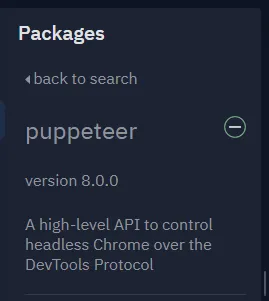
Eu só não sei oq devo fazer para o comando funcionar, copiei o comando q vc enviou para testar mas da erro.
Eu fiz isso 
1 like
Cada solicitação que alguem fizer para o bot ele vai ter uma atividade. É uma raspagem…
1 like
Qual erro?
Eu criei um comando “letras.js” e colei o código que você enviou do jeito q tá ai quando uso o comando aparece:
Erro:TypeError: commandFile.run is not a function
Eu tentei colocar na Index tbm, aparece uma mensagem um pouco maior:
Promise { <pending> }
Hint: hit control+c anytime to enter REPL.
(node:81) UnhandledPromiseRejectionWarning: Error: Failed to launch the browser process!
/home/runner/ITE-AQWWIKI/node_modules/puppeteer/.local-chromium/linux-856583/chrome-linux/chrome: error while loading shared libraries: libgobject-2.0.so.0: cannot open shared object file: No such file or directory


TROUBLESHOOTING: https://github.com/puppeteer/puppeteer/blob/main/docs/troubleshooting.md

    at onClose (/home/runner/ITE-AQWWIKI/node_modules/puppeteer/lib/cjs/puppeteer/node/BrowserRunner.js:193:20)
    at Interface.<anonymous> (/home/runner/ITE-AQWWIKI/node_modules/puppeteer/lib/cjs/puppeteer/node/BrowserRunner.js:183:68)
    at Interface.emit (events.js:326:22)
    at Interface.EventEmitter.emit (domain.js:483:12)
    at Interface.close (readline.js:416:8)
    at Socket.onend (readline.js:194:10)
    at Socket.emit (events.js:326:22)
    at Socket.EventEmitter.emit (domain.js:483:12)
    at endReadableNT (_stream_readable.js:1241:12)
    at processTicksAndRejections (internal/process/task_queues.js:84:21)
(node:81) UnhandledPromiseRejectionWarning: Unhandled promise rejection. This error originated either by throwing inside o
Promise { <pending> }
Hint: hit control+c anytime to enter REPL.
(node:171) UnhandledPromiseRejectionWarning: Error: Failed to launch the browser process!
/home/runner/ITE-AQWWIKI/node_modules/puppeteer/.local-chromium/linux-856583/chrome-linux/chrome: error while loading shared libraries: libgobject-2.0.so.0: cannot open shared object file: No such file or directory


TROUBLESHOOTING: https://github.com/puppeteer/puppeteer/blob/main/docs/troubleshooting.md

    at onClose (/home/runner/ITE-AQWWIKI/node_modules/puppeteer/lib/cjs/puppeteer/node/BrowserRunner.js:193:20)
    at Interface.<anonymous> (/home/runner/ITE-AQWWIKI/node_modules/puppeteer/lib/cjs/puppeteer/node/BrowserRunner.js:183:68)
    at Interface.emit (events.js:326:22)
    at Interface.EventEmitter.emit (domain.js:483:12)
    at Interface.close (readline.js:416:8)
    at Socket.onend (readline.js:194:10)
    at Socket.emit (events.js:326:22)
    at Socket.EventEmitter.emit (domain.js:483:12)
    at endReadableNT (_stream_readable.js:1241:12)
    at processTicksAndRejections (internal/process/task_queue
Promise { <pending> }
Hint: hit control+c anytime to enter REPL.
Ping recebido às 12:39:35
(node:216) UnhandledPromiseRejectionWarning: Error: Failed to launch the browser process!
/home/runner/ITE-AQWWIKI/node_modules/puppeteer/.local-chromium/linux-856583/chrome-linux/chrome: error while loading shared libraries: libgobject-2.0.so.0: cannot open shared object file: No such file or directory


TROUBLESHOOTING: https://github.com/puppeteer/puppeteer/blob/main/docs/troubleshooting.md

    at onClose (/home/runner/ITE-AQWWIKI/node_modules/puppeteer/lib/cjs/puppeteer/node/BrowserRunner.js:193:20)
    at Interface.<anonymous> (/home/runner/ITE-AQWWIKI/node_modules/puppeteer/lib/cjs/puppeteer/node/BrowserRunner.js:183:68)
    at Interface.emit (events.js:326:22)
    at Interface.EventEmitter.emit (domain.js:483:12)
    at Interface.close (readline.js:416:8)
    at Socket.onend (readline.js:194:10)
    at Socket.emit (events.js:326:22)
    at Socket.EventEmitter.emit (domain.js:483:12)
    at endReadableNT (_stream_readable.js:1241:12)
Promise { <pending> }
Hint: hit control+c anytime to enter REPL.
(node:260) UnhandledPromiseRejectionWarning: Error: Failed to launch the browser process!
/home/runner/ITE-AQWWIKI/node_modules/puppeteer/.local-chromium/linux-856583/chrome-linux/chrome: error while loading shared libraries: libgobject-2.0.so.0: cannot open shared object file: No such file or directory


TROUBLESHOOTING: https://github.com/puppeteer/puppeteer/blob/main/docs/troubleshooting.md

    at onClose (/home/runner/ITE-AQWWIKI/node_modules/puppeteer/lib/cjs/puppeteer/node/BrowserRunner.js:193:20)
    at Interface.<anonymous> (/home/runner/ITE-AQWWIKI/node_modules/puppeteer/lib/cjs/puppeteer/node/BrowserRunner.js:183:68)
    at Interface.emit (events.js:326:22)
    at Interface.EventEmitter.emit (domain.js:483:12)
    at Interface.close (readline.js:416:8)
    at Socket.onend (readline.js:194:10)
    at Socket.emit (events.js:326:22)
    at Socket.EventEmitter.emit (domain.js:483:12)
    at endReadableNT (_stream_readable.js:1241:12)
Promise { <pending> }
Hint: hit control+c anytime to enter REPL.
(node:298) UnhandledPromiseRejectionWarning: Error: Failed to launch the browser process!
/home/runner/ITE-AQWWIKI/node_modules/puppeteer/.local-chromium/linux-856583/chrome-linux/chrome: error while loading shared libraries: libgobject-2.0.so.0: cannot open shared object file: No such file or directory


TROUBLESHOOTING: https://github.com/puppeteer/puppeteer/blob/main/docs/troubleshooting.md

    at onClose (/home/runner/ITE-AQWWIKI/node_modules/puppeteer/lib/cjs/puppeteer/node/BrowserRunner.js:193:20)
    at Interface.<anonymous> (/home/runner/ITE-AQWWIKI/node_modules/puppeteer/lib/cjs/puppeteer/node/BrowserRunner.js:183:68)
    at Interface.emit (events.js:326:22)
    at Interface.EventEmitter.emit (domain.js:483:12)
    at Interface.close (readline.js:416:8)
    at Socket.onend (readline.js:194:10)
    at Socket.emit (events.js:326:22)
    at Socket.EventEmitter.emit (domain.js:483:12)
    at endReadableNT (_stream_readable.js:1241:12)
Promise { <pending> }
Hint: hit control+c anytime to enter REPL.
(node:525) UnhandledPromiseRejectionWarning: Error: Failed to launch the browser process!
/home/runner/ITE-AQWWIKI/node_modules/puppeteer/.local-chromium/linux-856583/chrome-linux/chrome: error while loading shared libraries: libgobject-2.0.so.0: cannot open shared object file: No such file or directory


TROUBLESHOOTING: https://github.com/puppeteer/puppeteer/blob/main/docs/troubleshooting.md

    at onClose (/home/runner/ITE-AQWWIKI/node_modules/puppeteer/lib/cjs/puppeteer/node/BrowserRunner.js:193:20)
    at Interface.<anonymous> (/home/runner/ITE-AQWWIKI/node_modules/puppeteer/lib/cjs/puppeteer/node/BrowserRunner.js:183:68)
    at Interface.emit (events.js:326:22)
    at Interface.EventEmitter.emit (domain.js:483:12)
    at Interface.close (readline.js:416:8)
    at Socket.onend (readline.js:194:10)
    at Socket.emit (events.js:326:22)
    at Socket.EventEmitter.emit (domain.js:483:12)
    at endReadableNT (_stream_readable.js:1241:12)
    at processTicksAndRejections (internal/process/task_queues.js:84:21)
(node:525) UnhandledPromiseRejectionWarning: Unhandled promis
Promise { <pending> }
Hint: hit control+c anytime to enter REPL.
(node:711) UnhandledPromiseRejectionWarning: Error: Failed to launch the browser process!
/home/runner/ITE-AQWWIKI/node_modules/puppeteer/.local-chromium/linux-856583/chrome-linux/chrome: error while loading shared libraries: libgobject-2.0.so.0: cannot open shared object file: No such file or directory


TROUBLESHOOTING: https://github.com/puppeteer/puppeteer/blob/main/docs/troubleshooting.md

    at onClose (/home/runner/ITE-AQWWIKI/node_modules/puppeteer/lib/cjs/puppeteer/node/BrowserRunner.js:193:20)
    at Interface.<anonymous> (/home/runner/ITE-AQWWIKI/node_modules/puppeteer/lib/cjs/puppeteer/node/BrowserRunner.js:183:68)
    at Interface.emit (events.js:326:22)
    at Interface.EventEmitter.emit (domain.js:483:12)
Promise { <pending> }
Hint: hit control+c anytime to enter REPL.
(node:757) UnhandledPromiseRejectionWarning: Error: Failed to launch the browser process!
/home/runner/ITE-AQWWIKI/node_modules/puppeteer/.local-chromium/linux-856583/chrome-linux/chrome: error while loading shared libraries: libgobject-2.0.so.0: cannot open shared object file: No such file or directory


TROUBLESHOOTING: https://github.com/puppeteer/puppeteer/blob/main/docs/troubleshooting.md

    at onClose (/home/runner/ITE-AQWWIKI/node_modules/puppeteer/lib/cjs/puppeteer/node/BrowserRunner.js:193:20)
    at Interface.<anonymous> (/home/runner/ITE-AQWWIKI/node_modules/puppeteer/lib/cjs/puppeteer/node/BrowserRunner.js:183:68)
    at Interface.emit (events.js:326:22)
    at Interface.EventEmitter.emit (domain.js:483:12)
    at Interface.close (readline.js:416:8)
    at Socket.onend (readline.js:194:10)
    at Socket.emit (events.js:326:22)
    at Socket.EventEmitter.emit (domain.js:483:12)
    at endReadableNT (_stream_readable.js:1241:12)
    at processTicksAndRejections (internal/process/task_queues.js:84:21)
(node:757) UnhandledPromiseRejectionWarning: Unhandled promise rejection. This error originated either by throwing inside of an async function without a catch block, or by rejecting a promise which was not handled with .catch(). To terminate the node process on unhandled promise rejection, use the CLI flag `--unhandled-rejections=strict` (see https://nodejs.org/api/cli.html#cli_unhandled_rejections_mode). (rejection id: 1)
(node:757) [DEP0018] DeprecationWarning: Unhandled promise rejections are deprecated. In the future, promise rejections that are not handled will terminate the Node.js process with a non-zero exit code.
Acho q atingir o máximo de mensagens de novato aqui
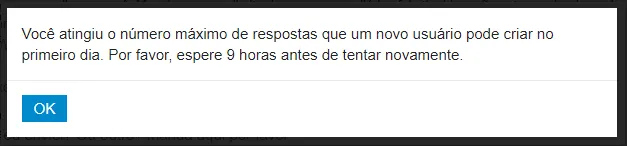
9 hrs pra eu poder responder de novo
eu mandei um email avisando pra vc caso não veja isso aqui
1 like
Vc ta usando o código que eu enviei? Ou outro? Manda aqui por favor
1 like
Pode enviar
1 like
Tem que adicionar o local de instalação do Java ao PATH. (https://mauriciogeneroso.medium.com/configurando-java-4-como-configurar-as-variáveis-java-home-path-e-classpath-no-windows-46040950638f)
Consegui, agora tá aparecendo isso aqui:
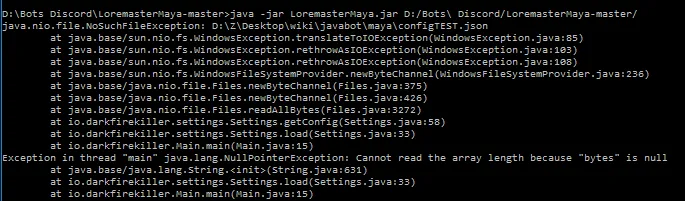
Acho q é algum erro né?
1 like
O programa não encontrou o arquivo “configTEST.json”

Eu refiz tudo de novo, o erro agora é na Main 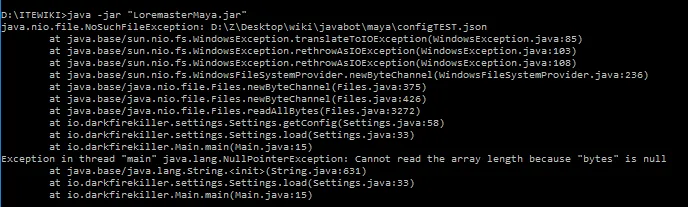
Essa é a minha main.java
package io.darkfirekiller;

    import io.darkfirekiller.core.Bot;
    import io.darkfirekiller.settings.*;

    public class Main {

        public static final boolean TESTING = true;

        public static Bot mayaBot;

        public static void main(String[] args) {

            String dir = args.length > 0 ? args[0] : null;
            Settings.load(dir);

            mayaBot = new Bot(Settings.token, Settings.prefix, Settings.aList).start();
        }
    }
1 like
classe Settings.java, linha 58
aqui está o código
package io.darkfirekiller.settings;

    import java.io.*;
    import java.nio.file.Files;
    import java.nio.file.Paths;
    import java.util.ArrayList;

    import io.darkfirekiller.Main;
    import org.json.simple.JSONArray;
    import org.json.simple.JSONObject;
    import org.json.simple.parser.JSONParser;
    import org.json.simple.parser.ParseException;

    public class Settings {

        private static final String defaultFolder = "C://Path/To/Config/";
        public static String destFolder;

        public static String token = "";
        public static String prefix = "";

        public static ArrayList<String> aList = new ArrayList<>();

        public static void load(String dir) {
            destFolder = (Main.TESTING || dir == null) ? defaultFolder : dir;

            final JSONParser jsonParser = new JSONParser();
            Object object;

            try {

                object = jsonParser.parse(new String(getConfig()));
                JSONObject mainBlock = (JSONObject) object;

                token = (String) mainBlock.get("token");
                prefix = (String) mainBlock.get("prefix");

                if (token.equals("") || prefix.equals("")) {
                    System.out.println("Prefix or token missing.");
                    System.exit(0);
                }

                JSONArray admins = (JSONArray) mainBlock.get("admins");
                if (admins == null || admins.size() == 0) {
                    System.out.println("Warning, no admins");
                } else {
                    for (Object a : admins) aList.add((String) a);
                }

            } catch (ParseException e) {
                e.printStackTrace();
            }
        }

        private static byte[] getConfig() {
            try {
                return Files.readAllBytes(Paths.get(Settings.destFolder + ((Main.TESTING) ? ("configTEST.json") : ("config.json"))));
            } catch (IOException e) {
                e.printStackTrace();
                return null;
            }
        }

    }
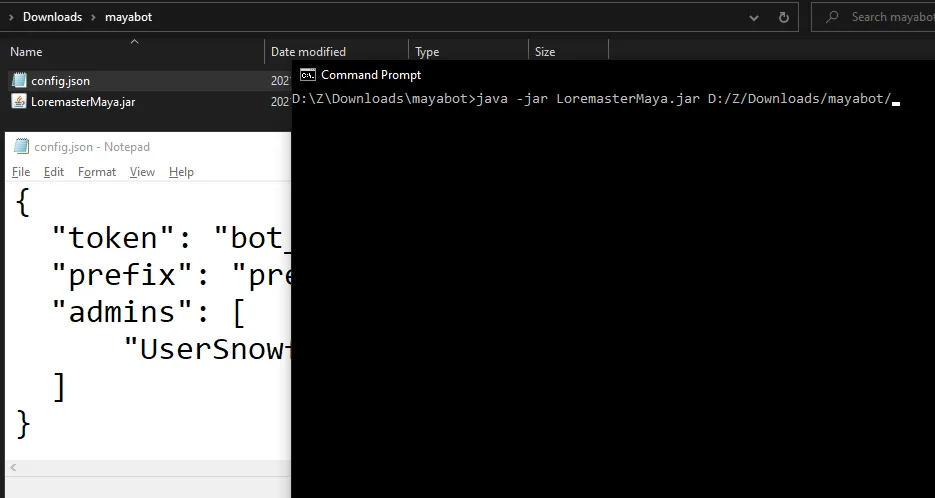
Mas tipo o criador desse Bot me disse q eu não precisaria editar nd do código, só baixar ele criar um bloco de notas “config.json” com o token do meu Bot e executar com java -jar, dessa forma:
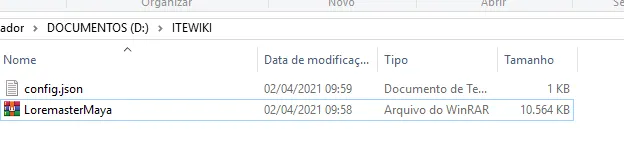
1 like
De acordo com o código da classe Settings, se isso é true, ele procura o arquivo configTEST.json; false, config.json.
Então basta mudar TESTING para false.
Então eu devo extrair tudo q tem dentro do arquivo .jar para poder editar isso é? ou é possível mudar pelo prompt de comando?
1 like
ou renomeie o config.json para configTEST.json
Fiz oq mandou

Tentei executar novamente, ocorreu o mesmo erro eu acredito
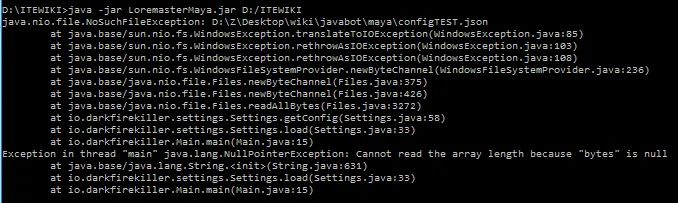
1 like
Veja o caminho no erro: D:\Z\Desktop\wiki\javabot\maya\configTEST.json
Tem que colocar o arquivo aí.
Ou edita o código mesmo e coloca aquele TESTING = false.
Pois é, para editar tenho q extrair todo ó código e abrir com o Intellij IDEA é?
E como eu salvo para ele ficar um arquivo .jar de novo?
1 like
Se o projeto está no GitHub é só importar ele. O IntelliJ tem opção de importar com a URL do git.
File -> New -> Project from Version Control
1 like
Consegui resolver o problema mano!!!
Esse problema todo era só pq o config.json estava salvo em arquivo de texto, e não em formato .json mesmo kkk
Agora está funcionando normalmente, muito obrigado pela ajuda mano!!!
Agora estou na luta de colocar ele no heroku pra ficar sempre online kkkk
Criado 31 de março de 2021
Ultima resposta 2 de abr. de 2021
Respostas 41
Participantes 3
Alura Sistemas operacionais: entenda seu conceito e suas funções Descubra o que são sistemas operacionais, suas funções e tipos. Aprenda tudo de forma clara e objetiva. Não perca tempo!
Casa do Codigo Logica de Programacao: Crie seus primeiros programas... Por Paulo Silveira, Adriano Almeida — Casa do Codigo
Fiap Pos-Tech: Arquitetura e Desenvolvimento Java Uma jornada especialmente pensada para profissionais que desejam dar os próximos passos na área...