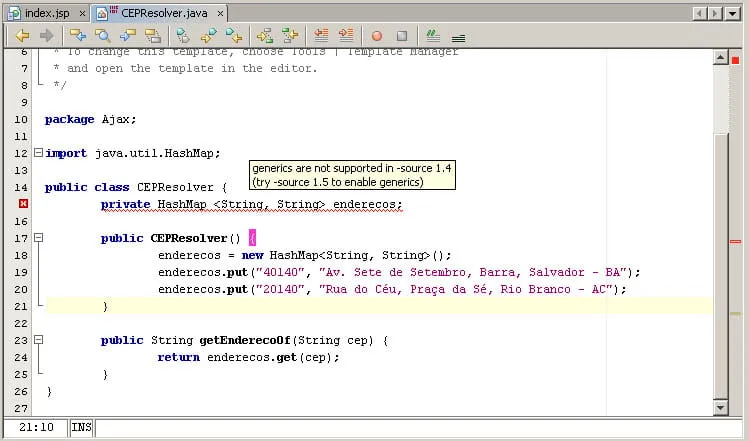
Estou usando o Netbeans 5.0 e JDK1.5 update 10 com JRE1.5 e Apache
Tomcat/5.5.17 em meu desenvolvimento e estou com um problema!
Erro ocorrido durante a compilação de uma classe:
generics are not supported in -source 1.4(try -source 1.5 to enable generics)
Alguém sabe como resolvê-lo!
Obrigado!
Vai na propriedade do projeto e lah vai ter a opcao.
marcos.junqueira
cara, eu fiz isso uma vez seguindo um tutorial no site do netbeans, se não me engano usando o tomcat não tem como mudar o source level para 1.5, mas tem como desmarcar a opção de forçar o source level para 1.4
Because we are deploying to Tomcat instead of a Java EE container, we need to set the J2EE version to J2EE 1.4 when we create our project. But we need to set the source level of our project to 1.5 so that can use Java EE 5 functionality in our source code.
Choose File > New Project (Ctrl-Shift-N). Select Web Application from the Web category and click Next.
Name the project ZooApp.
Set the server to the Bundled Tomcat server.
Specify the project location.
Set the Java EE Version to J2EE 1.4.
Deselect Set the Source Level to 1.4.
Note: By deselecting this, we are instructing the IDE to use the default source level. The default source level is determined by the default Java Platform of the IDE. In the previous exercise we set the default Java Platform to JDK 1.5.
Click Next.
Select the Java Server Faces framework checkbox and click Finish.
When you click Finish, the ZooApp web application appears in the Projects window of the IDE.