amk2
#1
Olá, estou começando a usar o JSF agora, e estou com uma dúvida aqui:
-
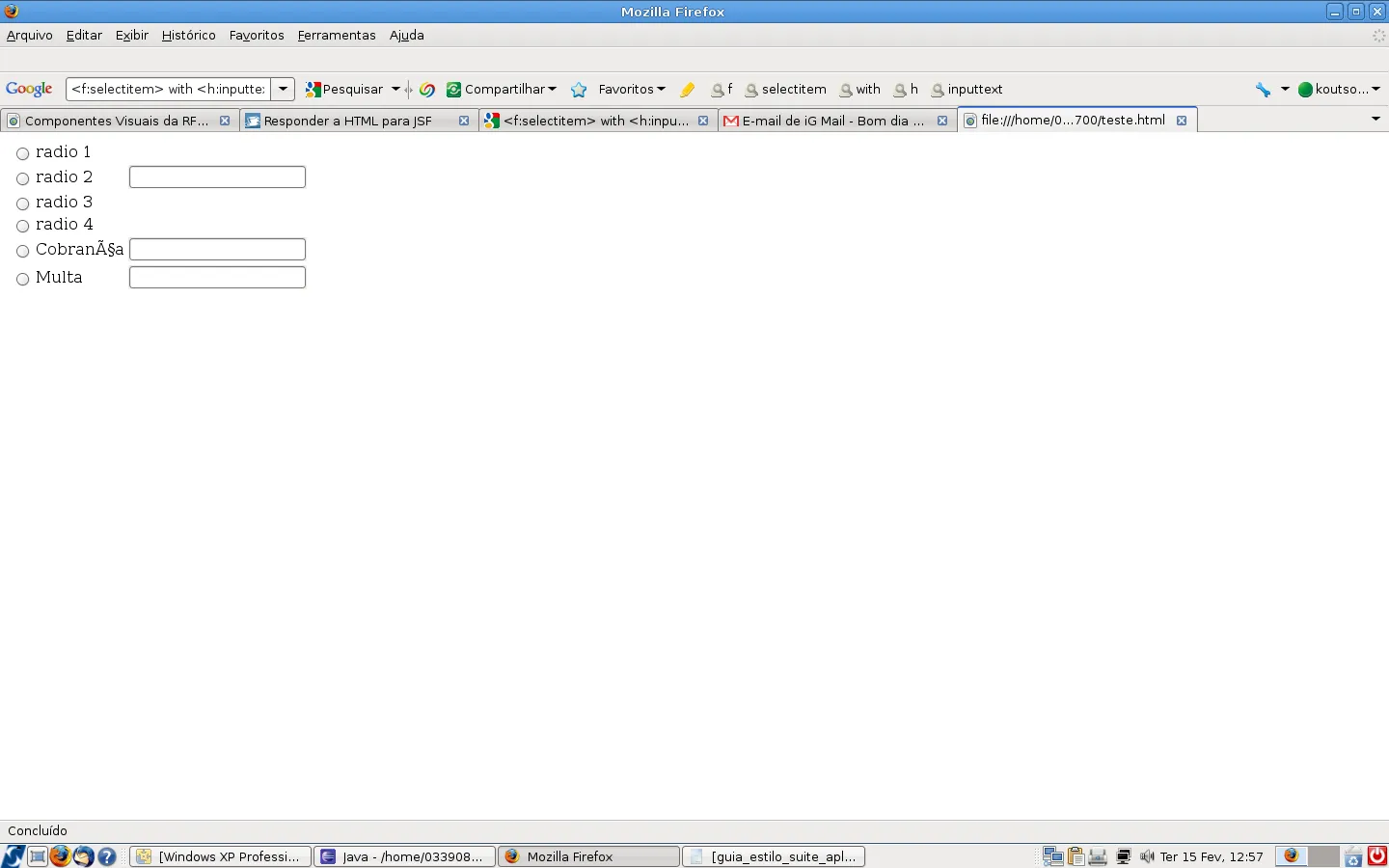
Como passar este trecho que está em HTML para o JSF
<table>
<tr>
<td><INPUT TYPE=“RADIO” NAME=“subscriptions” VALUE=“radio1” />
</td>
<td>radio 1</td>
<td> </td>
</tr>
<tr>
<td><INPUT TYPE=“RADIO” NAME=“subscriptions” VALUE=“radio2” />
</td>
<td>radio 2</td>
<td><input type=“text” name = “txtcobrança” /> </td>
</tr>
<tr>
<td><INPUT TYPE=“RADIO” NAME=“subscriptions” VALUE=“radio3” />
</td>
<td>radio 3</td>
<td> </td>
</tr>
<tr>
<td><INPUT TYPE="RADIO" NAME="subscriptions" VALUE="radio4" />
</td>
<td>radio 4</td>
<td> </td>
</tr>
<tr>
<td><INPUT TYPE="RADIO" NAME="subscriptions"
VALUE="cobranca" /></td>
<td>Cobrança</td>
<td>
<input type="text" name = "txtcobrança" />
</td>
</tr>
<tr>
<td><INPUT TYPE="RADIO" NAME="subscriptions"
VALUE="multa" /></td>
<td>Multa</td>
<td>
<input type="text" name = "txtmulta" />
</td>
</tr>
</table>

1 - Use [cod] tag para inserir seu código;
2 - Para a tabela em jsf use <h:panelGrid collunms=“quantidade de colunas”>
[quote=Polverini]2 - Para a tabela em jsf use <p:panelGrid collunms=“quantidade de colunas”>[/quote] Esse já precisaria primefaces.
JSF padrão mesmo é
<h:form>
<h:panelGrid columns="3">
<f:facet name="header">
<h:outputText value="Texto da Tabela"/>
</f:facet>
<h:selectOneRadio value="#{bean.color}">
<f:selectItem itemValue="Red" itemLabel="Color1 - Red" />
<f:selectItem itemValue="Green" itemLabel="Color1 - Green" />
<f:selectItem itemValue="Blue" itemLabel="Color1 - Blue" />
</h:selectOneRadio>
<h:inputText/>
<h:inputText/>
</h:panelGrid>
</h:form>
amk2
#4
tenho alguns campos radio com campo texto do lado, como está no HTML que coloquei, como fazer para deixá-los igual no JSF?
@edudebom Coloquei errado mesmo (mania) ja concertei
amk2
#6
hummm…continuei na mesma.
Coloquei este codigo aqui e testei de outra forma.
Porem continua não saindo como eu quero
Ex:
amk2
#8
Oi Edu,
Já postei, na primeira mensagem.
[quote=amk2]Oi Edu, Já postei, na primeira mensagem.[/quote] Sim, mas aquele era HTML puro. Não tentou adaptar ao JSF com os exemplos ?
amk2
#10
Coloquei assim no meu codigo, já tentei.
Eu precisaria de algo assim
<h:selectOneRadio id=“documentosdeadmissao” value="" layout=“pageDirection” >
<f:selectItem id=“doc1” itemLabel=“documento 1” itemValue=“1” />
<f:selectItem id=“doc2” itemLabel=“documento 2” itemValue=“2” /> <h:inputText id=“txtdoc2” value="" />
<f:selectItem id=“doc3” itemLabel=“documento 3” itemValue=“3” />
<f:selectItem id=“doc4” itemLabel=“documento 4” itemValue=“4” />
<f:selectItem id=“doc5” itemLabel=“documento 5” itemValue=“5” /> <h:inputText id=“txtdoc5” value="" />
<f:selectItem id=“doc6” itemLabel=“documento 6” itemValue=“6” /><h:inputText id=“txtdoc6” value="" />
</h:selectOneRadio>
amk2
#11
o problema é que estes campos textos ficam acima dos “radio”.
Eu quero igual ao que fica no html
E agora?

abs
amk2
#12
testei com este tb, que estava aq na página, porem colocando o campo texto onde tem que estar…
<h:panelGrid columns=“3”>
<f:facet name=“header”>
<h:outputText value=“Texto da Tabela”/>
</f:facet>
<h:selectOneRadio >
<f:selectItem itemValue="Red" itemLabel="Color1 - Red" />
<f:selectItem itemValue="Green" itemLabel="Color1 - Green" /><h:inputText/>
<f:selectItem itemValue="Blue" itemLabel="Color1 - Blue" /><h:inputText/>
<f:selectItem itemValue="Red" itemLabel="Color1 - Red" />
<f:selectItem itemValue="Red" itemLabel="Color1 - Red" /> <h:inputText/>
<f:selectItem itemValue="Red" itemLabel="Color1 - Red" />
</h:selectOneRadio>
</h:panelGrid>
e alem de ficar na horizontal o campo texto vai para acima
…
amk2
#13
alguma fórmula mágica?
Não?