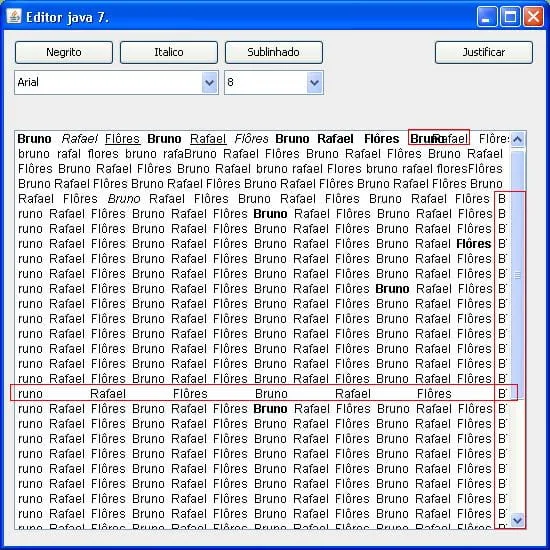
Saudações!
Pessoal to precisando de uma grande ajuda!!
Tenho um editor de texto que utiliza um RTFEditorKit para formatar o seu texto(Negrito, itálico, sublinhado, colorir, justificar, etc…), com o Java 6 o editor funcionava perfeitamente, agora com o Java 7 está dando um grande problema na justificação do texto, o JEditorPane se perde no alinhamento das palavras quando justifica, ele se perde na quebra de palavras, espaçamento entre palavras, etc… Abaixo um código de um editor simples que permite formatação… Quem puder dar algum palpite sobre o que pode estar ocorrendo fico grato…
package apresentacao.caixa;

import java.awt.GraphicsEnvironment;
import java.awt.event.ActionEvent;
import java.awt.event.ActionListener;
import java.awt.event.InputEvent;
import java.awt.event.KeyEvent;
import javax.swing.AbstractAction;
import javax.swing.JButton;
import javax.swing.JComboBox;
import javax.swing.JEditorPane;
import javax.swing.JFrame;
import javax.swing.JScrollPane;
import javax.swing.KeyStroke;
import javax.swing.text.StyledEditorKit;
import javax.swing.text.rtf.RTFEditorKit;

@SuppressWarnings("serial")
public class Editor extends JFrame {
    private JButton buttonNegrito, buttonItalico, buttonSublinhado, buttonJustificado;
    private RTFEditorKit rtfEditorKit;
    private JComboBox<String> comboFontes, comboSize;
    private JEditorPane editorPane;
    private JScrollPane scrollPane;

    public Editor() {
        try {
            javax.swing.UIManager.setLookAndFeel("com.sun.java.swing.plaf.windows.WindowsLookAndFeel");
        } catch (Exception e) { }

        this.setTitle("Editor java 7.");
        this.setDefaultCloseOperation(EXIT_ON_CLOSE);
        this.setSize(550, 550);
        this.setResizable(false);
        this.setLocationRelativeTo(null);
        this.setLayout(null);

        this.add(this.buttonNegrito = new JButton("Negrito"));
        this.buttonNegrito.setBounds(10, 10, 100, 25);
        this.buttonNegrito.addActionListener(new ActionListener() {
            @Override
            public void actionPerformed(ActionEvent e) {
                new StyledEditorKit.BoldAction().actionPerformed(null);
            }
        });

        this.add(this.buttonItalico = new JButton("Italico"));
        this.buttonItalico.setBounds(115, 10, 100, 25);
        this.buttonItalico.addActionListener(new ActionListener() {
            @Override
            public void actionPerformed(ActionEvent e) {
                new StyledEditorKit.ItalicAction().actionPerformed(null);
            }
        });

        this.add(this.buttonSublinhado = new JButton("Sublinhado"));
        this.buttonSublinhado.setBounds(220, 10, 100, 25);
        this.buttonSublinhado.addActionListener(new ActionListener() {
            @Override
            public void actionPerformed(ActionEvent e) {
                new StyledEditorKit.UnderlineAction().actionPerformed(null);
            }
        });

        this.add(this.buttonJustificado = new JButton("Justificar"));
        this.buttonJustificado.setBounds(430, 10, 100, 25);
        this.buttonJustificado.addActionListener(new ActionListener() {
            @Override
            public void actionPerformed(ActionEvent e) {
                new StyledEditorKit.AlignmentAction("Justificado", 3).actionPerformed(null);
            }
        });

        GraphicsEnvironment ge = GraphicsEnvironment.getLocalGraphicsEnvironment();
        String[] fontes = ge.getAvailableFontFamilyNames();

        this.add(this.comboFontes = new JComboBox(fontes));
        this.comboFontes.setBounds(10, 40, 205, 25);
        this.comboFontes.addActionListener(new ActionListener() {
            @Override
            public void actionPerformed(ActionEvent e) {
                new StyledEditorKit.FontFamilyAction("font-", comboFontes.getSelectedItem().toString()).actionPerformed(null);
            }
        });

        this.add(this.comboSize = new JComboBox(new String[]{"8", "10", "12", "14", "16", "18"}));
        this.comboSize.setBounds(220, 40, 100, 25);
        this.comboSize.addActionListener(new ActionListener() {
            @Override
            public void actionPerformed(ActionEvent e) {
                new StyledEditorKit.FontSizeAction("size-", Integer.parseInt(comboSize.getSelectedItem().toString())).actionPerformed(null);
            }
        });

        // ** Editor Pane **
        this.rtfEditorKit = new RTFEditorKit();
        this.editorPane = new JEditorPane();
        this.editorPane.setEditorKit(this.rtfEditorKit);
        this.editorPane.setContentType("text/rtf");
        this.editorPane.getInputMap(2).put(KeyStroke.getKeyStroke(KeyEvent.VK_N, InputEvent.CTRL_MASK), "negrito");
        this.editorPane.getInputMap(2).put(KeyStroke.getKeyStroke(KeyEvent.VK_I, InputEvent.CTRL_MASK), "italico");
        this.editorPane.getInputMap(2).put(KeyStroke.getKeyStroke(KeyEvent.VK_S, InputEvent.CTRL_MASK), "sublinhado");
        this.editorPane.getActionMap().put("negrito", new AbstractAction() {
            @Override
            public void actionPerformed(ActionEvent e) {
                buttonNegrito.doClick();
            }
        });
        this.editorPane.getActionMap().put("italico", new AbstractAction() {
            @Override
            public void actionPerformed(ActionEvent e) {
                buttonItalico.doClick();
            }
        });
        this.editorPane.getActionMap().put("sublinhado", new AbstractAction() {
            @Override
            public void actionPerformed(ActionEvent e) {
                buttonSublinhado.doClick();
            }
        });

        this.scrollPane = new JScrollPane(this.editorPane);
        this.scrollPane.setBounds(10, 100, 523, 400);
        this.add(this.scrollPane);
    }

    public static void main(String[] args) {
        new Editor().setVisible(true);
    }
}