
Tenho um combobox editável que está rodando “perfeitamente”. o problema é a parte gráfica dele, eu faco a busca no banco da dados e ele me retorna um valor, quando eu entro com a seta para baixo, me retorna a imagem 1, com o popup “cortado”, quando eu clico na seta do combobox ele aparece certinho, como eu faço para corrigir isso?

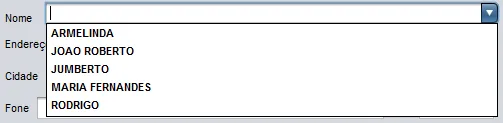
JcomboBox editável
H
1 Resposta
A
Dá uma olhada neste meu post…
Pessoal, passei muito tempo pesquisando para conseguir fazer a pesquisa dentro de um combobox…
Depois de muito tempo consegui realizar, estou contribuindo agora para quem desejar.
Sou iniciante no java, e programo com o netbeans utilizando a modalidade gráfica, então este tutorial não será nem perto de ser profissional, peço para os mais intendidos que melhorem ele por gentileza, mas o mais importante… Funciona.
Primeiro vou falar sobre o combobox, para que ele funcione utilizei um código adaptado que peguei na net, me desculpem não citar os criadores, pois fui pegando um pedaço aqui, outro ali e não salvei todos os criadores. Então a primeira parte será criar a classe que irá modificar o combobox, para isto basta criar uma classe com o nome AutoCompletion e sobrescrê-la com o código abaixo, não entendo o que acontece aqui, apenas copiei…
import java.awt.event.*;
import java.beans.PropertyChangeEvent;
import java.beans.PropertyChangeListener;
import javax.swing.*;
import javax.swing.text.*;

public class AutoCompletion extends PlainDocument {

    JComboBox comboBox;
    ComboBoxModel model;
    JTextComponent editor;
    // flag to indicate if setSelectedItem has been called
    // subsequent calls to remove/insertString should be ignored
    boolean selecting=false;
    boolean hidePopupOnFocusLoss;
    boolean hitBackspace=false;
    boolean hitBackspaceOnSelection;

    KeyListener editorKeyListener;
    FocusListener editorFocusListener;


    public AutoCompletion(final JComboBox comboBox) {
        this.comboBox = comboBox;
        model = comboBox.getModel();
        comboBox.addActionListener(new ActionListener() {
            public void actionPerformed(ActionEvent e) {
                if (!selecting) highlightCompletedText(0);
            }
        });
        comboBox.addPropertyChangeListener(new PropertyChangeListener() {
            public void propertyChange(PropertyChangeEvent e) {
                if (e.getPropertyName().equals("editor")) configureEditor((ComboBoxEditor) e.getNewValue());
                if (e.getPropertyName().equals("model")) model = (ComboBoxModel) e.getNewValue();
            }
        });
        editorKeyListener = new KeyAdapter() {
            public void keyPressed(KeyEvent e) {
                if (comboBox.isDisplayable()) comboBox.setPopupVisible(true);
                hitBackspace=false;
                switch (e.getKeyCode()) {
                    // determine if the pressed key is backspace (needed by the remove method)
                    case KeyEvent.VK_BACK_SPACE : hitBackspace=true;
                    hitBackspaceOnSelection=editor.getSelectionStart()!=editor.getSelectionEnd();
                    break;
                    // ignore delete key
                    case KeyEvent.VK_DELETE : e.consume();
                    comboBox.getToolkit().beep();
                    break;
                }
            }
        };
        // Bug 5100422 on Java 1.5: Editable JComboBox won't hide popup when tabbing out
        hidePopupOnFocusLoss=System.getProperty("java.version").startsWith("1.5");
        // Highlight whole text when gaining focus
        editorFocusListener = new FocusAdapter() {
            public void focusGained(FocusEvent e) {
                highlightCompletedText(0);
            }
            public void focusLost(FocusEvent e) {
                // Workaround for Bug 5100422 - Hide Popup on focus loss
                if (hidePopupOnFocusLoss) comboBox.setPopupVisible(false);
            }
        };
        configureEditor(comboBox.getEditor());
        // Handle initially selected object
        Object selected = comboBox.getSelectedItem();
        if (selected!=null) setText(selected.toString());
        highlightCompletedText(0);
    }

    public static void enable(JComboBox comboBox) {
        // has to be editable
        comboBox.setEditable(true);
        // change the editor's document
        new AutoCompletion(comboBox);
    }

    void configureEditor(ComboBoxEditor newEditor) {
        if (editor != null) {
            editor.removeKeyListener(editorKeyListener);
            editor.removeFocusListener(editorFocusListener);
        }

        if (newEditor != null) {
            editor = (JTextComponent) newEditor.getEditorComponent();
            editor.addKeyListener(editorKeyListener);
            editor.addFocusListener(editorFocusListener);
            editor.setDocument(this);
        }
    }

    public void remove(int offs, int len) throws BadLocationException {
        // return immediately when selecting an item
        if (selecting) return;
        if (hitBackspace) {
            // user hit backspace => move the selection backwards
            // old item keeps being selected
            if (offs>0) {
                if (hitBackspaceOnSelection) offs--;
            } else {
                // User hit backspace with the cursor positioned on the start => beep
                comboBox.getToolkit().beep(); // when available use: UIManager.getLookAndFeel().provideErrorFeedback(comboBox);
            }
            highlightCompletedText(offs);
        } else {
            super.remove(offs, len);
        }
    }

    public void insertString(int offs, String str, AttributeSet a) throws BadLocationException {
        // return immediately when selecting an item
        if (selecting) return;
        // insert the string into the document
        super.insertString(offs, str, a);
        // lookup and select a matching item
        Object item = lookupItem(getText(0, getLength()));
        if (item != null) {
            setSelectedItem(item);
        } else {
            // keep old item selected if there is no match
            item = comboBox.getSelectedItem();
            // imitate no insert (later on offs will be incremented by str.length(): selection won't move forward)
            offs = offs-str.length();
            // provide feedback to the user that his input has been received but can not be accepted
            comboBox.getToolkit().beep(); // when available use: UIManager.getLookAndFeel().provideErrorFeedback(comboBox);
        }
        setText(item.toString());
        // select the completed part
        highlightCompletedText(offs+str.length());
    }

    private void setText(String text) {
        try {
            // remove all text and insert the completed string
            super.remove(0, getLength());
            super.insertString(0, text, null);
        } catch (BadLocationException e) {
            throw new RuntimeException(e.toString());
        }
    }

    private void highlightCompletedText(int start) {
        editor.setCaretPosition(getLength());
        editor.moveCaretPosition(start);
    }

    private void setSelectedItem(Object item) {
        selecting = true;
        model.setSelectedItem(item);
        selecting = false;
    }

    private Object lookupItem(String pattern) {
        Object selectedItem = model.getSelectedItem();
        // only search for a different item if the currently selected does not match
        if (selectedItem != null && startsWithIgnoreCase(selectedItem.toString(), pattern)) {
            return selectedItem;
        } else {
            // iterate over all items
            for (int i=0, n=model.getSize(); i < n; i++) {
                Object currentItem = model.getElementAt(i);
                // current item starts with the pattern?
                if (currentItem != null && startsWithIgnoreCase(currentItem.toString(), pattern)) {
                    return currentItem;
                }
            }
        }
        // no item starts with the pattern => return null
        return null;
    }

    // checks if str1 starts with str2 - ignores case
    private boolean startsWithIgnoreCase(String str1, String str2) {
        return str1.toUpperCase().startsWith(str2.toUpperCase());
    }


}
Ok, como falei uso o modo gráfico para fazer meus simples projetos, então não vou postar códigos de geração de JFrames, até mesmo por que eu não escrevo eles, eu desenho todos,
agora iremos passar apra o nosso combobox, aqui no meu exemplo dei o nome de cmbNome ao meu combobox, vá até o seu Frame que tem o combobox, clique em código-fonte e na chamada do frame crie uma classe para carregar o seu combo box no meu exemplo o frame se chama TesteCombo e o método para carregar o combo se chama carregarNome, após carregar o combo, chame o método AutoCompletion.enable(cmbNome); isso transformará seu combo em editável e vai criar o popup para a busca, permitindo realizar a pesquisa apenas digitando no combo, uma vantagem é que carregamos o combo apenas uma vez e ele faz a pesquisa com estes dados, diferente de alguns códigos que vi que a cada letra digitada tinhamos uma nova pesquisa e um novo carregametno do combobox isso deixa o sistema lento.
public TesteCombo() {
       initComponents();
       carregarNome();


   }

   private void carregarNome(){
   //este for é para carregar meu combo substitua pelo seu
       for (Militar militar : militares) {
           cmbNome.addItem(militar.getNome());
    // o selected null é para que o combo fique limpo depois de carregado para que possamos escrever nele
           cmbNome.setSelectedItem(null);
       }
     // aqui iremos transformar o combo em editavel e com popup
       AutoCompletion.enable(cmbNome);
   }
Bem aqui está quase pronto, porém como utilizar a busca?
vá até a parte gráfica clicando em Projeto clique com o botão direito no seu combobox e escolha Eventos>Action>ActionPerformed
private void cmbNomeActionPerformed(java.awt.event.ActionEvent evt) {

   //imagine que o seu formulario tem o campo telefone do militar então ao começar a digitar no combo o nome deste militar
  // irá começar a aparecer os militares que começam com essa letra, então ao clicar no nome ou digitar enter o telefone do militar será carregado
      //este primeiro if limpará os campos do seu formulario para se no caso você estiver fazendo uma segunda pesquisa. Aqui teremos um Jtext para o telefone que nomeei de txtTelefone
        if(!txtTelefone.getText().isEmpty()||!String.valueOf(cmbNome.getSelectedItem()).isEmpty()){  //String.valueOf(cmbNome.getSelectedItem()) captura o que estiver no combobox
        txtTelefone.setText(""); //limpa o campo telefone
        }

  // aqui com este próximo if só teremos ação quando o usuário clicar em algum nome no popup, ou quando digitar enter no teclado, isso evita que o comando abaixo seja executado
// sempre quando estivermos digitando as primeiras letras ou quando estivermos apertando seta para baixo e percorrendo os valores no popup
        if(cmbNome.getActionCommand().equalsIgnoreCase("comboBoxEdited")){

    // neste próximo campo demostro um exemplo de como usar a pesquisa mas você deve substituir pelo seu


            String matricula = null; //uso a matricula dos militares como ID
            System.out.println(String.valueOf(cmbNome.getSelectedItem()));  // aqui irá mostrar o nome que está no combobox, deixei aqui só para que você possa comprovar que está funcionando
    militar = new MilitarDao().findByName(String.valueOf(cmbNome.getSelectedItem())); // aqui é um método que tenho que procura o militar pelo nome(findbyname) e o nome dele é exatamente o que está no combobox e me retorna o objeto militar com todas as variaveis inclusive o id dele q é um int e o telefone que estou usando como exemplo aqui
             txtTelefone.setText(militar.getTelefone()); // carrego o formulario com o telefone


        }else{

        }
    }
Criado 17 de abril de 2013
Ultima resposta 17 de jul. de 2015
Respostas 1
Participantes 2