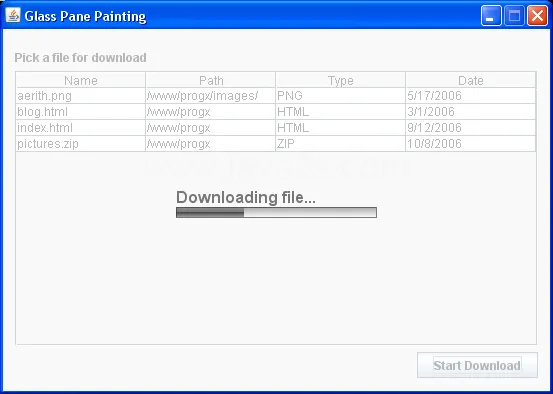
Porque naqueles exemplo que te mandei existe um que faz exatamente isso que você viu na imagem.
Essa classe faz uma simulação como se estivesse fazendo download de um arquivo, aí você precisa adaptar para o seu caso
import java.awt.AlphaComposite;
import java.awt.Color;
import java.awt.Composite;
import java.awt.Font;
import java.awt.FontMetrics;
import java.awt.GradientPaint;
import java.awt.Graphics;
import java.awt.Graphics2D;
import java.awt.LinearGradientPaint;
import java.awt.Paint;
import java.awt.Rectangle;
import java.awt.RenderingHints;
import javax.swing.JComponent;

public class TesteGlassPane extends javax.swing.JFrame {

    private ProgressGlassPane glassPane;
    private static final int MAX_DELAY = 300;

    /** Creates new form TesteGlassPane */
    public TesteGlassPane() {
        initComponents();
        setDefaultCloseOperation(javax.swing.WindowConstants.EXIT_ON_CLOSE);
        setTitle("Exemplo de GlassPane Cobrindo um JFrame");
        setResizable(false);
        setGlassPane(glassPane = new ProgressGlassPane());

        filesTable.setModel(new javax.swing.table.DefaultTableModel(
                new Object[][]{
                    {"aerith.png", "/www/progx/images/", "PNG", "5/17/2006"},
                    {"blog.html", "/www/progx", "HTML", "3/1/2006"},
                    {"index.html", "/www/progx", "HTML", "9/12/2006"},
                    {"pictures.zip", "/www/progx", "ZIP", "10/8/2006"}
                },
                new String[]{
                    "Nome",
                    "Path",
                    "Tipo",
                    "Data"
                }));

    }

    @SuppressWarnings("unchecked")
    // <editor-fold defaultstate="collapsed" desc="Generated Code">
    private void initComponents() {

        jLabel1 = new javax.swing.JLabel();
        jScrollPane1 = new javax.swing.JScrollPane();
        filesTable = new javax.swing.JTable();
        buttonDownload = new javax.swing.JButton();

        setDefaultCloseOperation(javax.swing.WindowConstants.EXIT_ON_CLOSE);

        jLabel1.setText("Pegue um arquivo para Download");

        filesTable.setModel(new javax.swing.table.DefaultTableModel(
            new Object [][] {
                {},
                {}
            },
            new String [] {

            }
        ));
        jScrollPane1.setViewportView(filesTable);

        buttonDownload.setFont(new java.awt.Font("Tahoma", 1, 11)); // NOI18N
        buttonDownload.setText("Iniciar Download");
        buttonDownload.addActionListener(new java.awt.event.ActionListener() {
            public void actionPerformed(java.awt.event.ActionEvent evt) {
                buttonDownloadActionPerformed(evt);
            }
        });

        javax.swing.GroupLayout layout = new javax.swing.GroupLayout(getContentPane());
        getContentPane().setLayout(layout);
        layout.setHorizontalGroup(
            layout.createParallelGroup(javax.swing.GroupLayout.Alignment.LEADING)
            .addGroup(layout.createSequentialGroup()
                .addContainerGap()
                .addGroup(layout.createParallelGroup(javax.swing.GroupLayout.Alignment.LEADING)
                    .addComponent(jScrollPane1, javax.swing.GroupLayout.DEFAULT_SIZE, 521, Short.MAX_VALUE)
                    .addComponent(jLabel1)
                    .addComponent(buttonDownload, javax.swing.GroupLayout.Alignment.TRAILING))
                .addContainerGap())
        );
        layout.setVerticalGroup(
            layout.createParallelGroup(javax.swing.GroupLayout.Alignment.LEADING)
            .addGroup(layout.createSequentialGroup()
                .addContainerGap()
                .addComponent(jLabel1)
                .addPreferredGap(javax.swing.LayoutStyle.ComponentPlacement.RELATED)
                .addComponent(jScrollPane1, javax.swing.GroupLayout.PREFERRED_SIZE, 184, javax.swing.GroupLayout.PREFERRED_SIZE)
                .addPreferredGap(javax.swing.LayoutStyle.ComponentPlacement.UNRELATED)
                .addComponent(buttonDownload)
                .addContainerGap(javax.swing.GroupLayout.DEFAULT_SIZE, Short.MAX_VALUE))
        );

        pack();
    }// </editor-fold>

    private void buttonDownloadActionPerformed(java.awt.event.ActionEvent evt) {
        getGlassPane().setVisible(true);
        startDownloadThread();
    }
    private void startDownloadThread() {
        Thread downloader = new Thread(new Runnable() {

            @Override
            public void run() {
                int i = 0;
                do {
                    try {
                        Thread.sleep(30 + (int) (Math.random() * MAX_DELAY));
                    } catch (InterruptedException ex) {
                        // who cares here?
                    }
                    i += (int) (Math.random() * 5);
                    glassPane.setProgress(i);
                } while (i < 100);
                glassPane.setVisible(false);
                glassPane.setProgress(0);
            }
        });
        downloader.start();
    }

    /**
     * @param args the command line arguments
     */
    public static void main(String args[]) {
        java.awt.EventQueue.invokeLater(new Runnable() {

            @Override
            public void run() {
                new TesteGlassPane().setVisible(true);
            }
        });
    }
    // Variables declaration - do not modify
    private javax.swing.JButton buttonDownload;
    private javax.swing.JTable filesTable;
    private javax.swing.JLabel jLabel1;
    private javax.swing.JScrollPane jScrollPane1;
    // End of variables declaration
}

class ProgressGlassPane extends JComponent {

    private static final int BAR_WIDTH = 200;
    private static final int BAR_HEIGHT = 10;
    private static final Color TEXT_COLOR = new Color(0x333333);
    private static final Color BORDER_COLOR = new Color(0x333333);
    private static final float[] GRADIENT_FRACTIONS = new float[]{
        0.0f, 0.499f, 0.5f, 1.0f
    };
    private static final Color[] GRADIENT_COLORS = new Color[]{
        Color.GRAY, Color.DARK_GRAY, Color.BLACK, Color.GRAY
    };
    private static final Color GRADIENT_COLOR2 = Color.WHITE;
    private static final Color GRADIENT_COLOR1 = Color.GRAY;
    private String message = "Fazendo download...";
    private int progress = 0;

    public ProgressGlassPane() {
        setBackground(Color.WHITE);
        setFont(new Font("Default", Font.BOLD, 13));
    }

    public int getProgress() {
        return progress;
    }

    public void setProgress(int progress) {
        int oldProgress = this.progress;
        this.progress = progress;

        // computes the damaged area
        FontMetrics metrics = getGraphics().getFontMetrics(getFont());
        int w = (int) (BAR_WIDTH * ((float) oldProgress / 100.0f));
        int x = w + (getWidth() - BAR_WIDTH) / 2;
        int y = (getHeight() - BAR_HEIGHT) / 2;
        y += metrics.getDescent() / 2;

        w = (int) (BAR_WIDTH * ((float) progress / 100.0f)) - w;
        int h = BAR_HEIGHT;

        repaint(x, y, w, h);
    }

    @Override
    protected void paintComponent(Graphics g) {
        // enables anti-aliasing
        Graphics2D g2 = (Graphics2D) g;
        g2.setRenderingHint(RenderingHints.KEY_ANTIALIASING, RenderingHints.VALUE_ANTIALIAS_ON);

        // gets the current clipping area
        Rectangle clip = g.getClipBounds();

        // sets a 65% translucent composite
        AlphaComposite alpha = AlphaComposite.SrcOver.derive(0.65f);
        Composite composite = g2.getComposite();
        g2.setComposite(alpha);

        // fills the background
        g2.setColor(getBackground());
        g2.fillRect(clip.x, clip.y, clip.width, clip.height);

        // centers the progress bar on screen
        FontMetrics metrics = g.getFontMetrics();
        int x = (getWidth() - BAR_WIDTH) / 2;
        int y = (getHeight() - BAR_HEIGHT - metrics.getDescent()) / 2;

        // draws the text
        g2.setColor(TEXT_COLOR);
        g2.drawString(message, x, y);

        // goes to the position of the progress bar
        y += metrics.getDescent();

        // computes the size of the progress indicator
        int w = (int) (BAR_WIDTH * ((float) progress / 100.0f));
        int h = BAR_HEIGHT;

        // draws the content of the progress bar
        Paint paint = g2.getPaint();

        // bars background
        Paint gradient = new GradientPaint(x, y, GRADIENT_COLOR1, x, y + h, GRADIENT_COLOR2);
        g2.setPaint(gradient);
        g2.fillRect(x, y, BAR_WIDTH, BAR_HEIGHT);

        // actual progress
        gradient = new LinearGradientPaint(x, y, x, y + h, GRADIENT_FRACTIONS, GRADIENT_COLORS);
        g2.setPaint(gradient);
        g2.fillRect(x, y, w, h);

        g2.setPaint(paint);

        // draws the progress bar border
        g2.drawRect(x, y, BAR_WIDTH, BAR_HEIGHT);

        g2.setComposite(composite);
    }
}