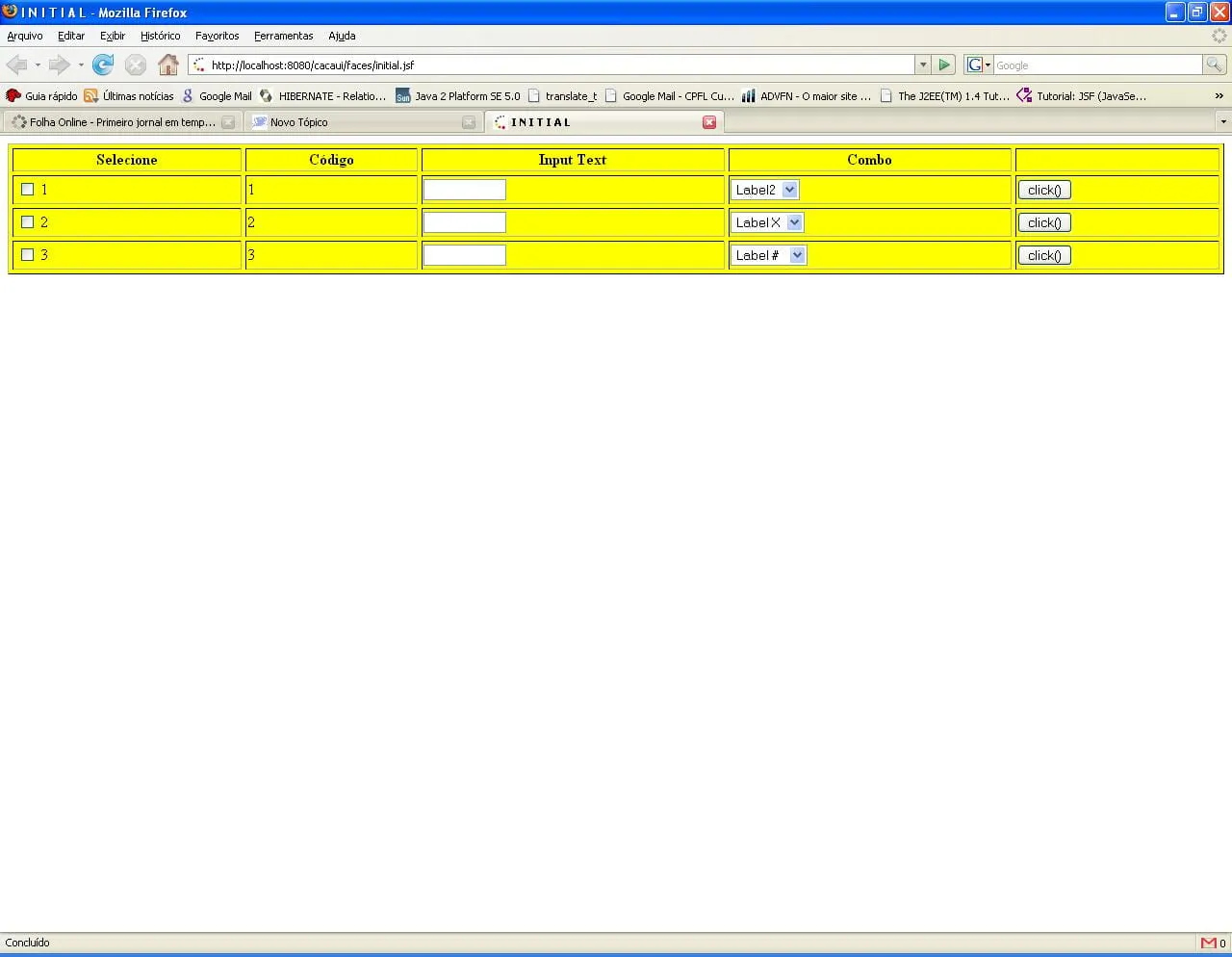
Seguinte Pessoal, tenho uma tela de teste usando JSF, conforme imagem em anexo, como é que eu faço para poder salvar os dados inputados pelo usuário?
Obviamente, esses dados vão ter que se transformar numa classe Java, mas como?
Vou colocar o código das minhas entidades, Backing Beans e JSP para entenderem como eu populei os objetos:
public class ManagedBean {
	private List<EntidadeFinal> entidades;
	private List<SelectItem> manyCheckBox;

	/**
	 * @return the manyCheckBox
	 */
	public List<SelectItem> getManyCheckBox() {
		return manyCheckBox;
	}

	/**
	 * @param manyCheckBox the manyCheckBox to set
	 */
	public void setManyCheckBox(List<SelectItem> manyCheckBox) {
		this.manyCheckBox = manyCheckBox;
	}

	/**
	 * @return the entidades
	 */
	public List<EntidadeFinal> getEntidades() {
		if(entidades==null)
			loadEntidades();

		return entidades;
	}

	/**
	 * @param entidades the entidades to set
	 */
	public void setEntidades(List<EntidadeFinal> entidades) {
		this.entidades = entidades;
	}

	private void loadEntidades() {
		this.entidades = new ArrayList<EntidadeFinal>();
		this.manyCheckBox = new ArrayList<SelectItem>();

		Map<String, Integer> valores = new HashMap<String, Integer>();

		valores.put("Label1 ", 1001);
		valores.put("Label2 ", 1002);
		valores.put("Label3 ", 1003);

		Map<String, Integer> valores2 = new HashMap<String, Integer>();

		valores2.put("Label X ", 1004);
		valores2.put("Label Y ", 1005);
		valores2.put("Label Z ", 1006);


		Map<String, Integer> valores3 = new HashMap<String, Integer>();

		valores3.put("Label $ ", 1007);
		valores3.put("Label # ", 1008);
		valores3.put("Label % ", 1009);

		//---------------------------------------------------------------//


		//---------------------------------------------------------------//
		EntidadeFinal entidadeFinal1 = new EntidadeFinal();
		EntidadeFinal entidadeFinal2 = new EntidadeFinal();
		EntidadeFinal entidadeFinal3 = new EntidadeFinal();

		entidadeFinal1.setIdEntidade(1);
		entidadeFinal2.setIdEntidade(2);
		entidadeFinal3.setIdEntidade(3);

		entidadeFinal1.setCombo(valores);
		entidadeFinal2.setCombo(valores2);
		entidadeFinal3.setCombo(valores3);

		List<SelectItem> si1 = new ArrayList<SelectItem>();
		si1.add(new SelectItem(entidadeFinal1.getIdEntidade().toString()));

		List<SelectItem> si2 = new ArrayList<SelectItem>();
		si2.add(new SelectItem(entidadeFinal2.getIdEntidade().toString()));

		List<SelectItem> si3 = new ArrayList<SelectItem>();
		si3.add(new SelectItem(entidadeFinal3.getIdEntidade().toString()));

		entidadeFinal1.setManyCheckBox2(si1);
		entidadeFinal2.setManyCheckBox2(si2);
		entidadeFinal3.setManyCheckBox2(si3);

		this.entidades.add(entidadeFinal1);
		this.entidades.add(entidadeFinal2);
		this.entidades.add(entidadeFinal3);
	}
}
import java.io.Serializable;
import java.util.List;
import java.util.Map;

import javax.faces.model.SelectItem;

 */
public final class EntidadeFinal implements Serializable {

	private static final long serialVersionUID = 8933157284996517153L;

	private Integer idEntidade;
	private List<String> inputText1;
	private String inputText2;
	private List<String> manyCheckBox1;
	private List<SelectItem> manyCheckBox2;
	private Map<String, Integer> combo;
	private String valueCombo;

	/**
	 * @return the valueCombo
	 */
	public String getValueCombo() {
		return valueCombo;
	}

	/**
	 * @param valueCombo the valueCombo to set
	 */
	public void setValueCombo(String valueCombo) {
		this.valueCombo = valueCombo;
	}

	/**
	 * @return the combo
	 */
	public Map<String, Integer> getCombo() {
		return combo;
	}

	/**
	 * @param combo the combo to set
	 */
	public void setCombo(Map<String, Integer> combo) {
		this.combo = combo;
	}

	/**
	 * @return the manyCheckBox
	 */
	public List<String> getManyCheckBox1() {
		return manyCheckBox1;
	}

	/**
	 * @param manyCheckBox the manyCheckBox to set
	 */
	public void setManyCheckBox1(List<String> manyCheckBox1) {
		this.manyCheckBox1 = manyCheckBox1;
	}

	/**
	 * @return the manyCheckBox2
	 */
	public List<SelectItem> getManyCheckBox2() {
		return manyCheckBox2;
	}

	/**
	 * @param manyCheckBox2 the manyCheckBox2 to set
	 */
	public void setManyCheckBox2(List<SelectItem> manyCheckBox2) {
		this.manyCheckBox2 = manyCheckBox2;
	}

	/**
	 * @return the inputText2
	 */
	public String getInputText2() {
		return inputText2;
	}

	/**
	 * @param inputText2 the inputText2 to set
	 */
	public void setInputText2(String inputText2) {
		this.inputText2 = inputText2;
	}

	public EntidadeFinal() {
	}

	/**
	 * @return the idEntidade
	 */
	public Integer getIdEntidade() {
		return idEntidade;
	}

	/**
	 * @param idEntidade the idEntidade to set
	 */
	public void setIdEntidade(Integer idEntidade) {
		this.idEntidade = idEntidade;
	}

	/**
	 * @return the inputText1
	 */
	public List<String> getInputText1() {
		return inputText1;
	}

	/**
	 * @param inputText1 the inputText1 to set
	 */
	public void setInputText1(List<String> inputText1) {
		this.inputText1 = inputText1;
	}

}
<f:view>
	<h:form id="form1">
		<t:saveState value="#{managedBean.entidades}" />
		<h:dataTable border="1" bgcolor="yellow" cellspacing="4" var="entitys" width="100%" value="#{managedBean.entidades}">
			<h:column>
				<f:facet name="header">
					<f:verbatim>Selecione</f:verbatim>
				</f:facet>
				<h:selectManyCheckbox id="manyCheckBox1" value="#{entitys.manyCheckBox1}">
					<f:selectItems value="#{entitys.manyCheckBox2}"/>
				</h:selectManyCheckbox>
				<f:attribute value="center" name="align" />
			</h:column>
			<h:column>
				<f:facet name="header">
					<f:verbatim><h:outputText>Código</h:outputText></f:verbatim>
				</f:facet>
				<h:outputText value="#{entitys.idEntidade}" />
				<f:attribute value="center" name="align" />
			</h:column>
			<h:column>
				<f:facet name="header">
					<f:verbatim><h:outputText>Input Text</h:outputText></f:verbatim>
				</f:facet>
				<h:inputText id="inputText1" value="#{entitys.inputText2}" size="10" maxlength="3" />
				<f:attribute value="center" name="align" />
			</h:column>
			<h:column>
				<f:facet name="header">
					<f:verbatim>Combo</f:verbatim>
				</f:facet>
				<h:selectOneMenu id="comboBox" value="#{entitys.valueCombo}">
					<f:selectItems value="#{entitys.combo}" />
				</h:selectOneMenu>
				<f:attribute value="center" name="align" />
			</h:column>
			<h:column>
				<f:facet name="header">
					<f:verbatim> </f:verbatim>
				</f:facet>
				<h:commandButton value="click()" action="#{managedBean.testarCheck}">
				</h:commandButton>
				<f:attribute value="center" name="align" />
			</h:column>
		</h:dataTable>
	<h:messages globalOnly="false"></h:messages>
	</h:form>
</f:view>