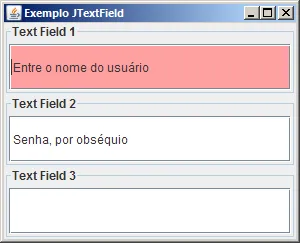
Boa tarde amigos programadores.
Estou com uma dúvida cruel queria saber se é possível em java passar uma mensagem dentro de jPasswordField e exibi-la como se fosse um jTextField, por exemplo, eu tenho uma tela onde o usuário têm que digitar a senha e eu estou usando aquele campo formatado jPasswordField até aí tranquilo agora o que eu quero fazer nesse campo é mostrar a mensagem “Digite sua senha”, ou seja, em vez de usar jLabel eu quero escrever dentro do campo onde o usuário vai digitar.
Então eu fiz :
campoSenha.setText("Digite sua senha...");Só que ele exibe o texto no formato pontilhado do jPasswordField.
Então eu faço a pergunta é possível configurar um campo de senha dessa forma, se for de que jeito?
packageguj;importjava.awt.*;importjava.awt.event.*;importjavax.swing.*;importjavax.swing.border.*;importjavax.swing.event.*;importjavax.swing.text.*;/** * The TextPrompt class will display a prompt over top of a text component when the Document of the text field is empty. * The Show property is used to determine the visibility of the prompt. * * The Font and foreground Color of the prompt will default to those properties of the parent text component. You are * free to change the properties after class construction. */publicclassTextPromptextendsJLabelimplementsFocusListener,DocumentListener{publicenumShow{ALWAYS,FOCUS_GAINED,FOCUS_LOST;}privateJTextComponentcomponent;privateDocumentdocument;privateShowshow;privatebooleanshowPromptOnce;privateintfocusLost;publicTextPrompt(Stringtext,JTextComponentcomponent){this(text,component,Show.ALWAYS);}publicTextPrompt(Stringtext,JTextComponentcomponent,Showshow){this.component=component;setShow(show);document=component.getDocument();setText(text);setFont(component.getFont());setForeground(component.getForeground());setBorder(newEmptyBorder(component.getInsets()));setHorizontalAlignment(JLabel.LEADING);component.addFocusListener(this);document.addDocumentListener(this);component.setLayout(newBorderLayout());component.add(this);checkForPrompt();}/** * Convenience method to change the alpha value of the current foreground Color to the specifice value. * * @param alpha value in the range of 0 - 1.0. */publicvoidchangeAlpha(floatalpha){changeAlpha((int)(alpha*255));}/** * Convenience method to change the alpha value of the current foreground Color to the specifice value. * * @param alpha value in the range of 0 - 255. */publicvoidchangeAlpha(intalpha){alpha=alpha>255?255:alpha<0?0:alpha;Colorforeground=getForeground();intred=foreground.getRed();intgreen=foreground.getGreen();intblue=foreground.getBlue();ColorwithAlpha=newColor(red,green,blue,alpha);super.setForeground(withAlpha);}/** * Convenience method to change the style of the current Font. The style values are found in the Font class. Common * values might be: Font.BOLD, Font.ITALIC and Font.BOLD + Font.ITALIC. * * @param style value representing the the new style of the Font. */publicvoidchangeStyle(intstyle){setFont(getFont().deriveFont(style));}/** * Get the Show property * * @return the Show property. */publicShowgetShow(){returnshow;}/** * Set the prompt Show property to control when the promt is shown. Valid values are: * * Show.AWLAYS (default) - always show the prompt Show.Focus_GAINED - show the prompt when the component gains focus * (and hide the prompt when focus is lost) Show.Focus_LOST - show the prompt when the component loses focus (and * hide the prompt when focus is gained) * * @param show a valid Show enum */publicvoidsetShow(Showshow){this.show=show;}/** * Get the showPromptOnce property * * @return the showPromptOnce property. */publicbooleangetShowPromptOnce(){returnshowPromptOnce;}/** * Show the prompt once. Once the component has gained/lost focus once, the prompt will not be shown again. * * @param showPromptOnce when true the prompt will only be shown once, otherwise it will be shown repeatedly. */publicvoidsetShowPromptOnce(booleanshowPromptOnce){this.showPromptOnce=showPromptOnce;}/** * Check whether the prompt should be visible or not. The visibility will change on updates to the Document and on * focus changes. */privatevoidcheckForPrompt(){// Text has been entered, remove the promptif(document.getLength()>0){setVisible(false);return;}// Prompt has already been shown once, remove itif(showPromptOnce&&focusLost>0){setVisible(false);return;}// Check the Show property and component focus to determine if the// prompt should be displayed.if(component.hasFocus()){if(show==Show.ALWAYS||show==Show.FOCUS_GAINED)setVisible(true);elsesetVisible(false);}else{if(show==Show.ALWAYS||show==Show.FOCUS_LOST)setVisible(true);elsesetVisible(false);}}// Implement FocusListenerpublicvoidfocusGained(FocusEvente){checkForPrompt();}publicvoidfocusLost(FocusEvente){focusLost++;checkForPrompt();}// Implement DocumentListenerpublicvoidinsertUpdate(DocumentEvente){checkForPrompt();}publicvoidremoveUpdate(DocumentEvente){checkForPrompt();}publicvoidchangedUpdate(DocumentEvente){}}
Um exemplo do uso dessa classe:
packageguj;importjava.awt.BorderLayout;publicclassTesteJTextFieldextendsJFrame{privatestaticfinallongserialVersionUID=1L;privateJPaneljContentPane=null;privateJPanelpnlTextField1=null;privateJPanelpnlTextField2=null;privateJPanelpnlTextField3=null;privateJTextFieldtxtField1=null;privateJPasswordFieldpwField=null;privateJTextFieldtxtField3=null;/** * This method initializes pnlTextField1 * * @return javax.swing.JPanel */privateJPanelgetPnlTextField1(){if(pnlTextField1==null){pnlTextField1=newJPanel();pnlTextField1.setLayout(newBorderLayout());pnlTextField1.setBorder(BorderFactory.createTitledBorder("Text Field 1"));pnlTextField1.add(getTxtField1(),BorderLayout.CENTER);}returnpnlTextField1;}/** * This method initializes pnlTextField2 * * @return javax.swing.JPanel */privateJPanelgetPnlTextField2(){if(pnlTextField2==null){pnlTextField2=newJPanel();pnlTextField2.setLayout(newBorderLayout());pnlTextField2.add(getTxtField2(),BorderLayout.CENTER);pnlTextField2.setBorder(BorderFactory.createTitledBorder("Text Field 2"));}returnpnlTextField2;}/** * This method initializes pnlTextField3 * * @return javax.swing.JPanel */privateJPanelgetPnlTextField3(){if(pnlTextField3==null){pnlTextField3=newJPanel();pnlTextField3.setLayout(newBorderLayout());pnlTextField3.add(getTxtField3(),BorderLayout.CENTER);pnlTextField3.setBorder(BorderFactory.createTitledBorder("Text Field 3"));}returnpnlTextField3;}/** * This method initializes txtField1 * * @return javax.swing.JTextField */privateJTextFieldgetTxtField1(){if(txtField1==null){txtField1=newMeuJTextField();TextPrompttp1=newTextPrompt("Entre o nome do usuário",txtField1);}returntxtField1;}/** * This method initializes pwField * * @return javax.swing.JPasswordField */privateJPasswordFieldgetTxtField2(){if(pwField==null){pwField=newJPasswordField();TextPrompttp2=newTextPrompt("Senha, por obséquio",pwField);}returnpwField;}/** * This method initializes txtField3 * * @return javax.swing.JTextField */privateJTextFieldgetTxtField3(){if(txtField3==null){txtField3=newMeuJTextField();}returntxtField3;}/** * @param args */publicstaticvoidmain(String[]args){// TODO Auto-generated method stubSwingUtilities.invokeLater(newRunnable(){publicvoidrun(){TesteJTextFieldthisClass=newTesteJTextField();thisClass.setDefaultCloseOperation(JFrame.EXIT_ON_CLOSE);thisClass.setVisible(true);}});}/** * This is the default constructor */publicTesteJTextField(){super();initialize();}/** * This method initializes this * * @return void */privatevoidinitialize(){this.setSize(300,243);this.setContentPane(getJContentPane());this.setTitle("Exemplo JTextField");}/** * This method initializes jContentPane * * @return javax.swing.JPanel */privateJPanelgetJContentPane(){if(jContentPane==null){jContentPane=newJPanel();jContentPane.setLayout(newBoxLayout(getJContentPane(),BoxLayout.Y_AXIS));jContentPane.add(getPnlTextField1(),null);jContentPane.add(getPnlTextField2(),null);jContentPane.add(getPnlTextField3(),null);}returnjContentPane;}}
Onimatsu
Obrigado pelo exemplo, mas sou iniciante e não entendi direito como aplicar tudo nesse meio tempo tentei separar o que eu posso utilizar, por exemplo, fiz uma janela em pelo netBeans com jPassordField chamado campoSenha no evento focusLost conforme o código.
Daí surge mais uma dúvida como eu recupero o valor para o campoSenha?
     private void campoSenhaFocusLost(java.awt.event.FocusEvent evt) {
        if (campoSenha.getText().equals("")) {
            TextPrompt tp1 = new TextPrompt("Digite a senha...", campoSenha);
            tp1.setShow(TextPrompt.Show.FOCUS_LOST);
            // como retornar a jPassword ?
        }
    }
E
entanglement
TextPrompt não deve ser usado para pegar a senha. Ele deve ser usado APENAS na hora de criar o seu JPasswordField, porque ele só dá esse “efeito visual” no JPasswordField.
Não é para pôr no FocusLost.
Leia o meu programa com mais atenção.
Seu JPasswordField continua funcionando do mesmo jeito (ou seja, para pegar a senha, use new String (seuJPasswordField.getPassword()) )