Eis exemplos simples de tela:

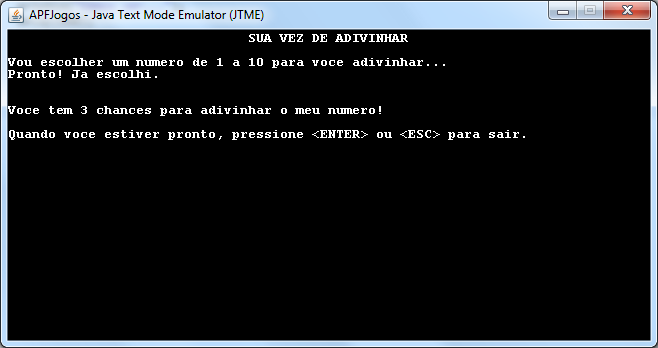
São instruções simples como:

Jtme.print(“Texto”);

Jtme.println(“Outro texto”);

Jtme.clrScr();

Jtme.gotoXY(5,10);

Jtme.typeText(“Digite algo:”);
E eis o código para ficar mais fácil para vocês.
/**
    * APFJogos - Java Text Mode Emulator (JTME)
    *   versão:1.0
    *   data da última revisão: 10/03/2013
    *   por: Carlos A. Correia
    *
    * A classe <code>Jtme</code> emula o Modo Texto com diversas funcionalidades.
    * Ela pode ser instanciada, estendida, ou simplesmente indicar o uso da classe
    * como estática. Veja exemplo de como imprimir um texto:
    *
    * Jtme.print("texto");
    *
    * ou se sua classe estender (extends) Jtm, então bastaria usar a instrução diretamente:
    *
    * print("texto");
    *
    *
    * <p> As principais funções são:
    * 	clrScr(); clrEol();
    * 	print(String); println(String);
    * 	isKeyPressed(); readKey(); typeText();
    *
    * Esta classe foi concebida para ser usada na Coleção Aprenda a Programar Fazendo Jogos
    *
    * Modifique-a ao seu gosto, e cite a fonte de uso.
    *
    * @author  Carlos Augusto Correia
    *
**/

import java.awt.Color;
import java.awt.Dimension;
import java.awt.Font;
import java.awt.FontMetrics;
import java.awt.Graphics;
import java.awt.KeyEventDispatcher;
import java.awt.KeyboardFocusManager;
import java.awt.event.ActionEvent;
import java.awt.event.ActionListener;
import java.awt.event.KeyEvent;

import javax.swing.JComponent;
import javax.swing.JFrame;
import javax.swing.Timer;


public class Jtme extends JComponent implements KeyEventDispatcher, ActionListener {

	private static JFrame f;

	private static int qtdColunas = 80;
	private static int qtdLinhas = 25;
	private static int fontSize = 13;
	private static Font fonte = new Font("monospaced", Font.BOLD, fontSize);
	private static int charWidth;
	private static int charHeight;
	private static int width;
	private static int height;
	private static Color backgroundColor = Color.BLACK;
	private static Color textColor = Color.WHITE;

	private static char[][] conteudo = new char[qtdLinhas][qtdColunas];
	private static int cursorX = 1;
	private static int cursorY = 1;
	private static boolean cursorOn = true;  // indica se cursor aparece ou não na tela
	private static boolean cursorInsert = true;  // indica se cursor está no modo de 'insert'
	private static boolean cursorTypingText = false;  // indica se cursor está no modo de edição
	private static boolean cursorXORMode = true;  // indica se cursor deve imprimir no modo XORMode ou PaintMode
	private static int cursorTicks = 500;  // tempo em ms para o cursor piscar (blink)
	private static boolean isKeyPressed = false;
	private static char keyPressed = Character.UNASSIGNED;
	private static int codeKeyPressed = -1;


	/**  método de inicialização da janela  **/

	public static void init() {
		f = new JFrame();
		f.setTitle("APFJogos - Java Text Mode Emulator (JTME)");

		f.setContentPane(new Jtme());
		resetColors();
		f.setFont(fonte);
		f.getContentPane().setBackground(backgroundColor);
		f.getContentPane().setFont(fonte);
		KeyboardFocusManager manager = KeyboardFocusManager.getCurrentKeyboardFocusManager();
		manager.addKeyEventDispatcher((KeyEventDispatcher) f.getContentPane());

		FontMetrics fonteM = f.getFontMetrics(f.getFont());
		int ascent = fonteM.getMaxAscent();
		int descent = fonteM.getMaxDescent();
		int advance = fonteM.getMaxAdvance(); // ou talvez fonteM.getWidths()[65]
		charWidth = advance;
		charHeight = descent + ascent;

		charWidth = 8;      // o correto seria achar os valores de acordo com font e size
		charHeight = 12;

		height = charHeight * qtdLinhas;
		width = charWidth * (qtdColunas-1);

		f.getContentPane().setPreferredSize(new Dimension(width,height));
		f.pack();  // acrescenta 40 pixels na altura e 16 pixels das bordas

		f.setLocationRelativeTo(null);
		f.setResizable(false);
		f.setDefaultCloseOperation(JFrame.EXIT_ON_CLOSE);
		f.setVisible(true);

		clrScr();

		System.out.println("ascent=" + ascent + ", descent= " + descent
				+ ", advance=" + advance + ". width=" + width + ", height="
				+ height);

	}

	/**  métodos referentes a janela Swing: paint(), eventos de Timer, e eventos de KeyListener() **/

	public void paint(Graphics g) {
		for (int linha = 0; linha < qtdLinhas; linha++) {
			String s = new String(conteudo[linha]);
			g.setPaintMode();
			g.drawString(s, 0, linha * charHeight + charHeight);
		}
		if (cursorOn) {
			if (cursorXORMode) {
				g.setXORMode(Color.BLACK);
				if (cursorInsert) {
					g.fillRect(cursorX * charWidth - charWidth, cursorY * charHeight, charWidth, 3);
				} else {
					g.fillRect(cursorX * charWidth - charWidth, cursorY * charHeight-charHeight+3, charWidth, charHeight);
				}
			}
		}
	}

	@Override
	public void actionPerformed(ActionEvent arg0) {
		if (cursorTypingText) {
			cursorXORMode = !cursorXORMode;
			f.repaint();
		}
	}

	@Override
	public boolean dispatchKeyEvent(KeyEvent e) {
		if (e.getID() == KeyEvent.KEY_PRESSED) {
			keyPressed(e);
		} else if (e.getID() == KeyEvent.KEY_RELEASED) {
			keyReleased(e);
		} else if (e.getID() == KeyEvent.KEY_TYPED) {
			keyTyped(e);
		}
		return false;
	}

	public void keyPressed(KeyEvent e) {
		keyPressed = e.getKeyChar();
		codeKeyPressed = e.getKeyCode();
		isKeyPressed = true;
	}

	public void keyTyped(KeyEvent e) {
		isKeyPressed = true;
	}

	public void keyReleased(KeyEvent e) {
		setKeyReleased();
	}

	public static void setKeyReleased() {
		isKeyPressed = false;
		keyPressed = Character.UNASSIGNED;//'\u0000';
		codeKeyPressed = -1;
	}

	/**  métodos referente ao cursor de impressão  **/

	public static void gotoXY(int x, int y) {
		if (f==null) init();
		if ((x < 1) || (x > qtdColunas)) {
			x = 1;
			y = 1;
		}
		if ((y < 1) || (y > qtdLinhas)) {
			x = 1;
			y = 1;
		}
		cursorX = x;
		cursorY = y;
		f.repaint();
	}

	public static void cursorOn() {
		if (f==null) init();
		cursorOn = true;
		f.repaint();
	}

	public static void cursorOff() {
		if (f==null) init();
		cursorOn = false;
		f.repaint();
	}

	public static void setCursorMode(boolean b) {
		if (f==null) init();
		cursorOn = b;
		f.repaint();
	}

	public static boolean getCursorMode() {
		return cursorOn;
	}

	public static int getCursorX() {
		return cursorX;
	}

	public static int getCursorY() {
		return cursorY;
	}

	/**  métodos referente a tela: clrScr (apagar a tela toda)   **/

	public static void clrScr() {
		if (f==null) init();
		for (int linha = 0; linha < qtdLinhas; linha++) {
			for (int coluna = 0; coluna < qtdColunas; coluna++) {
				conteudo[linha][coluna] = ' ';
			}
		}
		gotoXY(1, 1);
	}

	public static void clrEol() {
		if (f==null) init();
		int linha = getCursorY();
		for (int coluna = getCursorX(); coluna < qtdColunas; coluna++) {
				conteudo[linha][coluna] = ' ';
		}
		f.repaint();
	}

	private static void InsertLineUp(int linha) {
		for (int i = 1; i < linha; i++) {
			for (int j = 0; j < qtdColunas; j++) {
				conteudo[i - 1][j] = conteudo[i][j];
			}
		}
		for (int j = 0; j < qtdColunas; j++)
			conteudo[linha - 1][j] = ' ';
	}

	private static void carriageReturnLineFeed() {
		cursorX = 1;
		cursorY++;
		if (cursorY > qtdLinhas) {
			InsertLineUp(qtdLinhas);
			cursorY = qtdLinhas;
		}
	}

	/**  métodos de mudança de cores da tela   **/

	public static void resetColors(){
		f.setBackground(backgroundColor);
		f.setForeground(textColor);
	}

	public static void setBackGroundColor(Color backgroundColor){
		f.setBackground(backgroundColor);
	}

	public static void setTextColor(Color textColor){
		f.setForeground(textColor);
	}

	/**  métodos de impressão na tela   **/

	public static void print() {
		if (f==null) init();
		f.repaint();
	}

	public static void print(String s) {
		if (f==null) init();
		for (int i = 0; i < s.length(); i++) {
			conteudo[cursorY - 1][cursorX - 1] = s.charAt(i);
			cursorX++;
			if (cursorX > qtdColunas) {
				carriageReturnLineFeed();
			}
		}
		print();
	}

	public static void print(Object... args) {
		String s = new String();
		for (int i = 0; i < args.length; i++) {
			s = s + args[i].toString();
		}
		print(s);
	}

	public static void println() {
		print();
		carriageReturnLineFeed();
	}

	public static void println(String s) {
		print(s);
		carriageReturnLineFeed();
		f.repaint();
	}

	public static void println(Object... args) {
		print(args);
		carriageReturnLineFeed();
		f.repaint();
	}

	/**  método de temporização  **/

	public static void delay(int milliseconds) {
		try {
			Thread.sleep(milliseconds);

		} catch (Exception e) {
			e.printStackTrace();
		}
	}

	/**  métodos referentes a leitura do teclado  **/

	public static boolean isKeyPressed() {
		if (f==null) init();
		delay(0);
		return isKeyPressed;
	}

	public static char readKey() {
		while (!isKeyPressed());
			delay(1); // *necessário para funcionar em computadores mais rápidos!
		isKeyPressed=false;  // *necessário para pegar apenas uma tecla por vez!
		return keyPressed;
	}

	public static String typeText() {
		char c;
		StringBuffer s = new StringBuffer("");
		int xCursorInicial = cursorX;
		int yCursorInicial = cursorY;
		int indexString = 0;
		int xCursor = xCursorInicial;
		int yCursor = yCursorInicial;
		boolean cursorMode = getCursorMode();  // para voltar ao estado inicial do cursor
		cursorXORMode = true;   // para começar com o cursor impresso na tela
		cursorOn();           // e forçar edição de texto com cursor piscando na tela
		cursorTypingText=true; 		  // indica que o cursor pisca no modo de edição

		Timer timer = new Timer(cursorTicks, (ActionListener) f.getContentPane());
		timer.start();

		do {
			setKeyReleased(); // para zerar o buffer da tecla impedindo de acrescentar vários caracteres
			c = readKey();
			if (s.length() < 256) {      // texto máximo de 256 caracteres
				if (((int) c >= 32) && ((int) c <= 126)) {
					if (cursorInsert||(indexString==s.length()))  // acrescentar um caractere
						s.insert(indexString, c);
					else s.setCharAt(indexString, c);				// substituir um caractere (<insert>=off)
					indexString++;
				}
			}
			switch (codeKeyPressed) {
				case 37:								// <VK_LEFT>
					indexString--;
					break;
				case 39:								// <VK_RIGHT>
					indexString++;
					break;
				case 8:									// <VK_BACKSPACE>
					if (indexString>0){
						s.deleteCharAt(indexString - 1);
						indexString--;
					}
					break;
				case 127:								// <VK_DEL>
					if (indexString < s.length())
						s.deleteCharAt(indexString);
					break;
				case 36:								// <VK_HOME>
					indexString = 0;
					break;
				case 35:								// <VK_END>
					indexString = s.length();
					break;
				case 155:								// <VK_INSERT>
					cursorInsert = !cursorInsert;
					break;
			}
			if (indexString < 0)
				indexString = 0;
			if (indexString > s.length())
				indexString = s.length();
			gotoXY(xCursorInicial, yCursorInicial);
			print(s);
			if (((int) c == 8) || ((int) c == 127))    // imprimir um caracter em branco no final da
				print(" ");                            // string, caso algum caractere tenha sido deletado
			xCursor = 1 + (indexString + xCursorInicial - 1) % (qtdColunas);   // calcula posição do cursor em função de indexString
			yCursor = yCursorInicial + (indexString + xCursorInicial - 1) / (qtdColunas);
			if (yCursor > 25) {                        // quando o cursor ultrapassar a última linha
				yCursorInicial--;
				yCursor--;
			}
			//cursorEditing=false; // para permanecer o cursor ativo quando movê-lo ou se inserir um caractere
			cursorXORMode=true;  // para permanecer o cursor ativo quando movê-lo ou se inserir um caractere
			timer.restart();
			gotoXY(xCursor, yCursor);
		} while ((int) c != 10);
		timer.stop();
		setCursorMode(cursorMode);	// volta ao estado inicial do cursor
		cursorTypingText = false;	// indica que não está no modo de digitação
		cursorXORMode = true;		// indica que o cursor não pisca fora do modo de edição
		cursorInsert = true;		// sai do modo de edição forçando <insert>=On
		return s.toString();
	}


	public static String typeTextln() {
		String texto = typeText();
		carriageReturnLineFeed();
		return texto;
	}

	public static String typeText(Object... args) {
		print(args);
		return typeText();
	}

	public static String typeTextln(Object... args) {
		print(args);
		String texto = typeText();
		carriageReturnLineFeed();
		return texto;
	}

}
Ainda não considero o código acima como final. Há muita coisa para acrescentar e principalmente MELHORAR!!! Vejo principalmente a necessidade de:
- corrigir a velocidade do delay() que, para pequenos valores, há uma grande oscilação de tempo, considerando a mesma máquina e mesmo SO;
- velocidade da digitação: fui obrigado a colocar um delay() pois há uma diferença em computadores lentos e rápidos;
- precisei fixar o valor da janela, mas queria colocar como função da fonte, mas não consegui fazer e ainda não tive tempo de avançar nisso;
Há outras funcionalidades a serem acrescentadas (a imaginação é fértil!), mas a prioridade foi terminar tais funções para que eu pudesse usar na APFJogos - Aprenda a Programar Fazendo Jogos!!!
Uma funcionalidade seria expandir o array conteudo[] para informarmos cores do texto e de fundo para cada coordenada => isso é moleza, mas ainda não testei se cairia a performance.
Bem, é isso… Quem quiser alguns códigos para teste, veja em: http://github.com/gutovysk/jtme
abraços a todos e espero que muitos daqui queiram realmente opinar e, quem sabe, contribuir.
Carlos Correia
PS.: estou ainda em fase de construção do projeto APFJogos, mas já estou com 2 livros publicados para a coleção Aprenda a Programar Fazendo Jogos. Veja no www.facebook.com/APFJogos e dá uma curtida por lá! Valeu.
