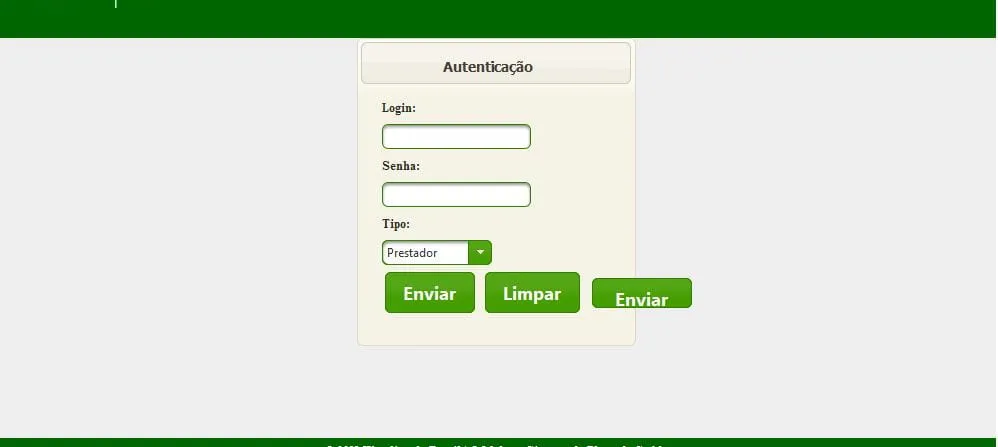
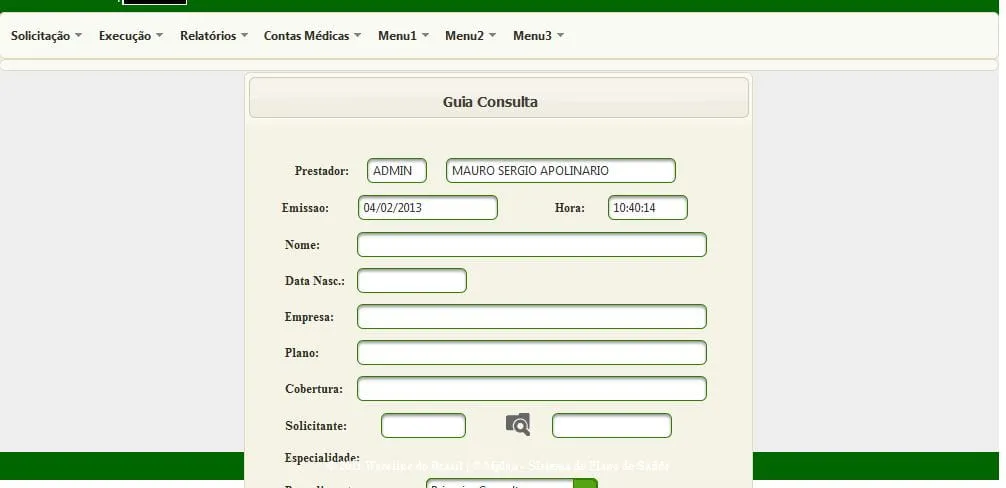
Pessoal, tenho a seguinte situacao.
A tela 1 , esta ok o Layout dele,
mas a tela 2 esta o Panel esta por cima do rodape, e estou usando o template junto com css…alguem pode me ajudar
segue abaixo o meu css e template :
#main { background: #eee;
    background-color: #006600;
    height:480px; left:37%; margin:-273px 0 0 -320px; position:absolute; top:45%; width:1000px
}


#headerindex {

    height: 95px;
    width: 900px;
    background: #aaa;
    background-color:#006600;
/*    background:url(../images/logotransp.gif) no-repeat 0 0;    */

/*   background:url(../images/logo_unimed11.jpg) no-repeat 0 0;   */


    background-image: url(../images/logo_unimed.jpg);
    background-repeat: no-repeat;

}

#header {

    height: 95px;
    width: 900px;
    background: #aaa;
    background-color:#006600;
/*    background:url(../images/logotransp.gif) no-repeat 0 0;    */

/*   background:url(../images/logo_unimed11.jpg) no-repeat 0 0;   */


    background-image: url(../images/logo_unimed.jpg);
    background-repeat: no-repeat;

}

.centralizar {text-align: center;}
#subheader {
    height: 20px;
    width: 1000px;
    background: #aaa;
    background-color: #006600;

}

#indexLeftColumn {
    height: 400px;
    width: 200px;
    float: left;
    background: #eee;
}

#indexRightColumn {
    height: 400px;
    width: 1000px;
    float: left;
    background: #eee;
}

/********** RODAPE **********/

#footer {
    /*height: 50px;
    width: 1000px;
    clear: left;
    background: #aaa;
    background-color: #006600;
    font-size: 12px;
    font-weight: bold;
    color: #ffffff;
    text-align: center;*/
    clear: left;
    background-color: #006600;
    height: 23px;
    text-align: center;
    padding-top: 5px;
    font-size: 12px;
    font-weight: bold;
    color: #ffffff;
}


  .ui-menuitem-text {

      font-size: 12px;
    font-weight: bold;
}


#box1 {
	position:absolute;
	top: 50px;
	left: 50px;
	background: #FA7C00;
	width: 50px;
	height:50px;
	padding:2px;
	border: 1px solid black;
	font-family:arial;
}


#usuario {
	position:absolute;
	top: 30px;
	right: 50px;
	width: 200px;
	height:50px;
	padding:2px;
	font-family:'Times New Roman',Times,serif;
        font-size: 12px;
        color: #ffffff;
        font-weight: bold;
}


#conteudousuario{
	position:absolute;
	top: 30px;
	right: 50px;
	width: 200px;
        left: 795px;
	height:50px;
	padding:2px;
	font-family:'Times New Roman',Times,serif;
        font-size: 12px;
        color: #ffffff;
        font-weight: bold;
}


#nome {
	position:absolute;
	top: 45px;
	right: 50px;
	width: 200px;
        left: 747px;
	height:50px;
	padding:2px;
        font-size: 12px;
        color: #ffffff;
        font-weight: bold;
        font-family:'Times New Roman',Times,serif;
}


#conteudonome {
	position:absolute;
	top: 45px;
	right: 50px;
	width: 200px;
        left: 795px;
	height:50px;
	padding:2px;
	font-family:'Times New Roman',Times,serif;
        font-size: 12px;
        color: #ffffff;
        font-weight: bold;
}


#email {
	position:absolute;
	top: 59px;
	right: 50px;
	width: 200px;
        left: 747px;
	height:50px;
	padding:2px;
	font-family:'Times New Roman',Times,serif;
        font-size: 12px;
        color: #ffffff;
        font-weight: bold;
}

#conteudoemail {
	position:absolute;
	top: 59px;
	right: 50px;
	width: 200px;
        left: 795px;
	height:50px;
	padding:2px;
	font-family:'Times New Roman',Times,serif;
        font-size: 12px;
        color: #ffffff;
        font-weight: bold;
}


#cidade {
	position:absolute;
        left: 3px;
	top: 69px;
	right: 50px;
	width: 200px;
	height:50px;
	padding:2px;
	font-family:Tahoma;
        font-size: 8px;
        color: #ffffff;
        font-weight: bold;

}


#box1 {
	position:absolute;
	top: 73px;
	left: 125px;
	background: #FA7C00;
	width: 56px;
	height:8px;
	padding:2px;
	border: 1px solid black;
	font-family:arial;
    background-color: #000000;
    color: #ffffff;
    background-position: center;
    font-size: 7px;
}


#boxbranca {
	position:absolute;
	top: 72px;
	left: 123px;
	width: 57px;
	height:8px;
	padding:2px;
	border: 2px solid black;
	font-family:arial;
    border-right-color: #ffffff;
    border-left-color: #ffffff;
    border-bottom-color: #ffffff;
    border-top-color: #ffffff;
}

.fonte{

   font-size: 12px;
    font-family: 'Times New Roman',Times,serif;
    font-weight: bold;
}


.fontecentralizada{

   font-size: 14px;
    font-weight: bold;
    text-align: center;
    font-family: Tahoma;
}


.ui-inputfield, .ui-widget-content .ui-inputfield, .ui-widget-header .ui-inputfield {
    background: #ffffff;
    -moz-box-shadow: inset 0 2px 2px #8f8f8f;
    -webkit-box-shadow: inset 0 2px 2px #8f8f8f;
    box-shadow: inset 0 2px 2px #8f8f8f;
    color: #333333;
    font-weight: normal;
        font-size: 12px;
}

.ui-inputfield.ui-state-focus, .ui-widget-content .ui-inputfield.ui-state-focus, .ui-widget-header .ui-inputfield.ui-state-focus {
    -moz-box-shadow: 0px 0px 5px #fbcb09, inset 0 2px 2px #8f8f8f;
    -webkit-box-shadow: 0px 0px 5px #fbcb09, inset 0 2px 2px #8f8f8f;
    box-shadow: 0px 0px 5px #fbcb09, inset 0 2px 2px #8f8f8f;
    font-weight: normal;
    font-size: 12px;
}

**************************************

<?xml version='1.0' encoding='UTF-8' ?>
<!DOCTYPE html PUBLIC "-//W3C//DTD XHTML 1.0 Transitional//EN" "http://www.w3.org/TR/xhtml1/DTD/xhtml1-transitional.dtd">
<html xmlns="http://www.w3.org/1999/xhtml"
      xmlns:ui="http://java.sun.com/jsf/facelets"
      xmlns:h="http://java.sun.com/jsf/html">

    <h:head>
        <meta http-equiv="Content-Type" content="text/html; charset=UTF-8" />
        <link href="./../resources/css/style.css" rel="stylesheet" type="text/css" />
        <title></title>
    </h:head>

    <h:body>


        <div id="main">

	        <div id="header">
                    <ui:insert name="header">


                    </ui:insert>
                          <h:panelGrid rendered="#{tblusuMbean.nomeprestador !=null}">
                               <div id="boxbranca">
                               </div>


                                <div id="box1">
                                      ANS - n.º #{tblusuMbean.codans}

                                </div>


                                <div id="cidade">
                                    #{tblusuMbean.cidade}
                                </div>


                        	<div id="usuario">
                                    Usuario:
                                </div>
                        	<div id="conteudousuario">
                                    #{tblusuMbean.username}
                                </div>

                                <div id="nome">
                                    Nome:
                                </div>

                                <div id="conteudonome">
                                    #{tblusuMbean.nomeprestador}
                                </div>

                                <div id="email">
                                    E-mail:
                                </div>

                               <div id="conteudoemail">

                                     #{tblusuMbean.emailprestador}
                                </div>
                         </h:panelGrid>
                </div>
	        <div id="subheader">
                    <ui:insert name="subheader"></ui:insert>
                </div>


                <div id="indexRightColumn">
                    <div align="center">
                    <ui:insert name="indexRightColumn"></ui:insert>
                   </div>
                </div>
              <div id="footer">
                    <ui:insert name="footer">
                                                <span> />
                                                </span>
                    </ui:insert>
                </div>


        </div>
    </h:body>

</html>