Problemas com header do rich:modal

6 respostas
cs.santos0

Fala ae pessual, blz?

entao…to com um probleminha chato aki q to meio sem saber como resolver.

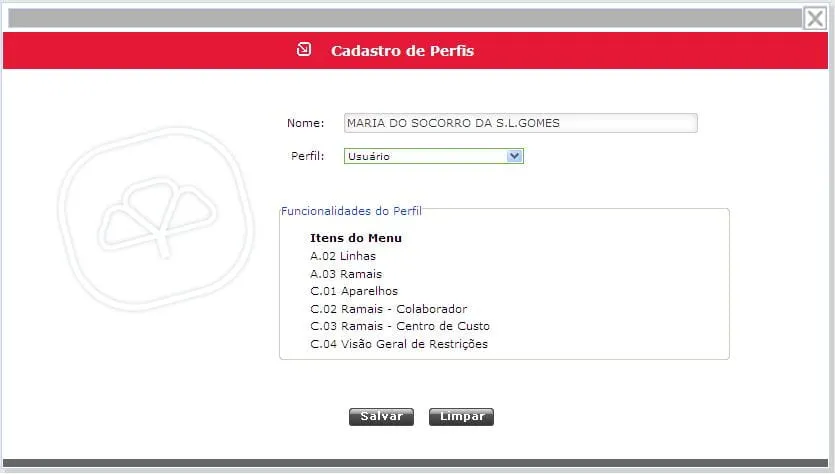
Todos os rich:modal do meu sistema estao com um comportamento estranho…eu nao alterei nada no css dele, mas quando abro algum ele mostra o header igual o da imagem em anexo…

alguem ai ja passou por isso ou sabe como volto ao header normal sem esse espaçamento que ele ta colocando?

PS:estou enviando em anexo a imgem.

Vlw


6 Respostas

juniorsatanas

testou em todos navegadores ? mudou a partir de quando ?

cs.santos0

Sim…testei no firefox, ie7, ie8 e acontece a msm coisa…

isso ai esta desde quando eu criei o primeiro modal da aplicação…

manja como eu posso tirar isso?..ou voltar o default…

juniorsatanas

manda teu projeto pra mim da uma olhada : [email removido].

cs.santos0

rsrsrs...o projeto é grande velho....só preciso ajustar esse header só.....

aki segue um jsp de um modal:

<%@taglib prefix="f" uri="http://java.sun.com/jsf/core"%>
<%@taglib prefix="h" uri="http://java.sun.com/jsf/html"%>
<%@taglib prefix="a4j" uri="http://richfaces.org/a4j"%>
<%@taglib prefix="rich" uri="http://richfaces.org/rich"%>

<html>
<head>
<title></title>
<link rel="stylesheet" type="text/css"
	href="../../Css/data_table_style.css" />


<style type="text/css">
<!--
.topo {
	margin-top: 0px;
	margin-right: 0px;
	margin-bottom: 0px;
	background-color: #E51937;
}

.rodape {
	margin-top: 0px;
	margin-right: 0px;
	margin-bottom: 0px;
	background-color: #666;
}

.fonteTitulo {
	font-size: 14px;
	font-weight: bold;
	font-family: Verdana, Arial, Helvetica, sans-serif;
	color: #FFFFFF;
}

.combo {
	border: 1px solid #66BB49;
	font-family: Verdana, Arial, Helvetica, sans-serif;
	font-size: 10px;
}

.Minusculo {
	border: 0px;
	background-image: url(../../Img/fundo_input_Minusculo.jpg);
	background-repeat: no-repeat;
	height: 20px;
	padding: 3px;
	font-size: 11px
}

.Menor {
	border: 0px;
	background-image: url(../../Img/fundo_input_menor.gif);
	background-repeat: no-repeat;
	height: 20px;
	padding: 3px;
	font-size: 11px
}

.Medio2 {
	border: 0px;
	background-image: url(../../Img/fundo_input_Medio2.jpg);
	background-repeat: no-repeat;
	height: 20px;
	padding: 3px;
	font-size: 11px
}

-->
.rich-sdt {
	border-width: 0px;
}

.rich-dt-column {
	border: 0px solid #FFFFFF;
	padding: 0 0 0 0;
	margin: 0 0 0 0;
}
</style>
</head>
<body>
<jsp:include page="/pages/modal/modalGeneric.jsp" />

<rich:modalPanel id="pnlCadRestColab" autosized="true" width="825"
	height="250">

	<f:facet name="header">
		<rich:spacer height="18" />
	</f:facet>
	<f:facet name="controls">
		<a4j:commandLink action="#"
			onclick="Richfaces.hideModalPanel('pnlCadRestColab');return false;">
			<h:graphicImage value="../../images/close2.png" title="Fechar"
				style="cursor:pointer;border-style:none;"
				styleClass="border-style:none" />
		</a4j:commandLink>
	</f:facet>

	<table width="100%" border="0" cellspacing="0" cellpadding="0"
		class="topo">
		<tr>
			<td width="1%"><a href="#"></a></td>
			<td width="33%">&nbsp;</td>
			<td width="66%">
			<table width="100%" border="0" cellspacing="0" cellpadding="0">
				<tr>
					<td width="3%"><img src="../../ImgMenu/fav_boxesandarrows.png"
						width="14" height="14" /></td>
					<td width="97%"><span class="fonteTitulo">&nbsp;Cadastro
					de Restrições por Colaborador</span></td>
				</tr>
			</table>
			</td>
		</tr>
	</table>

	<h:form id="idFormRestColab" rendered="true">

		<table width="100%" border="0" cellspacing="0" cellpadding="0">
			<tr>
				<td>&nbsp;</td>
				<td height="249">
				<table width="100%" border="0" cellspacing="0" cellpadding="0">
					<tr>
						
						<td width="97%" valign="top">
						
						<table width="100%" border="0" cellspacing="0" cellpadding="0">
							<tr>
								<td width="96%">
								<fieldset><legend>Dados do Colaborador </legend>
								<table width="100%" border="0" cellspacing="0" cellpadding="0">
									<tr>
										<td>&nbsp;</td>
										<td>&nbsp;</td>
										<td>&nbsp;</td>
									</tr>
									<tr>
										<td width="2%">&nbsp;</td>
										<td width="20%">
										<div align="right">Colaborador:&nbsp;</div>
										</td>
										<td width="78%"><input name="textfield2" type="text"
											class="Medio2" id="textfield2" size="60" /></td>
									</tr>
									<tr>
										<td>&nbsp;</td>
										<td>&nbsp;</td>
										<td>&nbsp;</td>
									</tr>
								</table>
								</fieldset>
								<br />
								<fieldset><legend>Restrições</legend>
								<table width="96%" border="0" cellspacing="0" cellpadding="0">
									<tr>
										<td colspan="5" align="center">
										<table width="100%" border="0" cellspacing="0" cellpadding="0">
											<tr>
												<td width="79%">&nbsp;</td>
												<td width="21%">
												
												<a4j:commandButton id="idAddRest"
													               action="#{restricaoColabHandler.addNewRest}" 
													               image="../../Img/bt_Add.png"
													               style="width:140;height:18;cursor:hand;border:0px"
													               rendered="true"
													               reRender="idDtRestColab"/>
												</td>
											</tr>
										</table>
										</td>
									</tr>
									 <tr>
									  <td width="25%" align="center"><div align="center"><strong>Marcas de Aparelho</strong></div></td>
					                  <td width="26%" align="center"><div align="center"><strong>Tipos de Aparelho</strong></div></td>
					                  <td width="19%" align="center"><div align="center"><strong>Liberado</strong></div></td>
					                  <td width="19%" align="center"><div align="center"><strong>Restrito</strong></div></td>
					                  <td width="20%" align="center"><div align="center"><strong>Excluir</strong></div></td>
					                </tr>
								</table>
								
								<rich:panel id="idPnlRest" rendered="true"
											style="width:745px;height:200px;overflow-y:scroll;border:0px">
											
									<rich:dataTable id="idDtRestColab" rendered="true" value="#{restricaoColabHandler.listRestColab}"
													var="item" style="width:715px;border:0px">									
	
									<rich:column width="25%" styleClass="rich-dt-column"  style="text-align:center">
										
										<h:selectOneMenu id="idRestColabMarca"
											value="#{restricaoHandler.marcaIdPesq}" styleClass="combo">
											<f:selectItem itemValue="0" itemLabel="#{msg.comboSelecione}" />
											<f:selectItems value="#{restricaoColabHandler.marcas}" />
											<a4j:support ajaxSingle="true" event="onchange"
												action="#{restricaoColabHandler.atualizaComboModeloCad}"
												reRender="idRestColabModelo,idRestColabMarca" />
										</h:selectOneMenu>
										
									</rich:column>	
	
									<rich:column width="25%" styleClass="rich-dt-column"  style="text-align:center">
										
										<h:selectOneMenu id="idRestColabModelo"
											value="#{item.modelo.idModelo}" rendered="true"
											styleClass="combo">
											<f:selectItem itemValue="0" itemLabel="#{msg.comboSelecione}" />
											<f:selectItems value="#{restricaoColabHandler.modelos}" />
										</h:selectOneMenu>
										
									</rich:column>
	
									<rich:column width="19%" styleClass="rich-dt-column"  style="text-align:center">
										<h:selectBooleanCheckbox value="" />
									</rich:column>
									
									<rich:column width="19%" styleClass="rich-dt-column" style="text-align:center">
										<h:selectBooleanCheckbox value="" />
									</rich:column>
									
									<rich:column width="20%" styleClass="rich-dt-column"  style="text-align:center">
									
										<a4j:commandButton id="idRemoveRest"
											               action="#{restricaoColabHandler.removeRest}" 
											               image="../../Img/ImgExcluirSmall1.gif"
											               style="width:14;height:14;cursor:hand;border:0px"
											               rendered="true"
											               reRender="idDtRestColab">
											<f:setPropertyActionListener value="#{item}" target="#{restricaoColabHandler.restColab}" />	               
										</a4j:commandButton>							
											  									
									</rich:column>
	
								</rich:dataTable>			
											
								</rich:panel>
										
								</fieldset>
								</td>
								
							</tr>
						</table>
						</td>
					</tr>
				</table>
				</td>
			</tr>
			<tr>
				<td>&nbsp;</td>
				<td>
				<table width="100%" border="0" cellspacing="0" cellpadding="0">
					<tr>
						<td width="49%" align="right">
						<div align="right"><a4j:commandButton id="idSalvarRest"
							action="#" image="../../Img/bt_Salvar.png"
							style="width:65;height:18;cursor:hand">
							<a4j:support event="onclick"
								action="#{restricaoHandler.saveOrUpdate}"
								oncomplete="#{messageBean.onComplete}"
								reRender="idFormRestColab,pnlError,pnlAlert,idDataTableRestColab" />
						</a4j:commandButton></div>
						</td>
						<td width="50%"><a4j:commandButton id="idLimparRest"
							action="#{restricaoHandler.clean}"
							image="../../Img/bt_Limpar.png" reRender="idFormRestColab"
							style="width:65;height:18;cursor:hand">
						</a4j:commandButton></td>
					</tr>
				</table>
				</td>
			</tr>
			
		</table>

	</h:form>

	<table width="100%" border="0" cellspacing="0" cellpadding="0"
		class="rodape">
		<tr>
			<td width="1%"><a href="#"></a></td>
		</tr>
	</table>

</rich:modalPanel>

</body>
</html>

e chamo ele normalmente em um outro jsp

<%@taglib prefix="f" uri="http://java.sun.com/jsf/core"%>
<%@taglib prefix="h" uri="http://java.sun.com/jsf/html"%>
<%@taglib prefix="a4j" uri="http://richfaces.org/a4j"%>
<%@taglib prefix="rich" uri="http://richfaces.org/rich"%>

<f:view>
	<!DOCTYPE html PUBLIC "-//W3C//DTD HTML 4.01 Transitional//EN" "http://www.w3.org/TR/html4/loose.dtd">
	<html>
	<head>
	<meta http-equiv="Content-Type" content="text/html; charset=ISO-8859-1">
	<title>Busca de Restrições por Colaborador</title>
	<link rel="stylesheet" type="text/css"
		href="../../Css/data_table_style.css" />
	<link href="../../Include/estilo2.css" rel="stylesheet" type="text/css" />
	<link rel="stylesheet" type="text/css" href="../../Include/style.css" />
	<link rel="stylesheet" type="text/css"
		href="../../Include/subModal.css" />
	<link href="../../bin/css/style_main.css" type="text/css"
		rel="stylesheet">
	<link href="../../bin/css/style_main2.css" type="text/css"
		rel="stylesheet">
	<script type="text/javascript" src="../../Include/common.js"></script>
	<script type="text/javascript" src="../../Include/subModal.js"></script>
	</head>
	<body>
	<jsp:include page="../../menu.jsp" />
	<jsp:include page="colab.jsp" />

	<table width="704" height="100%" border="0" align="center"
		cellpadding="0" cellspacing="0">
		<tr>
			<td height="14" colspan="3" valign="middle" class="TituloRed"><img
				src="../../Img/arrow_next.gif" width="15" height="16"> <img
				src="../../Img/arrow_next.gif" width="15" height="16">
			Restri&ccedil;&otilde;es por Colaborador</td>
		</tr>
		<tr>
			<td height="14" colspan="3" valign="middle" bgcolor="#E9E9E9">&nbsp;</td>
		</tr>
		<tr>
			<td width="3" height="6"></td>
			<td width="1208"></td>
			<td width="5" height="6"></td>
		</tr>


		<tr>
			<td>&nbsp;</td>
			<td height="100%" valign="top">
			<div align="center"></div>
			<h:form id="idFormPesquisaRestColab" rendered="true">		
			<table width="98%" border="0" align="center" cellpadding="2"
				cellspacing="1">

				<tr>
					<td width="18%" class="style15">
					<div align="right">Marca:</div>
					</td>
					<td width="40%"><select name="select2" class="combo"
						id="select2">
						<option>Selecione...</option>
					</select></td>
					<td width="15%">
					<div align="right">Status:</div>
					</td>
					<td width="26%"><select name="select5" class="combo"
						id="select5">
						<option>Selecione...</option>
					</select></td>
					<td width="1%">&nbsp;</td>
				</tr>
				<tr>
					<td class="style15">
					<div align="right">Modelo:</div>
					</td>
					<td><select name="select3" class="combo" id="select3">
						<option>Selecione...</option>
					</select></td>
					<td>&nbsp;</td>
					<td>&nbsp;</td>
					<td>&nbsp;</td>
				</tr>
				<tr>
					<td class="style15">&nbsp;</td>
					<td>&nbsp;</td>
					<td>&nbsp;</td>
					<td>&nbsp;</td>
					<td>&nbsp;</td>
				</tr>


				<tr>
					<td colspan="5" nowrap height="12"></td>
				</tr>
				<tr>
					<td colspan="5" nowrap>
					<div align="center">
					
					<img src="../../Img/bt_pesquisar.png"
						width="65" height="18" style="CURSOR: hand">
						
						&nbsp;
						
						<a4j:commandButton id="idShowModalCadRestColab"
											reRender="pnlCadRestColab"
											oncomplete="javascript:Richfaces.showModalPanel('pnlCadRestColab')"
											image="../../Img/bt_novo.png"
											style="width:65;height:18;cursor:hand" />		
						
						&nbsp;


						</div>
					</td>
				</tr>
				<tr>
					<td colspan="5"></td>
				</tr>
			</table>


			<rich:datascroller id="idScrollerRestColab" for="idDataTableRestColab"
						fastControls="hide" boundaryControls="show" stepControls="show"
						pageIndexVar="pageIndex" pagesVar="pages">
						<f:facet name="pages">
							<h:outputText value="#{pageIndex} / #{pages}" />
						</f:facet>
						<f:facet name="first">
							<h:graphicImage value="../../Img/ultimo.png" style="border:0px" />
						</f:facet>
						<f:facet name="first_disabled">
							<h:graphicImage value="../../Img/ultimo.png" style="border:0px" />
						</f:facet>
						<f:facet name="last">
							<h:graphicImage value="../../Img/primeiro.png" style="border:0px" />
						</f:facet>
						<f:facet name="last_disabled">
							<h:graphicImage value="../../Img/primeiro.png" style="border:0px" />
						</f:facet>
						<f:facet name="previous">
							<h:graphicImage value="../../Img/anterior.png" style="border:0px" />
						</f:facet>
						<f:facet name="previous_disabled">
							<h:graphicImage value="../../Img/anterior.png" style="border:0px" />
						</f:facet>
						<f:facet name="next">
							<h:graphicImage value="../../Img/proximo.png" style="border:0px" />
						</f:facet>
						<f:facet name="next_disabled">
							<h:graphicImage value="../../Img/proximo.png" style="border:0px" />
						</f:facet>
					</rich:datascroller>

				<br>
				<rich:dataTable id="idDataTableRestColab" rendered="true" width="700px"
					value='#{restricaoHandler.restricoes}' var='item'
					rowClasses="linha1,linha2" border="0" cellpadding="0"
					cellspacing="0" reRender="idScrollerRestColab">

					<f:facet name="header">
						<rich:columnGroup styleClass="my-header" style="my-header">
							<rich:column width="5%" style="text-align:center"
								styleClass="rich-table-header">
								<h:selectBooleanCheckbox id="idCheckAll"
									value="#{restricaoHandler.checkAllBoxes}"
									onclick="selectAllRestricoesCheckBox()" />
							</rich:column>
							<rich:column width="5%" styleClass="rich-table-header">
								<h:outputText value="" />
							</rich:column>
							<rich:column width="30%" styleClass="rich-table-header">
								<h:outputText value="#{msg.dataTableReCaV1}" />
							</rich:column>
							<rich:column width="30%" styleClass="rich-table-header">
								<h:outputText value="#{msg.dataTableReCaV2}" />
							</rich:column>
							<rich:column width="15%" styleClass="rich-table-header">
								<h:outputText value="#{msg.dataTableReCaV3}" />
							</rich:column>
							<rich:column width="15%" styleClass="rich-table-header">
								<h:outputText value="#{msg.dataTableReCaV4}" />
							</rich:column>
						</rich:columnGroup>
					</f:facet>

					<rich:column width="5%" style="text-align:center">
						<h:selectBooleanCheckbox
							value="#{restricaoHandler.selectedIds[item.idRestricao]}">
							<a4j:support action="#{restricaoHandler.selectItens}"
								event="onclick" />
						</h:selectBooleanCheckbox>
					</rich:column>

					<rich:column width="5%" style="text-align:center">
						<a4j:commandButton id="idShowModalEditaModelo"
							action="#{restricaoHandler.edit}" 
							reRender="pnlCadRestColab,idFormPesquisaRestColab,pnlError,pnlAlert,idDataTableRestColab,idScrollerRestColab"
							oncomplete="javascript:Richfaces.showModalPanel('pnlCadRestColab')"							
							image="../../Img/edit.png" style="width:65;height:18;cursor:hand" />
							
					</rich:column>
					
					<rich:column width="30%">
						<h:outputText value="#{item.modelo.marca.descricao}" style="text-align:center">
						</h:outputText>
					</rich:column>
					
					<rich:column width="30%">
						<h:outputText value="#{item.modelo.descricao}" style="text-align:center">
						</h:outputText>
					</rich:column>

					<rich:column width="15%">
						<h:outputText value="#{item.modelo.descricao}" style="text-align:center"/>						
					</rich:column>
					
					<rich:column width="15%">
						<h:outputText rendered="#{item.flagLiberadoRestrito eq 'L'}" value="Liberado" style="text-align:center"/>
						<h:outputText rendered="#{item.flagLiberadoRestrito eq 'R'}" value="Restrito" style="text-align:center"/>
					</rich:column>
					
				</rich:dataTable>
				<rich:jQuery selector="#idDataTableRest tr"
					query="mouseover(function(){jQuery(this).addClass('active-row')})" />
				<rich:jQuery selector="#idDataTableRest tr"
					query="mouseout(function(){jQuery(this).removeClass('active-row')})" />


			</h:form>
			</td>
			<td>&nbsp;</td>
		</tr>
		<tr>
			<td width="3" height="19"></td>
			<td align="right"></td>
			<td></td>
		</tr>


	</table>
	<br>
	<br>
	
	<rich:modalPanel id="pnlConfirmaExc" autosized="true" width="400">
		<f:facet name="header">
			<h:outputText value="#{msg.confirmaExc}" />
		</f:facet>		
		<h:form id="formPnlConfExc">
			<h:outputText value="#{msg.confExc}" />
			<f:verbatim>
				<br>
			</f:verbatim>
			<f:verbatim>
				<br>
			</f:verbatim>
			<center><a4j:commandButton id="idSimModalExc"
				action="#{restricaoHandler.delete}"		
				oncomplete="#{messageBean.onComplete}"			
				reRender="idFormPesquisaRestColab,pnlError,pnlAlert" value="Sim"
				style="width:65;height:18;cursor:hand">
				<rich:componentControl for="pnlConfirmaExc" attachTo="idSimModalExc"
					operation="hide" event="onclick" />

			</a4j:commandButton> <font color="white">a</font> <a4j:commandButton action="#"
				value="Não"
				onclick="Richfaces.hideModalPanel('pnlConfirmaExc');return false;" />
			</center>
		</h:form>
	</rich:modalPanel>	

	</body>
	</html>
</f:view>

alguem ai pode dar um help?
vlw

juniorsatanas

cs.santos0 Esse teu css não da pegando não ? parece que para pegar css junto com rich tem que fazer assim :
usar : !important;

*{

    /*Define  que todos os elementos da pgina, ficaro em negrito e com a fonte arial */

    font-weight: bold;

    font-family: arial;

    /*Define a tamanho da fonte para todos os elementos */

    font-size: 10px;

}


.edit {

    /*Define a borda do elemento, com um efeito de baixo-relevo menor que o padro */

    border: 1px inset;

    /*Especifica a cor cinza, como pano de fundo do elemento */

    background-color: #D3D3D3;

    /*Especifica como preta a  cor da fonte do elemento */

    color: #000000;

}


.botoes {

    /*Especifica a cor chocolate, como pano de fundo do elemento */

    background-color: #D2691E;

    /*Especifica como preta a cor da fonte do elemento */

    color: #FFFFFF;

    /*Define a borda do elemento, com um efeito de alto-relevo menor que o padro */

    border: 1px outset;

}


.rotulos {

    /*Especifica preta a cor da fonte do elemento */

    color: #000000;

}


legend{

    /*Define a tamanho da fonte para a legenda do FieldSet */

    font-size: 12px

}


input.inputPesquisa {

    font-size: 16px;        /* CONFLITO: Só pra mostrar uma outra propriedade conflitante */

    padding-left: 23px;

    padding-top: 5px;

    height: 20px;

    background-image:url(../images/zoom.gif)!important; /* CONFLITO */

    background-position: right;

    background-repeat: no-repeat;

    font-size: 16pt;

    color: #FF6A6A;


}

input.inputPesquisaBtn {

    position: fixed;

    top:60px;

    left: 538px;

    margin:0px;

    padding:0px;

}


input.inputLogin {

    font-size: 16px;        /* CONFLITO: Só pra mostrar uma outra propriedade conflitante */

    padding-left: 23px;

    padding-top: 5px;

    height: 20px;

    background-image:url(../images/zoom.gif)!important; /* CONFLITO */

    background-position: right!important;

    background-repeat: no-repeat;

    font-size: 30pt!important;

    color: #FF6A6A !important;


}


input.inputPesquisa2 {

    font-size: 25px;        /* CONFLITO: Só pra mostrar uma outra propriedade conflitante */

    padding-left: 15px;

    padding-top: 4px;

    height: 35px;

    background-image:url(../images/zoom.gif)!important; /* CONFLITO */

    background-position: right;

    background-repeat: no-repeat;

    color: #FF6A6A;

    width : 550px;

    height: px;


}

input.inputPesquisaBtn2 {

    position: fixed;

    top:50px;

    left: 670px;

    margin:0px;

    padding:0px;

}


input.inputLogin2 {

    font-size: 16px;        /* CONFLITO: Só pra mostrar uma outra propriedade conflitante */

    padding-left: 23px;

    padding-top: 5px;

    height: 20px;

    background-image:url(../images/zoom.gif)!important; /* CONFLITO */

    background-position: right!important;

    background-repeat: no-repeat;

    font-size: 30pt!important;

    color: #FF6A6A !important;


}
cs.santos0

nao precisa ter o important…

o problema nao esta em pegar o css…isso ai é de boa…

acabei descobrindo onde ta o problema…é em um css que esta no jsp incluido q é o do menu…

gostaria de fazer um jeito desse css nao pegar só no modal…

esse é o css q ta dando pau…

BODY { FONT-SIZE: 75%; BACKGROUND: #fff; COLOR: #222; FONT-FAMILY: Helvetica, Arial, sans-serif } H1 { FONT-WEIGHT: normal; COLOR: #111 } H2 { FONT-WEIGHT: normal; COLOR: #111 } H3 { FONT-WEIGHT: normal; COLOR: #111 } H4 { FONT-WEIGHT: normal; COLOR: #111 } H5 { FONT-WEIGHT: normal; COLOR: #111 } H6 { FONT-WEIGHT: normal; COLOR: #111 } H1 { FONT-SIZE: 3em; MARGIN-BOTTOM: 0.5em; LINE-HEIGHT: 1 } H2 { FONT-SIZE: 2em; MARGIN-BOTTOM: 0.75em } H3 { FONT-SIZE: 1.5em; MARGIN-BOTTOM: 1em; LINE-HEIGHT: 1 } H4 { FONT-SIZE: 1.2em; MARGIN-BOTTOM: 1.25em; LINE-HEIGHT: 1.25; HEIGHT: 1.25em } H5 { FONT-WEIGHT: bold; FONT-SIZE: 1em; MARGIN-BOTTOM: 1.5em } H6 { FONT-WEIGHT: bold; FONT-SIZE: 1em } H1 IMG { MARGIN: 0px } H2 IMG { MARGIN: 0px } H3 IMG { MARGIN: 0px } H4 IMG { MARGIN: 0px } H5 IMG { MARGIN: 0px } H6 IMG { MARGIN: 0px } P { MARGIN: 0px 0px 1.5em } DIV.articleimg { FLOAT: left } DIV.right.articleimg { FLOAT: right } A:focus { COLOR: #000 } A:hover { COLOR: #000 } A { COLOR: #08c; TEXT-DECORATION: underline } STRONG { FONT-WEIGHT: bold } EM { FONT-STYLE: italic } DFN { FONT-STYLE: italic } DFN { FONT-WEIGHT: bold } SUP { LINE-HEIGHT: 0 } SUB { LINE-HEIGHT: 0 } ABBR { BORDER-BOTTOM: #666 1px dotted } ACRONYM { BORDER-BOTTOM: #666 1px dotted } ADDRESS { MARGIN: 0px 0px 1.5em; FONT-STYLE: italic } DEL { COLOR: #666 } PRE { MARGIN: 1.5em 0px } CODE { MARGIN: 1.5em 0px } PRE { FONT: 1em/1.5 'andale mono', 'lucida console', monospace } CODE { FONT: 1em/1.5 'andale mono', 'lucida console', monospace } TT { FONT: 1em/1.5 'andale mono', 'lucida console', monospace } UL { LIST-STYLE-TYPE: disc } OL { LIST-STYLE-TYPE: decimal } #content LI UL { MARGIN: 0px 1.5em } #content LI OL { MARGIN: 0px 1.5em } #content UL { MARGIN: 0px 1.5em 1.5em } #content OL { MARGIN: 0px 1.5em 1.5em } DL { MARGIN: 0px 0px 1.5em } DL DT { FONT-WEIGHT: bold } DD { MARGIN-LEFT: 1.5em } #content TABLE { MARGIN-BOTTOM: 1.4em; WIDTH: 100% } TH { FONT-WEIGHT: bold; BACKGROUND: #c3d9ff } TH { PADDING-RIGHT: 10px; PADDING-LEFT: 5px; PADDING-BOTTOM: 4px; PADDING-TOP: 4px } TD { PADDING-RIGHT: 10px; PADDING-LEFT: 5px; PADDING-BOTTOM: 4px; PADDING-TOP: 4px } TR.even TD { BACKGROUND: #e5ecf9 } TFOOT { FONT-STYLE: italic } CAPTION { BACKGROUND: #eee } Misc classes -------------------------------------------------------------- .small { FONT-SIZE: 0.8em; MARGIN-BOTTOM: 1.87em; LINE-HEIGHT: 1.87em } .large { FONT-SIZE: 1.2em; MARGIN-BOTTOM: 1.25em; LINE-HEIGHT: 2.5em } .hide { DISPLAY: none } .quiet { COLOR: #666 } .loud { COLOR: #000 } .highlight { BACKGROUND: #ff0 } .added { BACKGROUND: #060; COLOR: #fff } .removed { BACKGROUND: #900; COLOR: #fff } .first { PADDING-LEFT: 0px; MARGIN-LEFT: 0px } .last { PADDING-RIGHT: 0px; MARGIN-RIGHT: 0px } .top { MARGIN-TOP: 0px; PADDING-TOP: 0px } .bottom { MARGIN-BOTTOM: 0px; PADDING-BOTTOM: 0px }

Criado 2 de fevereiro de 2010
Ultima resposta 2 de fev. de 2010
Respostas 6
Participantes 2