Problemas com primefaces

4 respostas
L

Olá pessoal

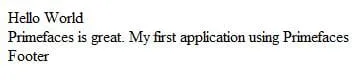
Preciso aprender a mexer com Primefaces. Estou seguindo um tutorial ( http://www.techbrainwave.com/?p=198 ) que eu encontrei na net, só que eu estou tendo problemas ao exibir o conteúdo da minha página utilizando os recursos do Primefaces que eu estou utilizando. Eu adicionei todas as bibliotecas necessárias e fiz tudo que o tutorial mostra, mas, ao exibir minha página, a única coisa que eu consigo ver é o texto que eu inseri ao longo do meu código.
Alguém tem ideia do que pode estar acontecendo?

Agradeceria se alguém pudesse me ajudar.
4 Respostas

F

posta o seu codigo pra gente analizar, vc colocou o jar do primefaces no seu classpath?

L

JSP:

<!DOCTYPE HTML PUBLIC "-//W3C//DTD HTML 4.01 Transitional//EN"
"http://www.w3.org/TR/html4/loose.dtd">

<f:view>
<html>
<head>
<meta http-equiv="Content-Type" content="text/html; charset=UTF-8"/>
<title>Hello World</title>
<p:resources/>
</head>
<body>
<h:form id="helloWorldPageForm">
<p:panel id="primefacesPanel" header="Hello World"
footer="Footer"
style="position: relative; width: 500px; " >
<h:outputText value="Primefaces is great. My first application using Primefaces"/>
</p:panel>
</h:form>
</body>
</html>
</f:view>

Index.xhtml:

<?xml version='1.0' encoding='UTF-8' ?>
<!DOCTYPE html PUBLIC "-//W3C//DTD XHTML 1.0 Transitional//EN" "http://www.w3.org/TR/xhtml1/DTD/xhtml1-transitional.dtd">
<html xmlns="http://www.w3.org/1999/xhtml"
      xmlns:h="http://java.sun.com/jsf/html"
      xmlns:p="http://primefaces.prime.com.tr/ui"
 >
    <h:head>
        <title>Facelet Title</title>
    </h:head>
    <h:body>
        Hello from Facelets
    </h:body>
</html>
<?xml version="1.0" encoding="UTF-8"?>
<web-app version="3.0"
xmlns="http://java.sun.com/xml/ns/javaee"
xmlns:xsi="http://www.w3.org/2001/XMLSchema-instance"
xsi:schemaLocation="http://java.sun.com/xml/ns/javaee http://java.sun.com/xml/ns/javaee/web-app_3_0.xsd">
<context-param>
<param-name>com.sun.faces.verifyObjects</param-name>
<param-value>false</param-value>
</context-param>
<context-param>
<param-name>com.sun.faces.validateXml</param-name>
<param-value>true</param-value>
</context-param>
<context-param>
<param-name>javax.faces.STATE_SAVING_METHOD</param-name>
<param-value>client</param-value>
</context-param>

<!--Configuration for Richfaces-->

<filter>
<display-name>RichFaces Filter</display-name>
<filter-name>richfaces</filter-name>
<filter-class>org.ajax4jsf.Filter</filter-class>
</filter>
<filter-mapping>
<filter-name>richfaces</filter-name>
<servlet-name>Faces Servlet</servlet-name>
<dispatcher>REQUEST</dispatcher>
<dispatcher>FORWARD</dispatcher>
<dispatcher>INCLUDE</dispatcher>
</filter-mapping>

<!--End of the configuration part for Richfaces-->

<servlet>
<servlet-name>Faces Servlet</servlet-name>
<servlet-class>javax.faces.webapp.FacesServlet</servlet-class>
<load-on-startup>1</load-on-startup>
</servlet>
<servlet-mapping>
<servlet-name>Faces Servlet</servlet-name>
<url-pattern>/faces/*</url-pattern>
</servlet-mapping>
<context-param>
<param-name>org.richfaces.SKIN</param-name>
<param-value>classic</param-value>
</context-param>

<!-- Configuration part for the Primefaces-->

<servlet>
<servlet-name>Resource Servlet</servlet-name>
<servlet-class>
org.primefaces.resource.ResourceServlet
</servlet-class>
<load-on-startup>2</load-on-startup>
</servlet>
<servlet-mapping>
<servlet-name>Resource Servlet</servlet-name>
<url-pattern>/primefaces_resource/*</url-pattern>
</servlet-mapping>

<!-- End of the configuration part for the Primefaces-->

web.xml:

<session-config>
<session-timeout>
30
</session-timeout>
</session-config>
<welcome-file-list>
<welcome-file>faces/welcomeJSF.jsp</welcome-file>
</welcome-file-list>
</web-app>
Já add todos os jars que constam no tutorial....tá tudo igualzinho ao que está lá...mas o resultado que eu vejo é o que está na imagem anexa.

Ah, só para constar: estou usando Netbeans 6.9.

Polverini

posta os cósdigos

L

Já postei acima!

Criado 16 de março de 2011
Ultima resposta 16 de mar. de 2011
Respostas 4
Participantes 3