Problemas em chamar um JDialog

8 respostas
marciofermino

Amigos tenho o seguinte:

Um form principal ( MDI Application )
ai clico no cadastro de clientes que é um JInternal Frame Form

dentro do cadastro de clientes tenho um botão e ao preciona-lo gostaria abrir
um JDialog …

Procurei na net e achei este código

tela3 t = new tela3(this, true);   
           t.show();

Mais me parece que não posso chamar um Dialog a partir de um JInternalFram. É isso mesmo ???

caso eu esteja certo, pensei entao em chamar um JFrame, e teria com fazer com que eu nao consiga clicar na janela de traz ?

Porque o JDialog não deixa é seria exatamente oque quero.

Obrigado.

8 Respostas

danielbussade

Fala márcio blz, fiz um exemplo simples aqui, vê se isso que você queria.

import java.awt.Container;
import java.awt.GridLayout;
import java.awt.event.ActionEvent;
import java.awt.event.ActionListener;

import javax.swing.JButton;
import javax.swing.JFrame;
import javax.swing.JLabel;
import javax.swing.JOptionPane;
import javax.swing.JTextField;


public class FCadCliente extends JFrame {
   private static final long serialVersionUID = 1L;
   private JLabel labelNome;
   private JButton btChamar;
   private JButton btSair;
   
   public FCadCliente() {
	   super("Cadastro de Cliente");
	   this.labelNome= new JLabel("Formulário não modal, JFrame:");
	   this.btChamar= new JButton("Chamar JDialog");
	   this.btSair= new JButton("Sair");
	   Container container= this.getContentPane();
	   container.add(labelNome);
	   container.add(btChamar);
	   container.add(btSair);
	   container.setLayout(new GridLayout(3,2));
	   this.setSize(300, 100);
	   this.setDefaultCloseOperation(JFrame.EXIT_ON_CLOSE);
	   
	   btSair.addActionListener(new ActionListener() {
		public void actionPerformed(ActionEvent arg0) {
			if(JOptionPane.showConfirmDialog(FCadCliente.this,"Deseja sair?","Confirmação",0)==0){
				System.exit(0);
			}
		}
	   });
	   
	   btChamar.addActionListener(new ActionListener(){
		   public void actionPerformed(ActionEvent arg1){
			  FCadModal fCadModal= new FCadModal();
			  fCadModal.setVisible(true);
		   }
	   });
}
	

}


import java.awt.Container;
import javax.swing.JDialog;
import javax.swing.JLabel;

public class FCadModal extends JDialog {
	private static final long serialVersionUID = 1L;
	private JLabel labelTexto;
	
	public FCadModal() {
		this.labelTexto= new JLabel("Formulário modal");
		Container container= this.getContentPane();
		container.add(labelTexto);
		this.setSize(150, 100);
		this.setModal(true);
		this.setTitle("Formulário Modal");
		this.setDefaultCloseOperation(JDialog.DISPOSE_ON_CLOSE);	
	}
}


public class Principal {

	public static void main(String[] args) {
		FCadCliente fCadCliente= new FCadCliente();
		fCadCliente.setVisible(true);

	}

}

Att

marciofermino

é ,… o meu caso
foi como esta na msg

eu crie um form principal do tipo MDI - ai chamo o cadatro cliente ( que é um JinternalFrame ) la tenho um botao… ai sim quero
chamar um JDialog.

parece que o JDialog nao pode ser aberto a partir de um JInterFrame

oque eu quero é isso mesmo ter o controle sobre modal e nao modal

danielbussade

O JDialog, serve exatamente para funcionar como um form modal, basta setar o método:

this.setModal(true);

Quanto a questão do JInternalFrame, vou testar aqui, e vê se consigo chamar um JDialog, de dentro dele, depois posto aqui!

marciofermino

amigo vc pode dar uma olhada no meu codigo e possivel alterar pq ainda nao consegui;.

package teste;

public class Main {

    public static void main(String[] args) {
        new mdi().setVisible(true);
    }
}


package teste;

public class mdi extends javax.swing.JFrame {
    

    public mdi() {
        initComponents();
    }
    
    /** This method is called from within the constructor to
     * initialize the form.
     * WARNING: Do NOT modify this code. The content of this method is
     * always regenerated by the Form Editor.
     */
    // <editor-fold defaultstate="collapsed" desc="Generated Code">                          
    private void initComponents() {

        desktopPane = new javax.swing.JDesktopPane();
        menuBar = new javax.swing.JMenuBar();
        fileMenu = new javax.swing.JMenu();
        openMenuItem = new javax.swing.JMenuItem();
        saveMenuItem = new javax.swing.JMenuItem();
        saveAsMenuItem = new javax.swing.JMenuItem();
        exitMenuItem = new javax.swing.JMenuItem();
        editMenu = new javax.swing.JMenu();
        cutMenuItem = new javax.swing.JMenuItem();
        copyMenuItem = new javax.swing.JMenuItem();
        pasteMenuItem = new javax.swing.JMenuItem();
        deleteMenuItem = new javax.swing.JMenuItem();
        helpMenu = new javax.swing.JMenu();
        contentMenuItem = new javax.swing.JMenuItem();
        aboutMenuItem = new javax.swing.JMenuItem();

        setDefaultCloseOperation(javax.swing.WindowConstants.EXIT_ON_CLOSE);

        fileMenu.setText("File");

        openMenuItem.setText("Open");
        openMenuItem.addActionListener(new java.awt.event.ActionListener() {
            public void actionPerformed(java.awt.event.ActionEvent evt) {
                openMenuItemActionPerformed(evt);
            }
        });
        fileMenu.add(openMenuItem);

        saveMenuItem.setText("Save");
        fileMenu.add(saveMenuItem);

        saveAsMenuItem.setText("Save As ...");
        fileMenu.add(saveAsMenuItem);

        exitMenuItem.setText("Exit");
        exitMenuItem.addActionListener(new java.awt.event.ActionListener() {
            public void actionPerformed(java.awt.event.ActionEvent evt) {
                exitMenuItemActionPerformed(evt);
            }
        });
        fileMenu.add(exitMenuItem);

        menuBar.add(fileMenu);

        editMenu.setText("Edit");

        cutMenuItem.setText("Cut");
        editMenu.add(cutMenuItem);

        copyMenuItem.setText("Copy");
        editMenu.add(copyMenuItem);

        pasteMenuItem.setText("Paste");
        editMenu.add(pasteMenuItem);

        deleteMenuItem.setText("Delete");
        editMenu.add(deleteMenuItem);

        menuBar.add(editMenu);

        helpMenu.setText("Help");

        contentMenuItem.setText("Contents");
        helpMenu.add(contentMenuItem);

        aboutMenuItem.setText("About");
        helpMenu.add(aboutMenuItem);

        menuBar.add(helpMenu);

        setJMenuBar(menuBar);

        javax.swing.GroupLayout layout = new javax.swing.GroupLayout(getContentPane());
        getContentPane().setLayout(layout);
        layout.setHorizontalGroup(
            layout.createParallelGroup(javax.swing.GroupLayout.Alignment.LEADING)
            .addGroup(layout.createSequentialGroup()
                .addComponent(desktopPane, javax.swing.GroupLayout.PREFERRED_SIZE, 875, javax.swing.GroupLayout.PREFERRED_SIZE)
                .addContainerGap(javax.swing.GroupLayout.DEFAULT_SIZE, Short.MAX_VALUE))
        );
        layout.setVerticalGroup(
            layout.createParallelGroup(javax.swing.GroupLayout.Alignment.LEADING)
            .addGroup(layout.createSequentialGroup()
                .addComponent(desktopPane, javax.swing.GroupLayout.PREFERRED_SIZE, 511, javax.swing.GroupLayout.PREFERRED_SIZE)
                .addContainerGap(javax.swing.GroupLayout.DEFAULT_SIZE, Short.MAX_VALUE))
        );

        pack();
    }// </editor-fold>                        
    
    private void exitMenuItemActionPerformed(java.awt.event.ActionEvent evt) {                                             
        System.exit(0);
    }                                            

    private void openMenuItemActionPerformed(java.awt.event.ActionEvent evt) {                                             
        final tela1 t = new tela1();
        t.setSize(desktopPane.getSize());
        desktopPane.add(t);
        t.setVisible(true);

    }                                            
    
    public static void main(String args[]) {
        java.awt.EventQueue.invokeLater(new Runnable() {
            public void run() {
                new mdi().setVisible(true);
            }
        });
    }
    
    // Variables declaration - do not modify                     
    private javax.swing.JMenuItem aboutMenuItem;
    private javax.swing.JMenuItem contentMenuItem;
    private javax.swing.JMenuItem copyMenuItem;
    private javax.swing.JMenuItem cutMenuItem;
    private javax.swing.JMenuItem deleteMenuItem;
    private javax.swing.JDesktopPane desktopPane;
    private javax.swing.JMenu editMenu;
    private javax.swing.JMenuItem exitMenuItem;
    private javax.swing.JMenu fileMenu;
    private javax.swing.JMenu helpMenu;
    private javax.swing.JMenuBar menuBar;
    private javax.swing.JMenuItem openMenuItem;
    private javax.swing.JMenuItem pasteMenuItem;
    private javax.swing.JMenuItem saveAsMenuItem;
    private javax.swing.JMenuItem saveMenuItem;
    // End of variables declaration                   
    
}


package teste;
public class tela1 extends javax.swing.JInternalFrame {
    

    public tela1() {
        initComponents();
    }
    
    // <editor-fold defaultstate="collapsed" desc="Generated Code">                          
    private void initComponents() {

        jButton1 = new javax.swing.JButton();

        jButton1.setText("jButton1");
        jButton1.addActionListener(new java.awt.event.ActionListener() {
            public void actionPerformed(java.awt.event.ActionEvent evt) {
                jButton1ActionPerformed(evt);
            }
        });

        javax.swing.GroupLayout layout = new javax.swing.GroupLayout(getContentPane());
        getContentPane().setLayout(layout);
        layout.setHorizontalGroup(
            layout.createParallelGroup(javax.swing.GroupLayout.Alignment.LEADING)
            .addGroup(layout.createSequentialGroup()
                .addGap(159, 159, 159)
                .addComponent(jButton1)
                .addContainerGap(162, Short.MAX_VALUE))
        );
        layout.setVerticalGroup(
            layout.createParallelGroup(javax.swing.GroupLayout.Alignment.LEADING)
            .addGroup(layout.createSequentialGroup()
                .addGap(127, 127, 127)
                .addComponent(jButton1)
                .addContainerGap(128, Short.MAX_VALUE))
        );

        pack();
    }// </editor-fold>                        

    private void jButton1ActionPerformed(java.awt.event.ActionEvent evt) {                                         
 
    }                                        
    
    
    // Variables declaration - do not modify                     
    private javax.swing.JButton jButton1;
    // End of variables declaration                   
    
}


O QUE É O JDIALOG

package teste;

public class tela2 extends javax.swing.JDialog {
    
    public tela2(java.awt.Frame parent, boolean modal) {
        super(parent, modal);
        initComponents();
    }
    
    
    // <editor-fold defaultstate="collapsed" desc="Generated Code">
    private void initComponents() {

        setDefaultCloseOperation(javax.swing.WindowConstants.DISPOSE_ON_CLOSE);

        javax.swing.GroupLayout layout = new javax.swing.GroupLayout(getContentPane());
        getContentPane().setLayout(layout);
        layout.setHorizontalGroup(
            layout.createParallelGroup(javax.swing.GroupLayout.Alignment.LEADING)
            .addGap(0, 400, Short.MAX_VALUE)
        );
        layout.setVerticalGroup(
            layout.createParallelGroup(javax.swing.GroupLayout.Alignment.LEADING)
            .addGap(0, 300, Short.MAX_VALUE)
        );

        pack();
    }// </editor-fold>
    
    /**
     * @param args the command line arguments
     */
    public static void main(String args[]) {
        java.awt.EventQueue.invokeLater(new Runnable() {
            public void run() {
                tela2 dialog = new tela2(new javax.swing.JFrame(), true);
                dialog.addWindowListener(new java.awt.event.WindowAdapter() {
                    public void windowClosing(java.awt.event.WindowEvent e) {
                        System.exit(0);
                    }
                });
                dialog.setVisible(true);
            }
        });
    }
    
    // Variables declaration - do not modify
    // End of variables declaration
    
}

OBRIGADO.

danielbussade

Ai márcio dá uma olhada neste exemplo, e vê se era isso que tava precisando.

JFrame:

public class JFrame extends javax.swing.JFrame {
	   private javax.swing.JDesktopPane jDesktopPane1;
	    private janelas.JInternalFrame jInternalFrame1;
	    private javax.swing.JMenu jMenu1;
	    private javax.swing.JMenuBar jMenuBar1;
	    private javax.swing.JMenuItem jMenuItem1;
    
  
    public JFrame() {
        initComponents();
    }
    
    
    private void initComponents() {
        jDesktopPane1 = new javax.swing.JDesktopPane();
        jInternalFrame1 = new janelas.JInternalFrame();
        jMenuBar1 = new javax.swing.JMenuBar();
        jMenu1 = new javax.swing.JMenu();
        jMenuItem1 = new javax.swing.JMenuItem();

        setDefaultCloseOperation(javax.swing.WindowConstants.EXIT_ON_CLOSE);
        jDesktopPane1.setBackground(java.awt.SystemColor.desktop);
        jInternalFrame1.setBounds(0, 0, 210, 110);
        jDesktopPane1.add(jInternalFrame1, javax.swing.JLayeredPane.DEFAULT_LAYER);

        getContentPane().add(jDesktopPane1, java.awt.BorderLayout.CENTER);

        jMenu1.setText("Menu");
        jMenuItem1.setText("Item");
        jMenuItem1.addActionListener(new java.awt.event.ActionListener() {
            public void actionPerformed(java.awt.event.ActionEvent evt) {
                jMenuItem1ActionPerformed(evt);
            }
        });

        jMenu1.add(jMenuItem1);
        jMenuBar1.add(jMenu1);
        setJMenuBar(jMenuBar1);
        java.awt.Dimension screenSize = java.awt.Toolkit.getDefaultToolkit().getScreenSize();
        setBounds((screenSize.width-408)/2, (screenSize.height-334)/2, 408, 334);
    }                  
    
    private void jMenuItem1ActionPerformed(java.awt.event.ActionEvent evt) {                                           
        jInternalFrame1.setVisible(true);
    }                                          
   
}

JInternalFrame

import java.awt.event.ActionEvent;
import java.awt.event.ActionListener;

import javax.swing.JButton;

public class JInternalFrame extends javax.swing.JInternalFrame {
	 private javax.swing.JLabel jLabel1;
	 private JButton btChamar;
    
    /** Creates new form JInternalFrame */
    public JInternalFrame() {
        initComponents();
        btChamar.addActionListener(new ActionListener() {

			public void actionPerformed(ActionEvent arg0) {
			    JDialog1 jDialog1= new JDialog1();
			    jDialog1.setVisible(true);
			  
				
			}
        	
        });
    }
    
    private void initComponents() {
        jLabel1 = new javax.swing.JLabel();
        btChamar= new JButton("btChamar");
        setClosable(true);
        setDefaultCloseOperation(javax.swing.WindowConstants.HIDE_ON_CLOSE);
        setIconifiable(true);
        setMaximizable(true);
        setResizable(true);
        setTitle("JInternalFrame");
        jLabel1.setText("jLabel1");
        getContentPane().add(jLabel1, java.awt.BorderLayout.CENTER);
        getContentPane().add(btChamar, java.awt.BorderLayout.NORTH);
        pack();
    }                          
}

JDialog:

import java.awt.Container;

import javax.swing.JDialog;
import javax.swing.JLabel;

public class JDialog1 extends JDialog {
	private JLabel label;
	
	public JDialog1() {
		label= new JLabel("JDialog, chamado de dentro do JInternalFrame");
		this.setDefaultCloseOperation(JDialog.DISPOSE_ON_CLOSE);
		Container container=this.getContentPane();
		container.add(label);
		this.setModal(true);
		pack();
	}

}

Principal

public class Principal {
	public static void main(String[] args) {
		JFrame jFrame=new JFrame();
		jFrame.setVisible(true);
	}

}
marciofermino

Amigo. acho que estamos quase-la
antes de tudo obrigado, muito obrigado,

Voce poderia alerar esse código para que eu posso rodar então ?

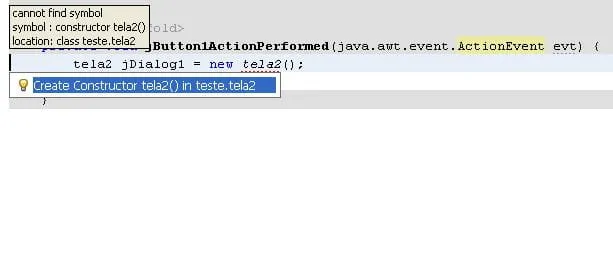
E ele da um errro me pedindo para criar um construtor…pq ?

Principal

package teste;
public class Main {
    public static void main(String[] args) {
         new mdi().setVisible(true);
    }

}

MDI

package teste;

public class mdi extends javax.swing.JFrame {


    public mdi() {
        initComponents();
    }

    // <editor-fold defaultstate="collapsed" desc="Generated Code">
    private void initComponents() {

        desktopPane = new javax.swing.JDesktopPane();
        jButton1 = new javax.swing.JButton();

        setDefaultCloseOperation(javax.swing.WindowConstants.EXIT_ON_CLOSE);

        jButton1.setText("jButton1");
        jButton1.addActionListener(new java.awt.event.ActionListener() {
            public void actionPerformed(java.awt.event.ActionEvent evt) {
                jButton1ActionPerformed(evt);
            }
        });
        jButton1.setBounds(708, 447, 73, 23);
        desktopPane.add(jButton1, javax.swing.JLayeredPane.DEFAULT_LAYER);

        javax.swing.GroupLayout layout = new javax.swing.GroupLayout(getContentPane());
        getContentPane().setLayout(layout);
        layout.setHorizontalGroup(
            layout.createParallelGroup(javax.swing.GroupLayout.Alignment.LEADING)
            .addComponent(desktopPane, javax.swing.GroupLayout.DEFAULT_SIZE, 893, Short.MAX_VALUE)
        );
        layout.setVerticalGroup(
            layout.createParallelGroup(javax.swing.GroupLayout.Alignment.LEADING)
            .addComponent(desktopPane, javax.swing.GroupLayout.DEFAULT_SIZE, 569, Short.MAX_VALUE)
        );

        pack();
    }// </editor-fold>

    private void jButton1ActionPerformed(java.awt.event.ActionEvent evt) {
        final tela1 t = new tela1();
        t.setSize(desktopPane.getSize());
        desktopPane.add(t);
        t.setVisible(true);
    }

    public static void main(String args[]) {
        java.awt.EventQueue.invokeLater(new Runnable() {

            public void run() {
                new mdi().setVisible(true);
            }
        });
    }
    // Variables declaration - do not modify
    private javax.swing.JDesktopPane desktopPane;
    private javax.swing.JButton jButton1;
    // End of variables declaration
}

tela 1 com o erro

package teste;
public class tela1 extends javax.swing.JInternalFrame {
    public tela1() {
        initComponents();
    }
   
    // <editor-fold defaultstate="collapsed" desc="Generated Code">
    private void initComponents() {

        jButton1 = new javax.swing.JButton();

        jButton1.setText("jButton1");
        jButton1.addActionListener(new java.awt.event.ActionListener() {
            public void actionPerformed(java.awt.event.ActionEvent evt) {
                jButton1ActionPerformed(evt);
            }
        });

        javax.swing.GroupLayout layout = new javax.swing.GroupLayout(getContentPane());
        getContentPane().setLayout(layout);
        layout.setHorizontalGroup(
            layout.createParallelGroup(javax.swing.GroupLayout.Alignment.LEADING)
            .addGroup(javax.swing.GroupLayout.Alignment.TRAILING, layout.createSequentialGroup()
                .addContainerGap(170, Short.MAX_VALUE)
                .addComponent(jButton1)
                .addGap(151, 151, 151))
        );
        layout.setVerticalGroup(
            layout.createParallelGroup(javax.swing.GroupLayout.Alignment.LEADING)
            .addGroup(layout.createSequentialGroup()
                .addGap(115, 115, 115)
                .addComponent(jButton1)
                .addContainerGap(140, Short.MAX_VALUE))
        );

        pack();
    }// </editor-fold>
    private void jButton1ActionPerformed(java.awt.event.ActionEvent evt) {
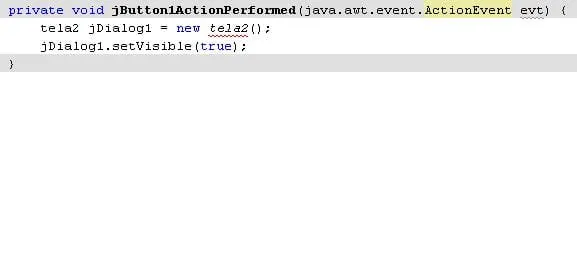
        tela2 jDialog1 = new tela2();
        jDialog1.setVisible(true);   
    }
    // Variables declaration - do not modify
    private javax.swing.JButton jButton1;
    // End of variables declaration
}

tela 2 com o JDialog

package teste;
public class tela2 extends javax.swing.JDialog {
    

    public tela2(java.awt.Frame parent, boolean modal) {
        super(parent, modal);
        initComponents();
    }
    
    // <editor-fold defaultstate="collapsed" desc="Generated Code">
    private void initComponents() {

        jLabel1 = new javax.swing.JLabel();

        setDefaultCloseOperation(javax.swing.WindowConstants.DISPOSE_ON_CLOSE);

        jLabel1.setText("jLabel1");

        javax.swing.GroupLayout layout = new javax.swing.GroupLayout(getContentPane());
        getContentPane().setLayout(layout);
        layout.setHorizontalGroup(
            layout.createParallelGroup(javax.swing.GroupLayout.Alignment.LEADING)
            .addGroup(layout.createSequentialGroup()
                .addGap(112, 112, 112)
                .addComponent(jLabel1)
                .addContainerGap(254, Short.MAX_VALUE))
        );
        layout.setVerticalGroup(
            layout.createParallelGroup(javax.swing.GroupLayout.Alignment.LEADING)
            .addGroup(layout.createSequentialGroup()
                .addGap(90, 90, 90)
                .addComponent(jLabel1)
                .addContainerGap(196, Short.MAX_VALUE))
        );

        pack();
    }// </editor-fold>
  public static void main(String args[]) {
        java.awt.EventQueue.invokeLater(new Runnable() {
            public void run() {
                tela2 dialog = new tela2(new javax.swing.JFrame(), true);
                dialog.addWindowListener(new java.awt.event.WindowAdapter() {
                    public void windowClosing(java.awt.event.WindowEvent e) {
                        System.exit(0);
                    }
                });
                dialog.setVisible(true);
            }
        });
    }
    
    // Variables declaration - do not modify
    private javax.swing.JLabel jLabel1;
    // End of variables declaration
    
}


marciofermino

amigo. consegui… muito obrigado…

era o tal maldito construtor…

consegui valeu mesmo

danielbussade

Fala márcio blz? Segue abaixo o código da tela 1 consertado:

package teste;   
public class tela1 extends javax.swing.JInternalFrame {   
    public tela1() {   
        initComponents();   
    }   
     
    // <editor-fold defaultstate="collapsed" desc="Generated Code">   
    private void initComponents() {   
  
    	setClosable(true);  //Acrescentei estes métodos tbm!!
    	setMaximizable(true);
    	setIconifiable(true);
        jButton1 = new javax.swing.JButton();   
  
        jButton1.setText("jButton1");   
        jButton1.addActionListener(new java.awt.event.ActionListener() {   
            public void actionPerformed(java.awt.event.ActionEvent evt) {   
                jButton1ActionPerformed(evt);   
            }   
        });   
  
        javax.swing.GroupLayout layout = new javax.swing.GroupLayout(getContentPane());   
        getContentPane().setLayout(layout);   
        layout.setHorizontalGroup(   
            layout.createParallelGroup(javax.swing.GroupLayout.Alignment.LEADING)   
            .addGroup(javax.swing.GroupLayout.Alignment.TRAILING, layout.createSequentialGroup()   
                .addContainerGap(170, Short.MAX_VALUE)   
                .addComponent(jButton1)   
                .addGap(151, 151, 151))   
        );   
        layout.setVerticalGroup(   
            layout.createParallelGroup(javax.swing.GroupLayout.Alignment.LEADING)   
            .addGroup(layout.createSequentialGroup()   
                .addGap(115, 115, 115)   
                .addComponent(jButton1)   
                .addContainerGap(140, Short.MAX_VALUE))   
        );   
  
        pack();   
    }// </editor-fold>   
    private void jButton1ActionPerformed(java.awt.event.ActionEvent evt) {   
       // tela2 jDialog1 = new tela2();   //O Erro estava aqui, você estava chamando, o construtor default de tela2, mas ele não existia. 
     
        tela2 jDialog1 = new tela2(null,true);   //Agora ta certo!!
        jDialog1.setVisible(true);     
    }   
    // Variables declaration - do not modify   
    private javax.swing.JButton jButton1;   
    // End of variables declaration   
}
Criado 10 de fevereiro de 2008
Ultima resposta 11 de fev. de 2008
Respostas 8
Participantes 2