
Problemas Spring Security - GlassFish 3.1.1

8 respostas
david.aurelio

Boa noite pessoal,

Estou tentando aplicar o Spring Security em uma aplicação. Utilizo o NetBeans 7.2 e Glasshfish 3.1.1, criei o datasource no Glassfish, e está funcionando corretamente porque o Hibernate utiliza normalmente. Mas quando habilito o applicationcontext-security.xml (abaixo) não consigo fazer o deploy e obtenho uma série de exception.

Alguém me ajuda?
<?xml version="1.0" encoding="UTF-8"?>
<b:beans xmlns="http://www.springframework.org/schema/security"
    xmlns:b="http://www.springframework.org/schema/beans"
    xmlns: xsi="http://www.w3.org/2001/XMLSchema-instance"
    xsi:schemaLocation="http://www.springframework.org/schema/beans http://www.springframework.org/schema/beans/spring-beans-3.0.xsd
                        http://www.springframework.org/schema/security http://www.springframework.org/schema/security/spring-security-3.1.xsd">
	<http>

		<intercept-url pattern="/admin/**" access="ROLE_ADMINISTRADOR" />
		<intercept-url pattern="/restrito/**" access="ROLE_USUARIO" />
		<form-login login-page="/publico/login.jsf"
			always-use-default-target="true" default-target-url="/restrito/principal.jsf"
			authentication-failure-url="/publico/login.jsf?login_error=1" />
		<logout/>
		<remember-me />
	</http>

	<authentication-manager>
		<authentication-provider>
			<jdbc-user-service data-source-ref="financeiroDataSource"
				authorities-by-username-query="SELECT u.login, p.permissao 
											 FROM usuario u, usuario_permissao p 
											WHERE u.codigo = p.usuario 
											  AND u.login = ?"
				users-by-username-query="SELECT login, senha, ativo 
									   FROM usuario 
									  WHERE login = ?" />
		</authentication-provider>
	</authentication-manager>
</b:beans>

Exception while loading the app : java.lang.IllegalStateException: ContainerBase.addChild: start: org.apache.catalina.LifecycleException: org.springframework.beans.factory.BeanCreationException: Error creating bean with name 'org.springframework.security.filterChains': Cannot resolve reference to bean 'org.springframework.security.web.DefaultSecurityFilterChain#0' while setting bean property 'sourceList' with key [0]; nested exception is org.springframework.beans.factory.BeanCreationException: Error creating bean with name 'org.springframework.security.web.DefaultSecurityFilterChain#0': Cannot create inner bean '(inner bean)' of type [org.springframework.security.web.authentication.logout.LogoutFilter] while setting constructor argument with key [1]; nested exception is org.springframework.beans.factory.BeanCreationException: Error creating bean with name '(inner bean)#2': Cannot resolve reference to bean 'org.springframework.security.web.authentication.rememberme.TokenBasedRememberMeServices#0' while setting constructor argument with key [1]; nested exception is org.springframework.beans.factory.BeanCreationException: Error creating bean with name 'org.springframework.security.web.authentication.rememberme.TokenBasedRememberMeServices#0': Cannot create inner bean '(inner bean)' while setting constructor argument; nested exception is org.springframework.beans.factory.BeanCreationException: Error creating bean with name '(inner bean)#3': Instantiation of bean failed; nested exception is org.springframework.beans.factory.BeanDefinitionStoreException: Factory method [org.springframework.security.core.userdetails.UserDetailsService org.springframework.security.config.http.UserDetailsServiceFactoryBean.cachingUserDetailsService(java.lang.String)] threw exception; nested exception is org.springframework.beans.factory.CannotLoadBeanClassException: Error loading class [org.springframework.security.provisioning.JdbcUserDetailsManager] for bean with name 'org.springframework.security.provisioning.JdbcUserDetailsManager#0' defined in null: problem with class file or dependent class; nested exception is java.lang.NoClassDefFoundError: org/springframework/jdbc/core/support/JdbcDaoSupport

8 Respostas

A

Pelo que me parece você esta seguindo o livro “Programando Java para Web”. Certo?

Post ai:
web.xml
context.xml
applicationContext.xml

Implementei o Spring securiy com glashfish, deu muito trabalho para acerta mais acabou dando certo.

andii.brunetta

Leia para ver se te ajuda:
Java EE 6: Segurança com Spring Security 3.0.5
http://javasemcafe.blogspot.com/2011/05/java-ee-6-seguranca-com-spring-security.html

david.aurelio

Isso, estou usando esse livro mesmo. Gostei do conteúdo e estou estudando por ele.

Eu havia parado de trabalhar com Java, e estou retomando os estudos.

Estou usando o NetBeans e está muito difícil essa parte, pois encontro diversos erros. E não consigo fazer o deploy.

Seguem os arquivos.

web.xml

<?xml version="1.0"?>
<web-app version="2.4" xmlns="http://java.sun.com/xml/ns/j2ee"
	xmlns:xsi="http://www.w3.org/2001/XMLSchema-instance"
	xsi:schemaLocation="http://java.sun.com/xml/ns/j2ee  
	                    http://java.sun.com/xml/ns/j2ee/web-app_2_4.xsd">
	<display-name>FinanceiroWeb</display-name>

	<!-- Spring Security -->
	<context-param>
		<param-name>contextConfigLocation</param-name>
		<param-value>
			/WEB-INF/applicationContext.xml
			/WEB-INF/applicationContext-security.xml
		</param-value>
	</context-param>
	
	<resource-ref>
		<description>DataSource FinaceiroBD</description>
		<res-ref-name>jdbc/FinanceiroDB</res-ref-name>
		<res-type>javax.sql.DataSource</res-type>
		<res-auth>Container</res-auth>
	</resource-ref>
	
	<resource-ref>
		<description>Mail Session</description>
		<res-ref-name>mail/Session</res-ref-name>
		<res-type>javax.mail.Session</res-type>
		<res-auth>Container</res-auth>
	</resource-ref> 
	

	<filter>
		<filter-name>springSecurityFilterChain</filter-name>
		<filter-class>org.springframework.web.filter.DelegatingFilterProxy</filter-class>
	</filter>

	<filter-mapping>
		<filter-name>springSecurityFilterChain</filter-name>
		<url-pattern>/*</url-pattern>
	</filter-mapping>

	<listener>
		<listener-class>org.springframework.web.context.ContextLoaderListener</listener-class>
	</listener>

	<!-- JavaServer Faces -->
	<context-param>
		<param-name>javax.faces.STATE_SAVING_METHOD</param-name>
		<param-value>server</param-value>
	</context-param>
	<context-param>
		<param-name>com.sun.faces.expressionFactory</param-name>
		<param-value>com.sun.el.ExpressionFactoryImpl</param-value>
	</context-param>

	<filter>
		<filter-name>conexaoFiter</filter-name>
		<filter-class>financeiro.web.filter.ConexaoHibernateFilter</filter-class>
	</filter>
	<filter-mapping>
		<filter-name>conexaoFiter</filter-name>
		<url-pattern>*.jsf</url-pattern>
	</filter-mapping>
	<filter-mapping>
		<filter-name>conexaoFiter</filter-name>
		<url-pattern>/webservice/*</url-pattern>
	</filter-mapping>

	<!-- FACELETS -->
	<!-- Use Documents Saved as *.xhtml -->
	<context-param>
		<param-name>javax.faces.DEFAULT_SUFFIX</param-name>
		<param-value>.xhtml</param-value>
	</context-param>
	<!-- Special Debug Output for Development -->
	<context-param>
		<param-name>facelets.DEVELOPMENT</param-name>
		<param-value>true</param-value>
	</context-param>

	<!-- Faces Servlet -->
	<servlet>
		<servlet-name>Faces Servlet</servlet-name>
		<servlet-class>javax.faces.webapp.FacesServlet</servlet-class>
		<load-on-startup>1</load-on-startup>
	</servlet>

	<!-- Faces Servlet Mapping -->
	<servlet-mapping>
		<servlet-name>Faces Servlet</servlet-name>
		<url-pattern>*.jsf</url-pattern>
	</servlet-mapping>

	<welcome-file-list>
		<welcome-file>index.html</welcome-file>
		<welcome-file>index.htm</welcome-file>
		<welcome-file>index.jsp</welcome-file>
		<welcome-file>default.html</welcome-file>
		<welcome-file>default.htm</welcome-file>
		<welcome-file>default.jsp</welcome-file>
	</welcome-file-list>
	
</web-app>

context.xml

<?xml version="1.0" encoding="UTF-8"?>
<Context reloadable="true">
	<Resource	name="jdbc/FinanceiroDB" 
				auth="Container" 
				type="javax.sql.DataSource"
				maxActive="100" 
				maxIdle="30" 
				maxWait="10000"
				username="root" 
				password="root" 
				driverClassName="com.mysql.jdbc.Driver"
				url="jdbc:mysql://localhost:3306/financeiro?autoReconnect=true"/>
				
</Context>

ApplicationContext.xml

<?xml version="1.0" encoding="UTF-8"?>
<beans xmlns="http://www.springframework.org/schema/beans"
       xmlns:xsi="http://www.w3.org/2001/XMLSchema-instance"
      xsi:schemaLocation="http://www.springframework.org/schema/beans http://www.springframework.org/schema/beans/spring-beans-3.1.xsd"
>

    <bean id="financeiroDataSource" class="org.springframework.jndi.JndiObjectFactoryBean">
		<property name="jndiName">
			<value>java:comp/env/jdbc/FinanceiroDB</value>
		</property>
	</bean> 
        
</beans>
andii.brunetta

david.aurelio, vi que vc está separando a configuração em 3 arquivos, será que não é isso que pode estar dando erro?
Antes de fazer o tutorial tentei fazer dessa forma, tudo separado, mas não deu certo, por isso fiz apenas com o applicationContext.xml

andii.brunetta

Outra coisa, ao final do erro, ele diz que está faltando esta classe: org/springframework/jdbc/core/support/JdbcDaoSupport

O que indica que está faltando uma biblioteca relacionada ao spring security e ao jdbc

tente baixa-lo daqui: http://www.java2s.com/Code/Jar/o/Downloadorgspringframeworkjdbcjar.htm

A

Quanto estava com problema na configuração do spring no glassfish fiz adicionei a configuração abaixo no arquivo domain.xml e mudei algumas jars. E tambem adicionei a jar do mysql diretamente no glassfiish.

Faça as alterações devidas de caminhos projeto, base, etc… e testa ai…

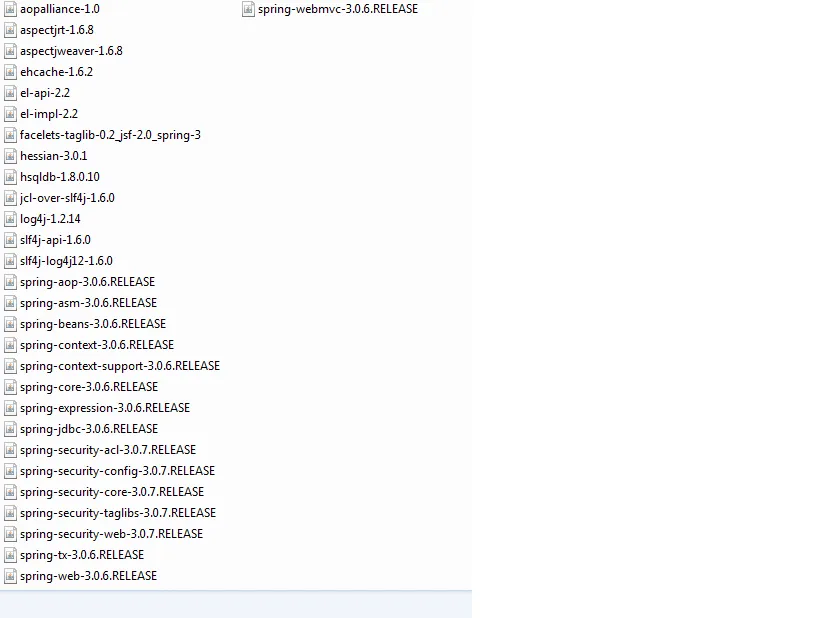
Em anexo as jars que utilizei

<application context-root="/FinanceiroWeb" location="file:/C:/Users/adilson/Desktop/FinanceiroWeb/build/web/" name="FinanceiroWeb" directory-deployed="true" object-type="user">
      <property name="defaultAppName" value="web" />
      <module name="FinanceiroWeb">
        <engine sniffer="security" />
        <engine sniffer="web" />
      </module>
 </application>


<jdbc-resource pool-name="FinanceiroDB" jndi-name="jdbc/FinanceiroDB" />

<jdbc-connection-pool datasource-classname="com.mysql.jdbc.jdbc2.optional.MysqlDataSource" res-type="javax.sql.DataSource" name="FinanceiroDB">
      <property name="DatabaseName" value="financeiro" />
      <property name="User" value="root" />
      <property name="Password" value="1234" />
      <property name="URL" value="jdbc:mysql://localhost:3306/financeiro?autoReconnect=true" />
      <property name="PortNumber" value="3306" />
      <property name="serverName" value="localhost" />
 </jdbc-connection-pool>


david.aurelio

Obrigado…

Agora funcionou, depois que adicionei os Jars. Agora vou retomar os estudos.

E qual sua opinião em relação a esse livro?

Grato…

A

Por nada, sofri muito pra fazer o Spring funcionar no glassfish…rsrsrsrs

Sobre o livro, achei muito bom, aprendi muito com ele, foi um investimento valido…

Abs

Criado 12 de outubro de 2012
Ultima resposta 13 de out. de 2012
Respostas 8
Participantes 3