[RESOLVIDO]Applet// Jframe

Pessoa to fazendo um trabalho da faculdade, só que tenho várias escolhas a se fazer … Queria quando eu clicasse me um button ela aparecesse os campos desse, tipo tenho que fazer vários métodos/calculos de operações, volume/area então queria que a pessoa clicasse em oq queria fazer e aparecesse os TextFiled correspondentes, no caso o volume de um Cubo é
V = l³ // onde l é as medidas de arestas
queria que se eu clicasse no Calcular volume do quadrado só aparecesse um TextField já que só precisa da medidas das arestas, sendo que são iguais.

Já tinha feito o código e ele tava funcionando, ai fui mexendo e está uma bagunça agora, mas eu sei ajeitar de novo… vou por aqui em baixo pra alguém me ajudar

PS : Sei que eu posso utilizar o polimorfismo e fazer muita coisa ainda, quero primeiro o funcionamento dele, funcionando eu arrumo direitinho :slight_smile:
PS²: Queria dentro desse IF o comando pra poder ser o click do mouse, não to achando :confused:

[code]package trabalho2e3;

import java.applet.*;
import java.awt.Button;
import java.awt.TextField;
import java.awt.event.ActionEvent;
import java.awt.event.ActionListener;
import javax.swing.plaf.basic.BasicBorders;

public class Trabalho2e3App extends Applet {

Calculo c = new Calculo();
TextField tf1 = new TextField(10);
TextField tf2 = new TextField(10);
TextField tf3 = new TextField(30);
double campo1, campo2, resposta;
String s1 = new String();
Button btnTrinagulo = new Button("Calcular a area do triangulo");
Button btnQuadrado = new Button("Calcular a volume do quadrado");
Button btnPara = new Button("Calcular volume paralelepipedo");
Button btnCil = new Button("Calcular volume do cilindo");
Button btnPrisma = new Button("Calcular volume do prisma");
Button btnCalcular = new Button("Calcular");

public void init() {
    add(tf1);
    add(tf2);
    add(btnTrinagulo);
    tf1.setVisible(false);
    tf2.setVisible(false);
    tf3.setVisible(false);
    //add(btnVolumeQuadrado);
    add(tf3);
    Trabalho2e3App.TrataEventoTri teTri = new Trabalho2e3App.TrataEventoTri();
    Trabalho2e3App.TrataEventoQuad teQuad = new Trabalho2e3App.TrataEventoQuad();

// btnVolumeQuadrado.addActionListener(teQuad);
// btnAreaTrinagulo.addActionListener(teTri);
if (btnTrinagulo) {
tf1.setVisible(false);
tf2.setVisible(false);
tf3.setVisible(false);
}
}

class TrataEventoTri implements ActionListener {

    public void actionPerformed(ActionEvent ae) {
        campo1 = Integer.valueOf(tf1.getText()).intValue();
        campo2 = Integer.valueOf(tf2.getText()).intValue();
        resposta = c.areaTrinagulo(campo1, campo2);
        s1 = "A area do trinagulo é " + String.valueOf(resposta);
        tf1.disable();;
        tf2.disable();

// btnAreaTrinagulo.disable();
tf3.requestFocus();
tf3.setText(s1);
tf3.disable();
}
}

class TrataEventoQuad implements ActionListener {

    public void actionPerformed(ActionEvent ae) {
        campo1 = Double.valueOf(tf1.getText()).doubleValue();
        campo2 = Double.valueOf(tf2.getText()).doubleValue();
        resposta = c.volumeQuadrado(campo1);
        s1 = "O volume do quadrado é " + String.valueOf(resposta);
        tf1.disable();;
        tf2.disable();

// btnAreaTrinagulo.disable();
tf3.requestFocus();
tf3.setText(s1);
tf3.disable();
}
}
}
[/code]

package trabalho2e3;

public class Calculo {

    public static double areaTrinagulo(double base, double altura) {
        return base * altura;
    }

    public static double volumeQuadrado(double l) {
        return l * l * l;
    }

    public static double volumePara(double l, double h, double c) {
        return l * h * c;
    }

    public static double volumeCili(double base, double altura) {
        return 3.14 * ((base * base) * altura);
    }

    public static double volumePrisma(double base, double altura) {
        return base* altura;
    }
}

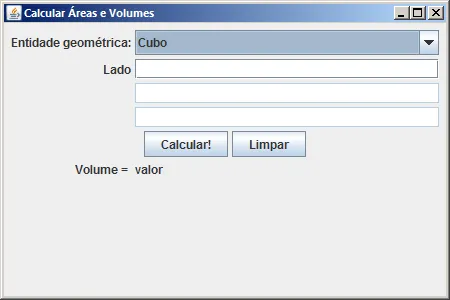
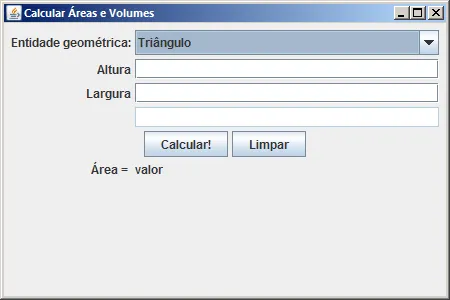
Você pode fazer algo como o programa abaixo.

package guj;

import java.awt.EventQueue;

import javax.swing.JFrame;
import net.miginfocom.swing.MigLayout;
import javax.swing.JLabel;
import javax.swing.JComboBox;
import javax.swing.DefaultComboBoxModel;
import javax.swing.JTextField;
import javax.swing.JButton;
import java.awt.event.ActionListener;
import java.awt.event.ActionEvent;

public class CalculoAreasEVolumesFrame extends JFrame {
    private JLabel lblEntidadeGeomtrica;
    private JComboBox comboBox;
    private JLabel lblMedida_1;
    private JLabel lblMedida_2;
    private JLabel lblMedida_3;
    private JTextField textField_1;
    private JTextField textField_2;
    private JTextField textField_3;
    private JButton btnCalcular;
    private JButton btnLimpar;
    private JLabel lblResultado;
    private JLabel lblValor;

    /**
     * Launch the application.
     */
    public static void main(String[] args) {
        EventQueue.invokeLater(new Runnable() {
            public void run() {
                try {
                    CalculoAreasEVolumesFrame frame = new CalculoAreasEVolumesFrame();
                    frame.setVisible(true);
                } catch (Exception e) {
                    e.printStackTrace();
                }
            }
        });
    }

    /**
     * Create the frame.
     */
    public CalculoAreasEVolumesFrame() {
        setTitle("Calcular \u00C1reas e Volumes");
        setBounds(100, 100, 450, 300);
        setDefaultCloseOperation(JFrame.EXIT_ON_CLOSE);
        getContentPane().setLayout(new MigLayout("", "[][grow]", "[][][][][][]"));
        getContentPane().add(getLblEntidadeGeomtrica(), "cell 0 0,alignx trailing");
        getContentPane().add(getComboBox(), "cell 1 0,growx");
        getContentPane().add(getLblMedida_1(), "cell 0 1,alignx trailing");
        getContentPane().add(getTextField_1(), "cell 1 1,growx");
        getContentPane().add(getLblMedida_2(), "cell 0 2,alignx trailing");
        getContentPane().add(getTextField_2(), "cell 1 2,growx");
        getContentPane().add(getLblMedida_3(), "cell 0 3,alignx trailing");
        getContentPane().add(getTextField_3(), "cell 1 3,growx");
        getContentPane().add(getBtnCalcular(), "flowx,cell 0 4,span 2,center");
        getContentPane().add(getBtnLimpar(), "cell 0 4");
        getContentPane().add(getLblResultado(), "cell 0 5,alignx trailing");
        getContentPane().add(getLblValor(), "cell 1 5");

    }

    private JLabel getLblEntidadeGeomtrica() {
        if (lblEntidadeGeomtrica == null) {
            lblEntidadeGeomtrica = new JLabel("Entidade geom\u00E9trica:");
        }
        return lblEntidadeGeomtrica;
    }

    private JComboBox getComboBox() {
        if (comboBox == null) {
            comboBox = new JComboBox();
            comboBox.addActionListener(new ActionListener() {
                public void actionPerformed(ActionEvent e) {
                    if (comboBox.getSelectedItem().equals("Tri\u00E2ngulo")) {
                        lblMedida_1.setText("Altura");
                        lblMedida_2.setText("Largura");
                        lblMedida_3.setText("");
                        textField_1.setEnabled(true);
                        textField_2.setEnabled(true);
                        textField_3.setEnabled(false);
                        lblResultado.setText("Área = ");
                    } else if (comboBox.getSelectedItem().equals("Quadrado")) {
                        lblMedida_1.setText("Lado");
                        lblMedida_2.setText("");
                        lblMedida_3.setText("");
                        textField_1.setEnabled(true);
                        textField_2.setEnabled(false);
                        textField_3.setEnabled(false);
                        lblResultado.setText("Área = ");
                    } else if (comboBox.getSelectedItem().equals("Cubo")) {
                        lblMedida_1.setText("Lado");
                        lblMedida_2.setText("");
                        lblMedida_3.setText("");
                        textField_1.setEnabled(true);
                        textField_2.setEnabled(false);
                        textField_3.setEnabled(false);
                        lblResultado.setText("Volume = ");
                    }
                }
            });
            comboBox.setModel(new DefaultComboBoxModel(new String[] {
                "Escolha...", "Tri\u00E2ngulo", "Quadrado", "Ret\u00E2ngulo", "Paralelogramo", "Prisma", "Cilindro", "Cubo",
                "Paralelep\u00EDpedo"
            }));
        }
        return comboBox;
    }

    private JLabel getLblMedida_1() {
        if (lblMedida_1 == null) {
            lblMedida_1 = new JLabel("Medida 1");
        }
        return lblMedida_1;
    }

    private JLabel getLblMedida_2() {
        if (lblMedida_2 == null) {
            lblMedida_2 = new JLabel("Medida 2");
        }
        return lblMedida_2;
    }

    private JLabel getLblMedida_3() {
        if (lblMedida_3 == null) {
            lblMedida_3 = new JLabel("Medida 3");
        }
        return lblMedida_3;
    }

    private JTextField getTextField_1() {
        if (textField_1 == null) {
            textField_1 = new JTextField();
            textField_1.setColumns(10);
        }
        return textField_1;
    }

    private JTextField getTextField_2() {
        if (textField_2 == null) {
            textField_2 = new JTextField();
            textField_2.setColumns(10);
        }
        return textField_2;
    }

    private JTextField getTextField_3() {
        if (textField_3 == null) {
            textField_3 = new JTextField();
            textField_3.setColumns(10);
        }
        return textField_3;
    }

    private JButton getBtnCalcular() {
        if (btnCalcular == null) {
            btnCalcular = new JButton("Calcular!");
        }
        return btnCalcular;
    }

    private JButton getBtnLimpar() {
        if (btnLimpar == null) {
            btnLimpar = new JButton("Limpar");
        }
        return btnLimpar;
    }

    private JLabel getLblResultado() {
        if (lblResultado == null) {
            lblResultado = new JLabel("Resultado:");
        }
        return lblResultado;
    }

    private JLabel getLblValor() {
        if (lblValor == null) {
            lblValor = new JLabel("valor");
        }
        return lblValor;
    }
}
  • cuidado, isto não é um Applet e sim um JFrame, mas acho que você deve ter pegado a ideia.
    Não fiz o cálculo, só desenhei a interface :slight_smile:


Consegui já, obrigado !!!