Como fazer dados inseridos em uma TextField aparecer em um Label

6 respostas Resolvido
swingjavafxprogramaçãojavascriptjava
Cerf_Pascal

Fiz uma pergunta muito parecida com isso agora pouco, mas vamos lá, galera estou tentando fazer um JTextField ir para um Label quando eu clico em um JButton, já tentei algumas tentativas, vi em alguns tópicos, mas dá erro, vou mandar só os evento do JTextField e do JButton, acho que é a maneira mais simplista de vocês me ajudarem, acho que não tem muita a nescessidade de mandar todo o código aqui, mas se prescisarem do código é só dizer ok?

eventos:

private void jTextField1ActionPerformed(java.awt.event.ActionEvent evt) {                                            
    
}                                           

private void jButton1ActionPerformed(java.awt.event.ActionEvent evt) {                                         
    
}

obs: o código tá indo, pórem eu não sei como fazer o o botão pegar os dados inseridos no JTextField e colocar numa JLabel, se alguém conseguir me da um exemplo agradeço desde já <3

6 Respostas

Jothar_Aleksander

Que tal assim?

private void jButton1ActionPerformed(java.awt.event.ActionEvent evt) {                                         
        jTextField1.setText(jLabel1.getText());
}
Cerf_Pascal

está funcionando, mas não aparece nada no meu JLabel ;-;frame.java (5,6,KB)

se quiser o arquivo com todos os códigos que eu coloquei está ai, mas se caso tiver algum receio de baixar esse .java veja esse .txt frame.txt (5,6,KB)

rodriguesabner

Vc ta usando Netbeans, pq já não usa o editor gráfico?

rodriguesabner

Mas isso corrigido:

public class NewJFrame extends javax.swing.JFrame {

    public NewJFrame() {
        initComponents();
    }

    @SuppressWarnings("unchecked")                    
    private void initComponents() {

        jPanel1 = new javax.swing.JPanel();
        jTextField1 = new javax.swing.JTextField();
        jButton1 = new javax.swing.JButton();
        jScrollPane1 = new javax.swing.JScrollPane();
        jTextArea1 = new javax.swing.JTextArea();

        setDefaultCloseOperation(javax.swing.WindowConstants.EXIT_ON_CLOSE);
        getContentPane().setLayout(new org.netbeans.lib.awtextra.AbsoluteLayout());

        jPanel1.setBackground(new java.awt.Color(255, 255, 255));
        jPanel1.setLayout(new org.netbeans.lib.awtextra.AbsoluteLayout());

        jPanel1.add(jTextField1, new org.netbeans.lib.awtextra.AbsoluteConstraints(10, 10, 550, -1));

        jButton1.setText("Enviar Texto");
        jButton1.addActionListener((java.awt.event.ActionEvent evt) -> {
            jButton1ActionPerformed(evt);
        });
        jPanel1.add(jButton1, new org.netbeans.lib.awtextra.AbsoluteConstraints(570, 10, 120, -1));

        jScrollPane1.setHorizontalScrollBarPolicy(javax.swing.ScrollPaneConstants.HORIZONTAL_SCROLLBAR_NEVER);

        jTextArea1.setColumns(20);
        jTextArea1.setFont(new java.awt.Font("Arial", 0, 13)); // NOI18N
        jTextArea1.setLineWrap(true);
        jTextArea1.setRows(5);
        jTextArea1.setWrapStyleWord(true);
        jScrollPane1.setViewportView(jTextArea1);

        jPanel1.add(jScrollPane1, new org.netbeans.lib.awtextra.AbsoluteConstraints(10, 40, 680, 430));

        getContentPane().add(jPanel1, new org.netbeans.lib.awtextra.AbsoluteConstraints(0, 0, 710, 480));

        pack();
    }                      

    private void jButton1ActionPerformed(java.awt.event.ActionEvent evt) {
        jTextArea1.append(jTextField1.getText());
    }

    public static void main(String args[]) {
        try {
            for (javax.swing.UIManager.LookAndFeelInfo info : javax.swing.UIManager.getInstalledLookAndFeels()) {
                if ("Windows".equals(info.getName())) {
                    javax.swing.UIManager.setLookAndFeel(info.getClassName());
                    break;
                }
            }
        } catch (ClassNotFoundException | InstantiationException | IllegalAccessException | javax.swing.UnsupportedLookAndFeelException ex) {
            java.util.logging.Logger.getLogger(NewJFrame.class.getName()).log(java.util.logging.Level.SEVERE, null, ex);
        }

        java.awt.EventQueue.invokeLater(() -> {
            new NewJFrame().setVisible(true);
        });
    }

    private javax.swing.JButton jButton1;
    private javax.swing.JPanel jPanel1;
    private javax.swing.JScrollPane jScrollPane1;
    private javax.swing.JTextArea jTextArea1;
    private javax.swing.JTextField jTextField1;
}
Jothar_Aleksander
Solucao aceita

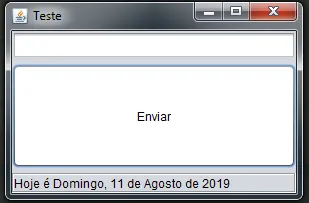
Ou fazendo na ‘unha’…

import java.awt.Color;
import java.awt.BorderLayout;
import java.awt.event.ActionEvent;
import java.awt.event.ActionListener;
import javax.swing.JFrame;
import javax.swing.JLabel;
import javax.swing.JButton;
import javax.swing.UIManager;
import javax.swing.JTextField;
import javax.swing.border.Border;
import javax.swing.BorderFactory;
import javax.swing.border.EtchedBorder;

public class Teste extends JFrame {
	public Teste(){
		setTitle("Teste");
		criarLayout();
	}
	
	private void criarLayout(){
		setLayout(new BorderLayout(5, 5));
		
		botao.setText("Enviar");
		botao.setBackground(Color.white);
		
		rotulo.setBorder(BorderFactory.createEtchedBorder(EtchedBorder.LOWERED));
		rotulo.setPreferredSize(new java.awt.Dimension(250, 20));
		
		add(campoTexto, BorderLayout.NORTH);
		add(botao, BorderLayout.CENTER);
		add(rotulo, BorderLayout.SOUTH);
		
		botao.addActionListener(new ActionListener(){
			public void actionPerformed(ActionEvent evento){
				eventoBotao(evento);
			}
		});
	}
	
	private void eventoBotao(ActionEvent evento){
		if(campoTexto.getText().isEmpty()){
			rotulo.setForeground(Color.red);
			rotulo.setText("Nada foi digitado!");
		}else{
			rotulo.setText(null);
			rotulo.setForeground(Color.black);
			
			rotulo.setText(campoTexto.getText());
			campoTexto.setText(null);
		}
	}
	
	public static void main(String[] args){
		try{
			for(UIManager.LookAndFeelInfo info : UIManager.getInstalledLookAndFeels()){
				if("Nimbus".equals(info.getName())){
					UIManager.setLookAndFeel(info.getClassName());
					break;
				}
			}
		}catch(Exception excp){}
		
		Teste teste = new Teste();
		teste.setDefaultCloseOperation(JFrame.EXIT_ON_CLOSE);
		teste.setSize(300, 200);
		teste.setVisible(true);
		teste.setLocationRelativeTo(null);
	}
	
	private JButton botao = new JButton();
	private JLabel rotulo = new JLabel();
	private JTextField campoTexto = new JTextField();
	
}

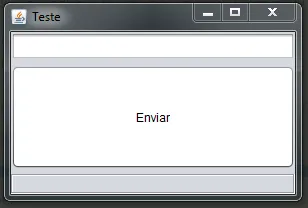
image

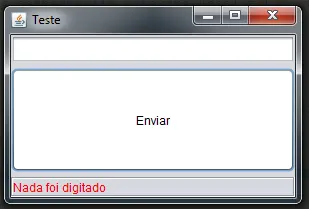
Quando clicar no botão e o campo de texto estiver vazio:

image

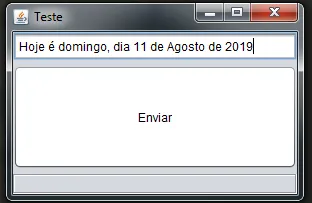
image

image

rodriguesabner

Boa!!!

Criado 11 de agosto de 2019
Ultima resposta 12 de ago. de 2019
Respostas 6
Participantes 3