
Erro em Código Java

3 respostas
programaçãojava
K

Boa noite pessoal,

O código abaixo está apresentando um erro mas eu não consigo arruma-lo de forma alguma. Poderiam me ajudar?

import javax.swing.<em>;

import java.awt.</em>;

import java.awt.event.<em>;

public class JCelular {

public static void main(String[] args) {

JFrame janela = new JFrame(Celular); // janela

final JLabel visor = new JLabel(5122299); // visor

visor.setHorizontalAlignment(JLabel.RIGHT);

JPanel numeros = new JPanel(new GridLayout(4,3));//Tecla

String[] nomes = {1,2,3,4,5,6,7,8,9,"</em>",0,"#"};

// Cria o listener para as teclas do celular

ActionListener trataTecla = (ActionEvent e) -> {

JButton botaoClicado = (JButton)e.getSource();

visor.setText(visor.getText()+botaoClicado.getText());

};

for(int i=0; i<nomes.length; i++)

((JButton)numeros.add(new JButton(nomes[i]))).addActionListener(trataTecla);

JPanel botoes = new JPanel(); // Botoes send e end

((JButton)botoes.add(newJButton(send)).addActionListener (new ActionListener() {

<a class="mention" href="/u/override">@Override</a>

public void actionPerformed(ActionEvent e) {

System.out.println(visor.getText());

}}));
((JButton)botoes.add(new JButton(end))).addActionListener(new ActionListener() {

public void actionPerformed(ActionEvent e) {

visor.setText(" ");

}});

// monta tudo

janela.getContentPane().add(visor, BorderLayout.NORTH);

janela.getContentPane().add(numeros, BorderLayout.CENTER);

janela.getContentPane().add(botoes, BorderLayout.SOUTH);

// mostra

janela.setDefaultCloseOperation (JFrame.EXIT_ON_CLOSE);

janela.pack();

janela.show();

}
private static PopupMenu newJButton(String send) {
    throw new UnsupportedOperationException("Not supported yet."); //To change body of generated methods, choose Tools | Templates.
}

}

3 Respostas

rodriguesabner

O que tá acontecendo? Não tá iniciando?

Eu testei aqui e funcionou certinho, só tive que fazer alguns imports

rodriguesabner
package utilitarios;

import java.awt.BorderLayout;
import java.awt.GridLayout;
import java.awt.PopupMenu;
import java.awt.event.ActionEvent;
import java.awt.event.ActionListener;
import javax.swing.JButton;
import javax.swing.JFrame;
import javax.swing.JLabel;
import javax.swing.JPanel;

public class JCelular {

    public static void main(String[] args) {
        JFrame janela = new JFrame("Celular"); // janela
        final JLabel visor = new JLabel("5122299"); // visor
        visor.setHorizontalAlignment(JLabel.RIGHT);
        JPanel numeros = new JPanel(new GridLayout(4, 3));//Tecla
        String[] nomes = {"1", "2", "3", "4", "5", "6", "7", "8", "9", "", "0", "#"};
        // Cria o listener para as teclas do celular
        ActionListener trataTecla = (ActionEvent e) -> {
            JButton botaoClicado = (JButton) e.getSource();
            visor.setText(visor.getText() + botaoClicado.getText());
        };
        for (int i = 0; i < nomes.length; i++) {
            ((JButton) numeros.add(new JButton(nomes[i]))).addActionListener(trataTecla);
        }

        JPanel botoes = new JPanel(); // Botoes send e end

        ///////////////////////////// NOVO "SEND" //////////////////////////////////////
        ((JButton) botoes.add(new JButton("send"))).addActionListener(new ActionListener() {
            @Override
            public void actionPerformed(ActionEvent e) {
                System.out.println(visor.getText());
            }
        });

        ///////////////////////////// ANTIGO "SEND" //////////////////////////////////////
//        ((JButton) botoes.add(newJButton("send")).addActionListener(new ActionListener() {
//            @Override
//            public void actionPerformed(ActionEvent e) {
//                System.out.println(visor.getText());
//            }
//        }));
        ((JButton) botoes.add(new JButton("end"))).addActionListener(new ActionListener() {
            public void actionPerformed(ActionEvent e) {
                visor.setText(" ");
            }
        });
        // monta tudo
        janela.getContentPane().add(visor, BorderLayout.NORTH);
        janela.getContentPane().add(numeros, BorderLayout.CENTER);
        janela.getContentPane().add(botoes, BorderLayout.SOUTH);
        // mostra
        janela.setDefaultCloseOperation(JFrame.EXIT_ON_CLOSE);
        janela.pack();
        janela.show();
    }

    private static PopupMenu newJButton(String send) {
        throw new UnsupportedOperationException("Not supported yet."); //To change body of generated methods, choose Tools | Templates.
    }
}
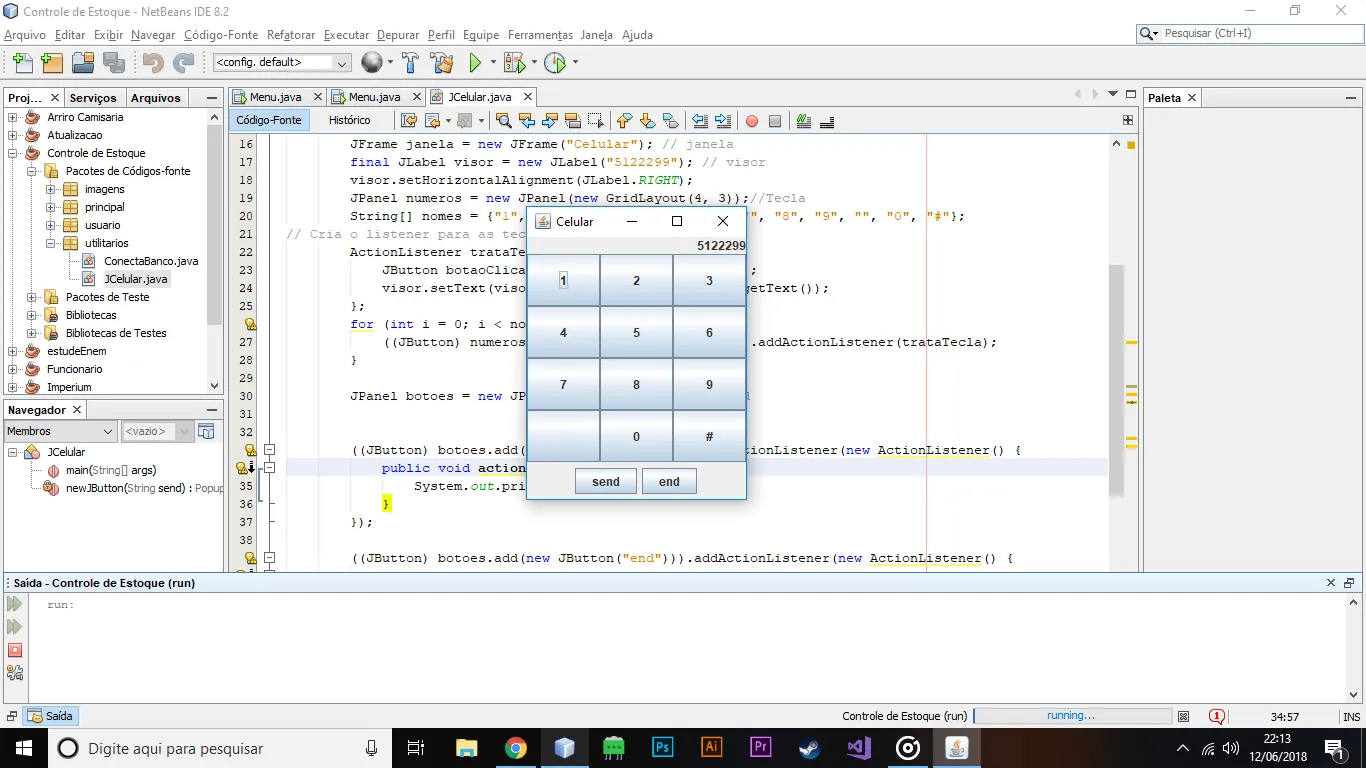
rodriguesabner

Sobre o seu código, vc colocou assim:

((JButton) botoes.add(newJButton("send")).addActionListener(new ActionListener() {
        @Override
        public void actionPerformed(ActionEvent e) {
            System.out.println(visor.getText());
        }
    }));

MAS, o certo é assim:

((JButton) botoes.add(new JButton("send"))).addActionListener(new ActionListener() {
        @Override
        public void actionPerformed(ActionEvent e) {
            System.out.println(visor.getText());
        }
    });
Criado 13 de junho de 2018
Ultima resposta 13 de jun. de 2018
Respostas 3
Participantes 2