

Olá 
Criei este codigo que imprime os resultados de uma palavra no search do google. O programa guarda o titulo e o link de cada resultado.
Como posso extrair tambem a data:
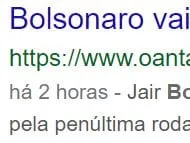
O há 2 horas, por exemplo?
Aqui esta o meu codigo com o que tentei! Funciona tudo menos a data:
package googlesearch;

import java.io.IOException;
import java.io.UnsupportedEncodingException;
import java.net.URLDecoder;
import java.nio.charset.Charset;
import java.nio.charset.StandardCharsets;
import static java.nio.charset.StandardCharsets.UTF_8;
import java.util.ArrayList;
import java.util.List;
import java.util.Scanner;
import java.util.regex.Matcher;
import java.util.regex.Pattern;
import javafx.util.Pair;
import javax.swing.text.Document;
import org.jsoup.Jsoup;
import org.jsoup.nodes.Element;
import org.jsoup.select.Elements;


public class GoogleSearch {

  // pattern for extracting the link such as www.codeforeach.com/java/ ( domain
  // name + path )compile("([a-zA-Z0-9]([a-zA-Z0-9\\-]{0,61}[a-zA-Z0-9])?\\.)+[a-zA-Z]{2,6}(/[^&]*)*");


    private static final Pattern p = Pattern
      .compile("([a-zA-Z0-9]([a-zA-Z0-9\\-]{0,61}[a-zA-Z0-9])?\\.)+[a-zA-Z]{2,6}(/[^&]*)*");

    private static String request;

    private static String data;

    public static void main(String[] args) throws IOException {
        Scanner ler = new Scanner(System.in);
        System.out.println("Insira a notícia: ");
        String pesquisa = ler.nextLine();
        pesquisa = pesquisa.toLowerCase();
        String searchQuery = pesquisa;
        List<Pair> links = searchGoogle(searchQuery);
        for (Pair titulosResultados : links) {
//            System.out.println("Titulo: " + titulosResultados.getKey());
//            System.out.println("Link: " + titulosResultados.getValue());
        }

    }
    public static List<Pair> searchGoogle(String searchQuery) throws IOException {

        List<Pair> result = new ArrayList<>();

    // lets get the top results counting to nearly 15
        request = "https://www.google.com/search?q=" + searchQuery + "&hl=pt-PT&gl=PT&ceid=PT%3Apt-150";
        org.jsoup.nodes.Document doc = Jsoup.connect(request)
        .userAgent("Mozilla/5.0 (compatible; Googlebot/2.1; +http://www.google.com/bot.html)").get();
    // get the required content from response . Here ( h3 a ) is the selector
    // pattern for selecting all heading links

    //  System.out.println( "--> \n" + doc.toString() );

        Elements links = doc.select(".kCrYT");

        for (Element link : links) {


            Elements el_a = link.select("a");
            data = el_a.attr("span");
            System.out.println(data);
            String hrefValue = el_a.attr("href");
            Elements el_divs = el_a.select("div");

            String nome = "";
            if(el_divs.size() > 0) {
                nome = el_divs.get(0).html();
            }

            if (hrefValue.startsWith("/url?q=")) {

                try {

                    String slink = extractLink(hrefValue);

                    if( slink != null ) {

                    hrefValue = URLDecoder.decode(slink, StandardCharsets.UTF_8.toString());

                    Pair pair = new Pair(nome, hrefValue);

                    result.add( pair );

                    }

                } catch (UnsupportedEncodingException ex) {
                    throw new RuntimeException(ex.getCause());
                } catch(java.lang.IndexOutOfBoundsException ie) {
                    ie.printStackTrace();

                }

            }
        }

        return result;
    }

  // extract required titulosResultados from href value
    private static String extractLink(String href) {

        String result = null;
        Matcher m = p.matcher(href);

        if (m.find()) {
            result = m.group();
        }

        return result;

    }

}
Obrigado a todos pela ajuda!